
- Products & services Products & services
- Resources ResourcesCustomer resources
- Customer resources
- Customer support Find more information about engaging support and get help
- Services guide Find more information about working with Services teams
- Free resources Leverage our free tools and trainings
- Modernize to Identity Security Cloud Transition to the cloud for advanced capabilities and a future-ready security posture
Learning- Learning
- Identity University Get technical training to ensure a successful implementation
- SailPoint professional certifications & credentials Advance your career or validate your identity security knowledge
- SailPoint recertification program Get recertified by demonstrating ongoing learning
- Training onboarding guide Make of the most of training with our step-by-step guide
- Training FAQs Find answers to common training questions
- Community Community
- Compass
- :
- Discuss
- :
- Community Wiki
- :
- IdentityIQ Wiki
- :
- Manager correlation
Manager correlation
Manager correlation
Discovering a manager identity and correlating it with all of its repartee identities are two step process in IdentityIQ as follows.
1. Configure source of the "manager" identity attribute under Global Settings> Identity Mapping > Manager
The value which is supplied by the source for "manager" attribute must by the "name" attribute of the manager identity. The source mapping for manager can be just an HR application attribute mapping or can be a rule which returns the name of a manager identity.
This process helps IdentityIQ identify all the managers in IdentityIQ.

2. Configure Manager Correlation in HR application to link an identity to its manager.
Populating "manager" identity attribute alone does not link identity to its manager, for correlating manager to identity "Manager Correlation Configuration" is required.
The Manager Correlation can be done either by simply mapping HR application attribute (which has manager details like manager email, manager employee id) to identity attribute (like email of manager) or by writing a Manager Correlation rule.
Both the configuration are done on HR application.
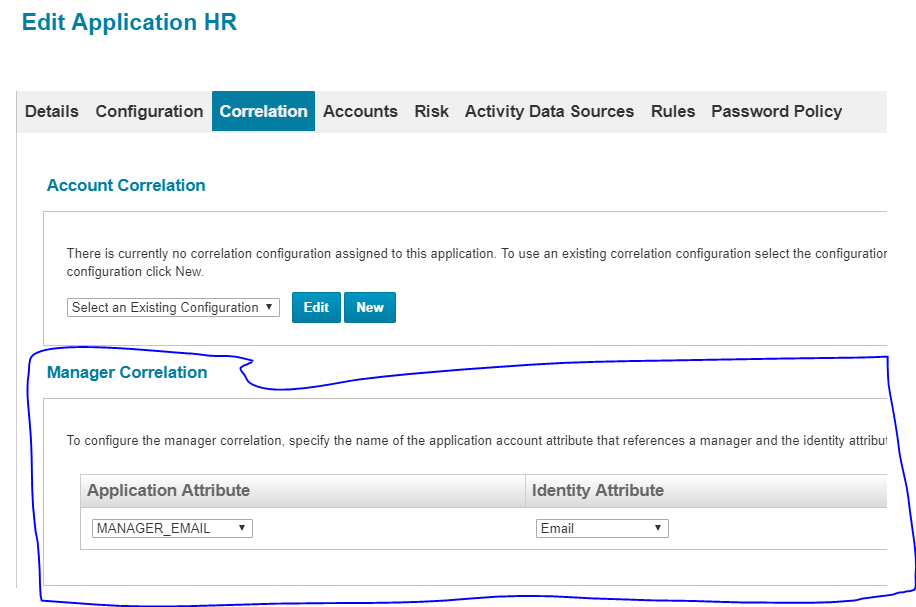
Or
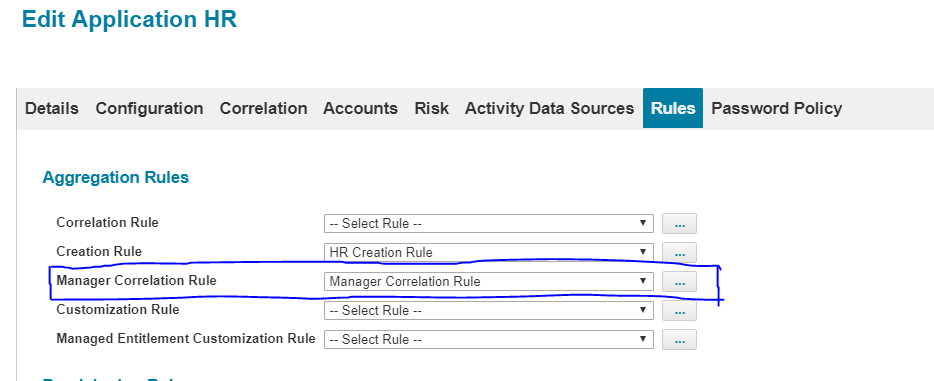
Identity Cube Refresh task is required after the configuration change to synchronise manager details.
Please feel free to provide your comments.
