Knowledge Article
Quick Tips on Naming Conventions for Roles and Entitlements
Author
cathy_mallet
SailPoint
- General Tips
- Examples of Names and Descriptions in the IdentityIQ UI
- Examples of Names and Descriptions in the IdentityNow UI
- Examples of Naming Conventions
- Additional Resources
How you name the elements that control user access in your governance environment - in IdentityIQ, roles and entitlements, and in IdentityNow, roles, entitlements, and access profiles - can have an important impact on how user-friendly, and therefore how successful, your governance program is.
When users look at a list of access items - for example, when they request access, approve access requests from other users, review access, or work with policies - they may be faced with a list of hundreds or even thousands of individual items in the UI. Too often, users don’t fully understand the access they are asked to make a decision on. Consistent, meaningful names for roles, entitlements, and access profiles help these users quickly grasp important information about the access under review.
General Tips
- Keep names simple and consistent. Ideally, names should be meaningful at a glance, not too complex, and not too similar. Following a consistent structure for your names will also help users quickly grasp the meaning - see the examples later in this document.
- Add meaningful descriptions when names are constrained. You may not always have the ability to choose or to change the names of entitlements that come from your applications. If IT or vendor constraints mean your entitlement names can't be as intuitive as you'd like, use the description field to add meaningful, user-friendly information about them. IdentityIQ and IdentityNow provide generous character limits for both display names and descriptions, giving you plenty of room for descriptive wording.
- Include business users in the creation and review of names, descriptions, and conventions. Names should be meaningful not just to IT users, but to business users as well. To help you give your team an easy way to provide input on names, you can export the IdentityIQ entitlement catalog, and the results of role searches, to CSV files for a spreadsheet-based review.
- Develop a naming convention, and enforce it. Establish an enterprise-wide standard for names, with input from business users as well as IT staff and application owners. Once you’ve settled on a standard, enforce it – otherwise users can lose confidence in your model. Do regular reviews and certifications of your roles and applications, to verify that the users responsible for roles and entitlements are observing your organization’s standards.
Examples of Names and Descriptions in the IdentityIQ UI
Consider the following IdentityIQ access reviews. In these examples, the reviews are the responsibility of people managers who are familiar with the work their direct reports do, but may not be as familiar with the specific names of entitlements or roles.
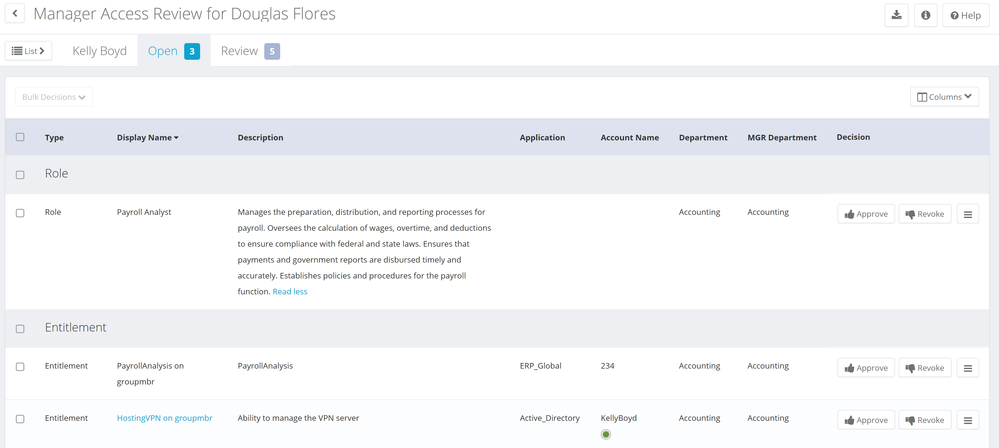
In this example, manager Douglas Flores is reviewing access for his employee Kelly Boyd. Kelly’s role, Payroll Analyst, has a clear name and a detailed, user-friendly description. One of her entitlements, HostingVPN, has a name that may not be intuitive to everyone, but the description for this entitlement, though brief, gives a reasonably clear sense of the access. The other entitlement, PayrollAnalysis, is less clear. If Kelly’s manager is not sure what access is granted by PayrollAnalysis, the description here is of no help.
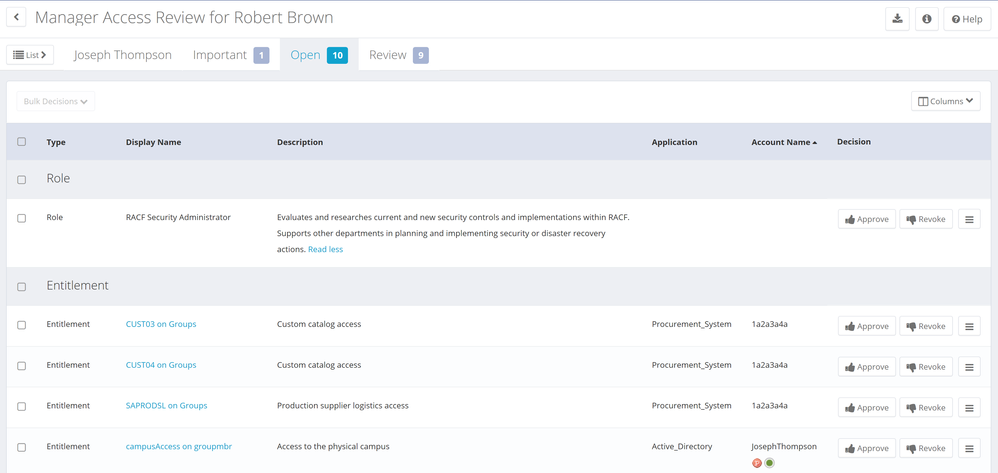
In the next example, manager Robert Brown is reviewing access for Joseph Thompson. There is a detailed, clear description of Joseph's RACF Security Administrator role – very helpful. The entitlements under review are less clear. Entitlements CUST03 and CUST04 use unintuitive names, and share the same short description. Entitlement SAPRODSL’s description is distinct, but lacks detail that Robert may need. The campusAccess entitlement seems straightforward, but if this organization has more than one campus, it may not be clear to Robert which campus Joseph can access.
Examples of Names and Descriptions in the IdentityNow UI
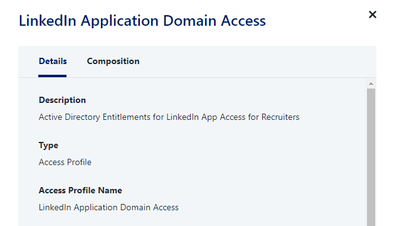
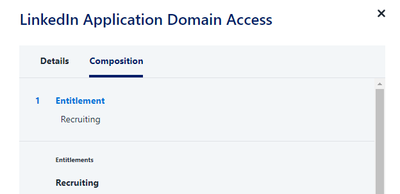
Here is an example of an IdentityNow access profile in a certification, showing the Details view and the Composition view. The details view includes brief but clear detail about what the access profile is called, and its description. The information provided in the composition view in this example is less helpful; the only description for the “Recruiting” entitlement is a repetition of its name.
 |  |
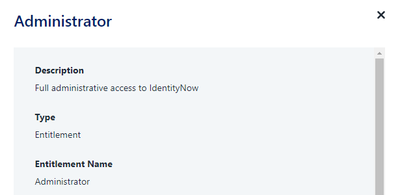
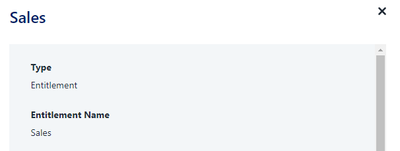
Here is a view of some entitlement in IdentityNow. The Administrator example provides a short but meaningful description of the entitlement. The Sales entitlement lacks any helpful description for the user.
 |  |
Examples of Naming Conventions
There is no single naming convention that is best for everyone; you’ll need to take your own organization’s structure and access into account as you plan your standards. Here are some examples of standards our implementers have seen in the field.
<Name of Application or Department> <User Role or Function>
Examples: DocuSign HR Admin
IT Helpdesk Associate
Compliance SOX Access Reviewer
LDAP-Direct User
<Optional Department or Group>-<Application>-<Entitlement or Role Name>
Examples: Finance-ActiveDir-Project ABC Member
Procurement_System-Supply_Chain
Engineering-Active_Directory-ENG Mgmt
<Organization Name> - <Role Name> - <Role Type, Blank for Business Role or -IT for IT Role>
Examples: Accounting-Salesforce
Accounting-Salesforce-IT
<Application> <Role Type, Blank for Business Role or -IT for IT Role>
Examples: Oracle Administrator
Oracle Administrator-IT
Additional Resources
- 8.1 IdentityIQ Role and Group Management Guide
- Role Management in IdentityIQ