Knowledge Article
Partitioning Best Practices
Author
jennifer_mitchell
SailPoint
- Introduction
- General Best Practices for Partitioning
- Global Partitioning Settings
- Partitioned Aggregation
- Partitioned Identity Refresh Tasks
- Partitioned Manager Certification Generation
- Partitioned Targeted Certification
- Partitioned Role Propagation Tasks
Introduction
IdentityIQ supports partitioning of various jobs so that data processing can not only be be split across multiple hosts but also across multiple threads per host. The overall goal with partitioning is to increase processing throughput and speed. Specifically, partitioning is supported for account aggregation tasks, for identity refresh tasks, for generation of manager certifications, and for role propagation. This document describes the steps required to configure partitioning of these processes in an IdentityIQ installation and outlines some recommended best practices around partitioning.
Partitioning was introduced in IdentityIQ version 6.2 and has been expanded and enhanced in subsequent versions. Differences in this functionality across IdentityIQ product versions are clearly called out in this document. Note: this document is designed to cover IdentityIQ versions that are currently supported per the IdentityIQ End of Life Policy.
General Best Practices for Partitioning
In general, IdentityIQ prefers fewer larger partitions over many smaller partitions. There is some system overhead involved in administering and tracking each partition which can impact the performance of the overall task. The recommended best practice for most processes is to limit the number of partitions to fewer than 50. With more than 50 partitions, IdentityIQ will spend too much time administering the accounting for each partition relative to the amount of time spent performing the task. Even in environments with large numbers of servers with multiple cores each, resulting in lots of available threads of CPU processing power, smaller numbers of partitions yield better performance.
The only exception to the recommended 50-partition limit is with aggregation tasks. IdentityIQ handles aggregation with very large numbers of partitions gracefully and with good performance results. IdentityIQ has been tested with configurations of 50, 100, and 200 partitions defined for aggregation from certain application types. Configurations of more than 250 partitions are still discouraged because configurations at that scale are not likely to be beneficial to overall task throughput.
Know that one factor limiting the number of partitions that should be defined for an account aggregation is likely the target application itself. For example, an inappropriate partitioning configuration in IdentityIQ for aggregating an LDAP server could result in effectively overwhelming the LDAP server. Implementers should carefully monitor the load on the target systems to ensure that the multiple concurrent aggregation threads do not overload it; this could result in a slowdown of not only the aggregation but also other processes within the target application.
The specific number of partitions to use sometimes depends on the data set itself, particularly for partitioned aggregations. Logical subdivision of the data can help determine how many partitions to define. In fact, the search algorithms available on some applications may constrain the number of partitions that can be defined for them. Common, and frequently recommended, choices include:
- 28 - every character of the alphabet plus a partition for ordinally lower characters and another for ordinally higher characters
- 10 - one for each ending digit of an account number or employee ID number
- 13 - one for each 2 letters of the alphabet
- 15 - one for each 2 letters of the alphabet plus one for ordinally lower characters and one for ordinally higher characters
- 100 - one partition for the final two digits (00 ... 99) of an account number or employee ID number
Discovery of the optimal number of partitions for each environment and each task often involves a trial-and-error process; the goal is to find a reasonably small number of partitions which results in good performance.
Global Partitioning Settings
The Server, ServiceDefinition, and RequestDefinition objects defined for the installation specify important parameters that affect partitioning. These include the number of threads each server can support, the maximum number of threads to use on each host for a given task type, and which servers to use as request hosts for processing partitioned tasks.
Server Object
IdentityIQ automatically creates a Server object for each host which connects to an IdentityIQ database. A maxRequestThreads value can be specified in the Server object's attributes map to designate the maximum number of threads which can be used for request processing on this host at one time. This value overrides all RequestDefinition object values for maxThreads. This value is most commonly used when IdentityIQ servers in a single installation have varied CPU counts or other various resource differences. If resources are consistent among IdentityIQ hosts involved in partitioning (which is our recommendation), an installation can entirely skip setting maxRequestThreads on Server objects.
If your installation uses maxRequestThreads settings per Server object, the recommendation is to set the maxRequestThreads value equal to two times the the number of CPUs on the server (e.g. 4 CPU means value of 8). It is not recommended to set maxRequestThreads to higher than four times the number of cores on the server. More conservative maxRequestThreads values might be appropriate if an application server is being used as both a UI and a task server for the installation.
As an example, if you have 2 IdentityIQ task servers, one with 8 CPU and one with 4 CPU, the host with 8 CPU can manage more threads during a partitioned task than a server with 4 CPU. Thus you can set maxRequestThreads on the 4 CPU server lower than the Aggegate Partition RequestDefinition object's maxThreads so the 4 CPU server picks up fewer partitions during an aggregation task.
Here's an example that sets the maxRequestThreads to 8. Your server object may look different and you may have to explicitly add a maxRequestThreads entry. Note that requestThreads and other values in the Server object are dynamic and change during job execution or user load. Thus, we suggest only adjusting the maxRequestThreads value here.
<?xml version='1.0' encoding='UTF-8'?>
<!DOCTYPE Server PUBLIC "sailpoint.dtd" "sailpoint.dtd">
<Server heartbeat="1399470179063" name="iiqHost1">
    <Attributes>
        <Map>
            <entry key="cpuUsage" value="73.23232323232324"/>
            <entry key="requestServiceStarted" value="true"/>
            <entry key="maxRequestThreads">
                <value>
                    <Integer>8</Integer>
                </value>
            </entry>
            <entry key="taskThreads">
                <value>
                    <Integer>0</Integer>
                </value>
            </entry>
            <entry key="requestThreads">
                <value>
                    <Integer>0</Integer>
                </value>
            </entry>
        </Map>
    </Attributes>
</Server>
ServiceDefinition Object
By default, each IdentityIQ host as part of an installation serves in UI, task, and request roles simultaneously. Remember that a UI server for IdentityIQ simply has the Task Scheduler and Request Processor services disabled. Also, a task/batch server that is logically dedicated to background processing still has the UI functionality available. The Task and Request ServiceDefinition objects can constrain which servers are used as task and request servers using their hosts attribute. Partitioned processes are managed by creating Request objects that are then run on request servers. The hosts attribute on the Request ServiceDefinition object must specify the list of hosts which should be used to process these partitioned activities. When changing hosts attribute, we suggest setting both Task and Request definitions to use the exact same comma-separated value.
By default, the hosts> attribute is set to global for Task and Request ServiceDefinition objects, meaning all connected IdentityIQ hosts function as Request and Task hosts. A sample ServiceDefinition for Request showing this default is below.
<?xml version='1.0' encoding='UTF-8'?>
<!DOCTYPE ServiceDefinition PUBLIC "sailpoint.dtd" "sailpoint.dtd">
<ServiceDefinition created="1396551148848" hosts="global" id="ff8080814528eeb9014528ef653000f8" name="Request">
    <Description>Service definition for the Request processor service. </Description>
</ServiceDefinition>
Here's a sample Task ServiceDefinition showing the default global value for hosts.
<?xml version='1.0' encoding='UTF-8'?>
<!DOCTYPE ServiceDefinition PUBLIC "sailpoint.dtd" "sailpoint.dtd">
<ServiceDefinition created="1563900039484" hosts="global" id="ff8080816c1fb46e016c1fb4d13c0149" modified="1563900215683" name="Task">
    <Description> Service definition for the Task scheduler service. </Description>
</ServiceDefinition>
The CSV delimited list of host names in the hosts attribute must be set to the same value returned by the hostname command when it is run on the application server hosts. For some installations, this is the short hostname, like "iiqHost1", but for other installations this is the fully qualified domain name, like "iiqHost1.compliance.acme.com". As an alternative, the name of each Server object can by used, as this reflects the exact value IdentityIQ needs to ensure proper ServiceDefinition function. Changes to these objects require a restart of IdentityIQ for the change to be effective.
Here's a sample Request ServiceDefinition directing all requests to two specific servers.
<?xml version='1.0' encoding='UTF-8'?>
<!DOCTYPE ServiceDefinition PUBLIC "sailpoint.dtd" "sailpoint.dtd">
<ServiceDefinition created="1396551148848" hosts="iiqHost1, iiqHost2" id="ff8080814528eeb9014528ef653000f8" name="Request">
    <Description>Service definition for the Request processor service. </Description>
</ServiceDefinition>
Here's a sample Task ServiceDefinition directing all tasks to the same two servers as our sample Request ServiceDefinition. Again, the recommendation is that these two object's hosts values match exactly.
<?xml version='1.0' encoding='UTF-8'?>
<!DOCTYPE ServiceDefinition PUBLIC "sailpoint.dtd" "sailpoint.dtd">
<ServiceDefinition created="1563900039484" hosts="iiqHost1, iiqHost2" id="ff8080816c1fb46e016c1fb4d13c0149" modified="1563900215683" name="Task">
    <Description> Service definition for the Task scheduler service. </Description>
</ServiceDefinition>
Finally, remember that in the above examples, iiqHost1 and iiqHost2 still have the UI functionality. If we extend this example for a medium-sized installation, perhaps we have iiqHost3 and iiqHost4 are designated as UI servers (in a load balanced pool). Hosts 3 and 4 would be presenting the IdentityIQ UI to users and be exempt from most Task and Request workloads - for example, they would not run scheduled aggregation jobs. Hosts 1 and 2 still have the UI running and available, but users would not be directed to those servers. Instead hosts 1 and 2 would do the bulk of background processing while hosts 3 and 4 manage user interactions.
RequestDefinition Object
RequestDefinition objects govern how IdentityIQ handles items added to the Request queue for processing. There are many different RequestDefinition objects, but only a few of them are relevant to partitioning. Those types include: Aggregate Partition, Identity Refresh Partition, Manager Certification Generation Partition, Certification Builder, and Role Propagation Partition. Each RequestDefinition object specifies the maximum number of threads per server to use for each request type through its maxThreads attribute.
Note: There is another RequestDefinition called Workflow Request which does not specifically apply to partitioning but is generally configured with a maxThreads value in concert with the partition-specific objects. This value is used to increase parallel processing done via workflows. Usually, all concurrency configuration happens at one time on a project, when these five XML files are checked into a source code control system (4 specific to partitioning above, plus Workflow Request).
The maxThreads values on each of these mentioned RequestDefinition objects govern the number of threads that IdentityIQ will attempt to use on each request server to run each task of the specified type. For example, it is possible to constrain certification generation to use fewer than the maximum total number of available threads on a server, even when nothing else is running on that host. Remember that this value overrides the maxThreads value for a RequestDefinition when the Server object specifies a value below that of the RequestDefinition. The recommended best practice is to specify a value for maxThreads in the range of 1-2 times the number of CPUs for all RequestDefinition objects mentioned here. If different servers have different number of cores, the smaller number specified in each Server object's maxRequestThreads attribute will supersede the maxThreads value for those servers.
Note: It is strongly recommended that all request/task servers in an IdentityIQ installation have the same number of CPUs, available memory, and allocated disk space. This allows them to operate as a set of interchangeable resources and avoids having to apply any host-specific configurations. Host must be taken offline for maintenance periodically, and as a best practice, requiring host-specific configuration should be avoided when possible. See the IdentityIQ Hardware Sizing Guide for more details.
As a conservative example in an environment where each server has 4 CPUs - specify a maxThreads value of 4, as shown in the Identity Refresh Partition RequestDefinition object below. This tells IdentityIQ to make use of 4 threads of parallel execution on each request server to support aggregation operations. In this example, if there are 2 request servers, this means a total of 8 aggregation partitions can run concurrently on all hosts in the installation.
<?xml version='1.0' encoding='UTF-8'?>
<!DOCTYPE RequestDefinition PUBLIC "sailpoint.dtd" "sailpoint.dtd">
<RequestDefinition executor="sailpoint.request.AggregationRequestExecutor" name="Aggregate Partition" retryMax="20">
    <Attributes>
        <Map>
        <!-- The maximum # of CPU cores/threads to use when running
        partitioned aggregation tasks on a server. This applies globally
        across the cluster of request servers. -->
        <entry key="maxThreads" value="4"/>
        </Map>
    </Attributes>
</RequestDefinition>
In managing concurrently running tasks of the same type (e.g. multiple partitioned aggregations running simultaneously), IdentityIQ constrains the number of simultaneous threads on each request server to the relevant maxThreads value. For example, with an Aggregation Partition maxThreads value of 4 and two request servers available, IdentityIQ will use no more than 8 threads (four per request server) for processing partitioned aggregations. If two partitioned aggregations were simultaneously executed, each defined with 12 partitions for a total of 24 partitions of work, IdentityIQ would launch 8 partitions first, randomly selected from the pool of 24 partitions needing work. Four partitions would be processed on the first task server and the other four on the second task server. The remaining 16 partitions would remain queued and would be processed as each of the running partitions completes and its aggregation thread becomes available. This throttling example would apply independent from other RequestDefinition types - for example, if all 8 threads were used for aggregation tasks, a partitioned identity refresh task could still be executed, using another set of threads up to the per-host maxThreads value for the Identity Refresh Partition object.
Note: A conservative number for maxThreads is one thread per CPU, but know that IdentityIQ has been tested with large numbers of partitions executing concurrently on servers with 4 CPUs. IdentityIQ is stable with up to 50 concurrent partitions on 4-CPU servers when running account aggregations. While the software is stable with this configuration, implementers should understand that overcommitting the CPUs of task servers like this (a 12.5 : 1 thread-to-CPU ratio in this example) usually does not result in optimal overall performance or task throughput. Implementers attempting to achieve optimal throughput should test their specific environment and hardware to find an optimal maxThreads value for each RequestDefinition object. A good number to start with is 2 times the CPU count for request servers. Thus, a typical medium-sized installation would have two task/request servers, each with 4 CPUs; 8 would be a reasonable starting point for each RequestDefinition object's maxThreads value (ignoring each Server object's maxRequestThreads setting because all task/request hosts have identical configuration). It is important to understand that each partition consumes a JDBC connection to IdentityIQ's database for the duration of the task's execution. Bear in mind that setting a reasonable task execution schedule to ensure proper thread management may require input from both technical and non-technical stakeholders. For instance, scheduling a large, partitioned Identity Refresh to run at the same time as multiple, partitioned aggregations every day may be ill-advised and require staggering of tasks schedules.
The maxThreads limit applies only to account aggregation tasks defined with partitioning enabled. Non-partitioned tasks are managed completely separately and are run on hosts configured as task servers. The RequestDefinition maxThreads values do not in any way impact when or how non-partitioned tasks are processed, including how concurrent processing of multiple non-partitioned aggregations is managed.
Preventing Connection Starvation
Due to the multi-threaded nature of partitioned tasks, it is important to tune the number of IdentityIQ JDBC and managed-application connections to avoid connection starvation. IdentityIQ database pooling maximum values must provide headroom for all parallel task threads, plus all UI interactions. In addition, the database server must be configured to support the number of possible pooled connections.
Implementers must be certain to configure each IdentityIQ host's values in iiq.properties for datasource.maxActive (pre-8.0) or datasource.maxTotal (8.0+) beyond the defaults to prevent IdentityIQ database connection bottlenecks. This number reflects the total number of pooled JDBC connections that can be active from an IdentityIQ host to the IdentityIQ database simultaneously; when the pool maximum is hit, connections are queued and are effectively paused until the pool has a free connection. In general, a good starting point for these values is 100 for small installations, 250 for medium installations, and 350 for large installations. Consider that these are adjusted on each server, thus, a medium installation with 4 IdentityIQ 8.0 hosts would have each host's maxTotal set to 250. If you are using another JDBC pooling library (e.g. Tomcat with JNDI configuration outside of iiq.properties), then adjust the same maximum pooling value as needed for your specific pooling configuration. If you plan on very large numbers of threads in partitioned tasks (e.g. 50 as a value for maxThreads in Aggregate Partition RequestDefinition), then you may want to increase these baselines further. In general, each active, running partition takes a JDBC connection from the pool, and the baselines provided here are reasonable starting points to avoid any connection starvation related to IdentityIQ JDBC pooling.
For the other side of the connection pool, implementors must ensure the database server will support planned JDBC pool maximums. Thus, our example environment above (4-server, medium, IdentityIQ 8.0) would have a potential to open 1,000 (4 * 250) concurrent connections with the IdentityIQ database server. Ensure your database management system support at least your planned pool maximums totalled for all IdentityIQ hosts plus 25% headroom. In our continued example, we'd set our datbase connection limit to 1,250.
Note: If using the plugin database, consider that iiq.properties pooling settings apply there as well. If your instattions will make use of the plugin database, consider increasing both the IdentityIQ JDBC pooling max value for it and the related datbase mangement system connection limit.
IdentityIQ-managed JDBC applications can also have JDBC pooling settings adjusted (i.e. those application using the JDBC connector). Tune each application's client connections settings to cover the total number of aggregation request threads that could be simultaneously connecting to the target application. In addition, consider the connection limit for the target database managment system. A simple formula for this is: number of IdentityIQ hosts * maxThreads + 25%. JDBC pooling values for JDBC applications are specified in the application XML attributes map. Continuing our previous example, there are two task severs with 16 as maxThreads for Aggregate Partition. If we extend this example with a JDBC application, we would add a map entry to the JDBC application like this: <entry key="pool.maxActive" value="40"/>. Note that the current JDBC connector still utilizes the DBCP 1.4 and Commons Pooling 1.6 - thus, maxTotal does not apply here. If no pool settings are configured for pool.maxActive on a JDBC connector instance, sailpoint.connector.util.JDBCUtil defaults this to 10. Additional DBCP parameters (e.g. maxWait) can be set per the Direct Connector and Administration Guide for your version of IdentityIQ (see JDBC connector chapter).
Partitioned Aggregation
Partitioned aggregation can occur at either the application or task levels. Application-level partitioning requires connector support and some use of partitioning statements to obtain mutually-exclusive data sets for parallel processing; this creates multiple connections to a target system and also spreads aggregation processing across the task servers. Task-level partitioning is an alternative when application-level partitioning is not available or is undesirable. This variation pulls data from the target system into IdentityIQ using a single connection and multi-threads the processing across the task servers. The best practice is to use application-level partitioning whenever possible, as it has superior throughput potential when compared to task-level partitioning or traditional single-threaded aggregation. Recall that single-threaded aggregation uses a single thread for both data source connection and data processing within IdentityIQ.
Configuring partitioned aggregations starts with the global partitioning settings described earlier in this document. These system-wide values set the stage for individual tasks to leverage partitioning. Beyond the global settings, there are two other factors for making partitioning effective: aggregation tasks and connectors.
Considerations
When determining whether or not to use partitioned aggregation, consider these questions:
- How many servers/CPU cores are available?
- Is delta aggregation an option with the connector type?
- How frequently do data values on the application change?
- How large is the dataset being aggregated?
Partitioned aggregation is most useful for full aggregation of large datasets and for applications that do not support true delta aggregations. Of course, where you can do partitioned delta aggregation (AD), that is likely to be the most efficient option. However, when aggregating from an application that supports non-partitioned delta aggregation (e.g. LDAP applications), the choice between delta aggregation and partitioned aggregation must be investigated on a per-installation basis. Some installations aggregate data values which change frequently (like lastLoginTimestamp) or have automated activities like email group additions/removals which can change significant numbers of records daily. In such cases, partitioned aggregation with optimization is often a faster option than delta aggregation. The process may be more expensive in CPU cycles and database activity, but because delta aggregation is single-threaded in most cases, the partitioned full aggregation may still out-perform delta aggregation in terms of actual (wall-clock) time.
By contrast, for small datasets and in environments where adequate CPU cores are not available, partitioning may prove to be slower than single-threaded aggregation tasks, just due to the overhead of partition management. Note also that if there is only one server with one thread available for processing, IdentityIQ will automatically run a partitioned task as a single-threaded operation and will include a warning in the TaskResult indicating that partitioning was disabled for that reason. This is true for aggregation or any other partitioned operation.
Aggregation Task Configuration
Activating partitioning on an aggregation task is simple once other partitioning settings are configured. It only requires selecting the Enable Partitioning (enablePartitioning in XML) option in the task definition user interface page. This must be enabled for each aggregation task which will use partitioning, as this setting is disabled by default.

This partial TaskDefinition XML snippet below shows an example of the enablePartitioning task setting.
<?xml version='1.0' encoding='UTF-8'?>
<!DOCTYPE TaskDefinition PUBLIC "sailpoint.dtd" "sailpoint.dtd">
<TaskDefinition name="Aggregate Financials" type="AccountAggregation"...>
    <Attributes>
        <Map>
            ...
            <entry key="applications" value="Financials"/>
            <entry key="enablePartitioning" value="true"/>
            ...
        </Map>
    </Attributes>
...
There is a second configuration option for TaskDefinitions that is applicable in some situations: objects per partition (objectsPerPartition in XML). This option sets the maximum number of records to include in each partition. IdentityIQ will then divide the accounts from the data source into as many partitions as required to create mutually-exclusive segments, with each containing no more than the specified number of accounts. If no number of objects is specified and the partitions are not defined by the application itself, the default is 1000 objects per partition.

Note this setting is only used bypassing connector-level partitioning statements or when an application connector does not support connector-level partitioning. Thus, the best practice for using application-level partitioning means objectsPerPartition can be ignored; essentially, partitioning statements in the application perform the same action in a more flexible manner.
Application Configuration
For the most current information about a particular connector's partitioning support, see the relevant chapter in the Direct Connector and Administration Guide for your version of IdentityIQ. Given that, we do provide several of examples of partitioning strategies in this document that go beyond the default product documentation. Not all options are available in the UI, and this is mentioned in proceeding sections when relevant. Like other IdentityIQ settings, everything can be configured in XML; whenever feasible, this guide presents both options.
Delimited File Configuration
Unlike other applications that have partitioning, the delimited file connector does not have user-definable partitioning statements. Instead, records are split into partitions based on a configuration item that sets the maximum records per partition. This number can be configured automatically or manually and has options in both the Application and TaskDefinition objects.
When automatic delimited file partitioning (<entry key="partitionMode" value="auto"/> in XML) is used, it relies on the "Aggregate Partition" RequestDefinition maxThreads attribute (or, if less, Server maxRequestThreads) and the number of task servers. Thus, if you have 25 as maxThreads with 2 task servers, you would get 50 partitions for your delimited file aggregation with IdentityIQ determining the appropriate record count per partition. In addition, omitting a value for iteration partitioning on the connector altogether (leave off partitionMode in XML) results in the "auto" action taking effect if no value is present for objectsPerPartition on an associated aggregation task.
When using manual partition mode (<entry key="partitionMode" value="manual"/>), the administrator specifies a number of objects (accounts or groups) to put in each partition, and IdentityIQ calculates the number of partitions based on the total count of objects divided by the number of objects per partitions. The manual option should only be used when the number of records in the file is known and relatively stable so the object count specified in this configuration will result in an appropriate number of partitions being created to achieve good task performance. If there's a conflict between partitionObjectCount on the application definition and objectsPerPartition on an associated task, the application setting wins during aggregation; set the object count in one place to avoid this conflict.
Thus, the recommendation for delimited file aggregation partitioning when record counts vary (perhaps by 10% or more) is to set partitionMode as auto and configure a reasonable value for maxThreads on the "Aggregate Partition" RequestDefinition. This allows for the greatest flexibility and efficiency of partitioning is used and record counts are unknown.
Delimited File Partitioning Performance
There are important performance considerations around delimited file partitioning when the application configuration includes a BuildMap rule or a record merging configuration. With delimited files, as IdentityIQ calculates the partitions, it stores the file record number for the starting and ending point for each partition. As it processes each partition, the system must start by iterating through all records in the file up to the starting point record to get to the set of records it needs to process.
When the application definition specifies a need for record merging, either through a merging configuration or a mergeMaps rule, there is a possibility that the breakpoint between partitions could occur across records which actually need to be merged with each other. To protect against this, IdentityIQ analyzes each record as it advances to the starting point for each partition, to ensure that it starts the partition at a clean breakpoint. This means that for each partition, it will run the merge calculation process for each record in the file up to the partition's starting point record.
Likewise, because the BuildMap rule could potentially affect data that would be used in the merging process, the BuildMap rule, if one exists for the application, must also be run for every line of text in the input delimited file as the system advances to the designated starting point. In fact, logic in the BuildMap rule can determine if there even is a next record to deal with, so that rule gets run for each file record as the system iterates to the partition starting point, regardless of whether there is a merge configuration specified or not.
This can result in a large amount of system overhead in this process. Consequently, for delimited files with a merge configuration or a BuildMap rule, customers are advised to conduct performance test in their non-production environments to evaluate whether they are best served by the connector's partitioning configuration or by a single-threaded aggregation process. There are delimited file formats and environments where single-threaded aggregation with optimization is faster than partitioned aggregation. Additionally, because of this potential performance impact, the recommended best practice for installations choosing partitioned aggregation for a delimited file is to use a Customization rule instead of a BuildMap rule for any record manipulation which does not need to be done during the BuildMap stage (e.g. pre-merging).
JDBC Partition Configuration
For JDBC applications, partitioning is configured in the "iteration partitioning" section of the application definition (in the UI). First, enable "partitioning enabled", then input partitioning statements (queries), one per line. In XML, partitioning is enabled with entry partitionMode being set to true and adding entry partitionStatements with a List<String></String> that represents the queries. In either case, each String is an independent query that retrieves an exclusive set of records.
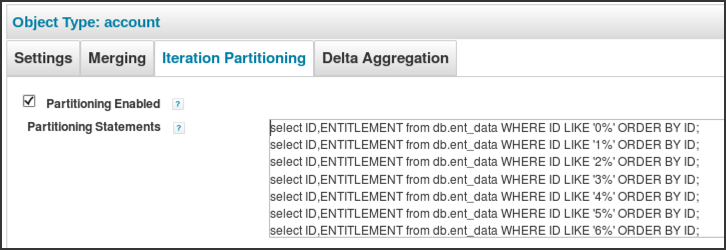
This example illustrates a JDBC application broken into 10 partitions, separated by the starting digit of the ID. The ID field in this example is indexed to support efficient filtering.
select ID,ENTITLEMENT from db.ent_data WHERE ID LIKE '0%' ORDER BY ID;
select ID,ENTITLEMENT from db.ent_data WHERE ID LIKE '1%' ORDER BY ID;
select ID,ENTITLEMENT from db.ent_data WHERE ID LIKE '2%' ORDER BY ID;
select ID,ENTITLEMENT from db.ent_data WHERE ID LIKE '3%' ORDER BY ID;
select ID,ENTITLEMENT from db.ent_data WHERE ID LIKE '4%' ORDER BY ID;
select ID,ENTITLEMENT from db.ent_data WHERE ID LIKE '5%' ORDER BY ID;
select ID,ENTITLEMENT from db.ent_data WHERE ID LIKE '6%' ORDER BY ID;
select ID,ENTITLEMENT from db.ent_data WHERE ID LIKE '7%' ORDER BY ID;
select ID,ENTITLEMENT from db.ent_data WHERE ID LIKE '8%' ORDER BY ID;
select ID,ENTITLEMENT from db.ent_data WHERE ID LIKE '9%' ORDER BY ID;
NOTE: Depending on the efficiency of the specified where clauses for JDBC connector-based partitioning, partitioning of JDBC aggregations through the connector can actually run slower than the task-based partitioning configuration supported for all connectors. It is important that these queries run against indexed fields to maximize efficiency in this partitioning process. If the queries are not performing well, connector-level partitioning can be disabled by deselecting the "partitioning enabled" (in XML make partitionMode false or null) option in the application definition, allowing the task-based partitioning option to be used instead.
Active Directory and LDAP Partition Configuration
Configuring partitioning in an Active Directory (AD) or LDAP application is done by specifying the partitions with List<Map> of searchDN attributes. Each map contains keys for an LDAP search string (keyed as iterateSearchFilter), a scope (generally SUBTREE), and an search start point (searchDN). These values work together and must be configured to to divide the accounts into exclusive partitions, ensuring that each account appears in one and only one partition.
Active Directory Auto-Partitioning
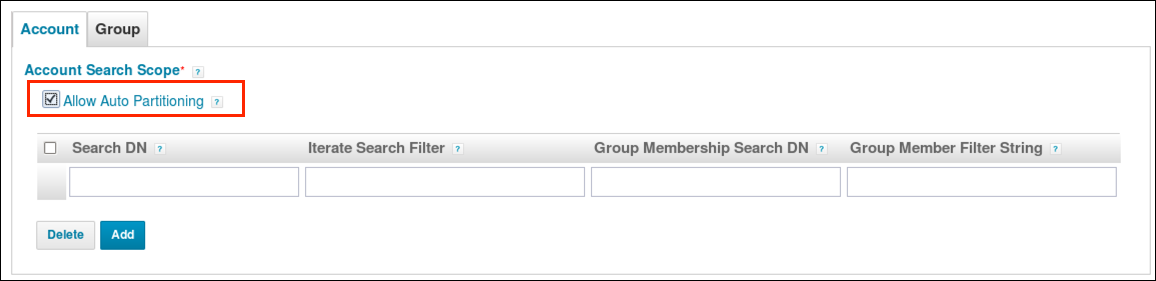
IdentityIQ 7.2 or above can take advantage of automatic partitioning for Active Directory aggregation, and this is recommended by SailPoint over manual partitioning. With the auto-partitioning feature, the user no longer has to provide iterate search filters for partitioning the account records and always has automatically balanced partition counts.
Auto-partitioning queries the objects (accounts) on Active Directory based on objectGUID, a 16-byte unique identifier for each object. The objectGUID, when represented as a string, is 32 characters long, and each character can have one of 16 hexadecimal values (0 - 9, a - f). The connector considers only the last two characters of the objectGUID, which represent a total of 256 different combinations, so the connector creates 256 partitions, each responsible for aggregating objects with objectGUID ending with particular characters. For example, one partition would be responsible for aggregating accounts whose objectGUID ends with 00, while another would be responsible for aggregating accounts whose objectGUID ends with 01, and so forth.
To turn on auto-partitioning, select the "allow auto partitioning" option in the UI on the configuration page of the Active Directory application (see "user search scope" area). If you are modifying an existing application which previously had been configured for manual partitioning, the system will detect when you have duplicate searchDNs with overlapping iterateSearchFilter values and warn you that those must be cleaned up by the administrator before aggregation can properly resume.
Here is an example of XML for the auto-partitioning setting in AD:
<entry key="allowAutoPartitioning">
    <value>
        <Boolean>true</Boolean>
    </value>
</entry>
Manual Partitioning Example
Below is an example of an AD partitioning strategy with 15 partitions defined: sAMAccountName starting with characters < "a" (digits), then a-b, c-d, e-f, ..., y-z, and finally characters > "z" (special characters). NOTE: AD (i.e. LDAP) filtering will not recognize a greater-than or less-than operation in a filter without an equal-to component, so we must specify the "less than a" filter as "not greater than or equal to a" to satisfy LDAP filter syntax. Likewise, we specify "greater than z" as "not less than or equal to z". With these filters, we ensure that each account falls into exactly one partition. A similar approach can be taken with other LDAP systems and swapping the sAMAccountName filter parameter for another relevant account attribute.
<entry key="account.searchDNs">
<value>
<List>
<Map>
<entry key="searchDN" value="ou=orgRoot,dc=acme,dc=com"/>
<entry key="searchScope" value="SUBTREE"/>
<entry key="iterateSearchFilter" value="(&(objectCategory=person)(objectClass=user)(!(sAMAccountName>=a)))"/>
</Map>
<Map>
<entry key="searchDN" value="ou=orgRoot,dc=acme,dc=com"/>
<entry key="searchScope" value="SUBTREE"/>
<entry key="iterateSearchFilter" value="(&(objectCategory=person)(objectClass=user)(|(sAMAccountName=a*)(sAMAccountName=b*)))"/>
</Map>
<Map>
<entry key="searchDN" value="ou=orgRoot,dc=acme,dc=com"/>
<entry key="searchScope" value="SUBTREE"/>
<entry key="iterateSearchFilter" value="(&(objectCategory=person)(objectClass=user)(|(sAMAccountName=c*)(sAMAccountName=d*)))"/>
</Map>
<Map>
<entry key="searchDN" value="ou=orgRoot,dc=acme,dc=com"/>
<entry key="searchScope" value="SUBTREE"/>
<entry key="iterateSearchFilter" value="(&(objectCategory=person)(objectClass=user)(|(sAMAccountName=e*)(sAMAccountName=f*)))"/>
<Map>
<entry key="searchDN" value="ou=orgRoot,dc=acme,dc=com"/>
<entry key="searchScope" value="SUBTREE"/>
<entry key="iterateSearchFilter" value="(&(objectCategory=person)(objectClass=user)(|(sAMAccountName=g*)(sAMAccountName=h*)))"/>
</Map>
<Map>
<entry key="searchDN" value="ou=orgRoot,dc=acme,dc=com"/>
<entry key="searchScope" value="SUBTREE"/>
<entry key="iterateSearchFilter" value="(&(objectCategory=person)(objectClass=user)(|(sAMAccountName=i*)(sAMAccountName=j*)))"/>
</Map>
<Map>
<entry key="searchDN" value="ou=orgRoot,dc=acme,dc=com"/>
<entry key="searchScope" value="SUBTREE"/>
<entry key="iterateSearchFilter" value="(&(objectCategory=person)(objectClass=user)(|(sAMAccountName=k*)(sAMAccountName=l*)))"/>
</Map>
<Map>
<entry key="searchDN" value="ou=orgRoot,dc=acme,dc=com"/>
<entry key="searchScope" value="SUBTREE"/>
<entry key="iterateSearchFilter" value="(&(objectCategory=person)(objectClass=user)(|(sAMAccountName=m*)(sAMAccountName=n*)))"/>
</Map>
<Map>
<entry key="searchDN" value="ou=orgRoot,dc=acme,dc=com"/>
<entry key="searchScope" value="SUBTREE"/>
<entry key="iterateSearchFilter" value="(&(objectCategory=person)(objectClass=user)(|(sAMAccountName=o*)(sAMAccountName=p*)))"/>
</Map>
<Map>
<entry key="searchDN" value="ou=orgRoot,dc=acme,dc=com"/>
<entry key="searchScope" value="SUBTREE"/>
<entry key="iterateSearchFilter" value="(&(objectCategory=person)(objectClass=user)(|(sAMAccountName=q*)(sAMAccountName=r*)))"/>
</Map>
<Map>
<entry key="searchDN" value="ou=orgRoot,dc=acme,dc=com"/>
<entry key="searchScope" value="SUBTREE"/>
<entry key="iterateSearchFilter" value="(&(objectCategory=person)(objectClass=user)(|(sAMAccountName=s*)(sAMAccountName=t*)))"/>
</Map>
<Map>
<entry key="searchDN" value="ou=orgRoot,dc=acme,dc=com"/>
<entry key="searchScope" value="SUBTREE"/>
<entry key="iterateSearchFilter" value="(&(objectCategory=person)(objectClass=user)(|(sAMAccountName=u*)(sAMAccountName=v*)))"/>
</Map>
<Map>
<entry key="searchDN" value="ou=orgRoot,dc=acme,dc=com"/>
<entry key="searchScope" value="SUBTREE"/>
<entry key="iterateSearchFilter" value="(&(objectCategory=person)(objectClass=user)(|(sAMAccountName=w*)(sAMAccountName=x*)))"/>
</Map>
<Map>
<entry key="searchDN" value="ou=orgRoot,dc=acme,dc=com"/>
<entry key="searchScope" value="SUBTREE"/>
<entry key="iterateSearchFilter" value="(&(objectCategory=person)(objectClass=user)(|(sAMAccountName=y*)(sAMAccountName=z*)))"/>
</Map>
<Map>
<entry key="searchDN" value="ou=orgRoot,dc=acme,dc=com"/>
<entry key="searchScope" value="SUBTREE"/>
<entry key="iterateSearchFilter" value="(&(objectCategory=person)(objectClass=user)(!(sAMAccountName<=z)))"/>
</Map>
</List>
</value>
</entry>
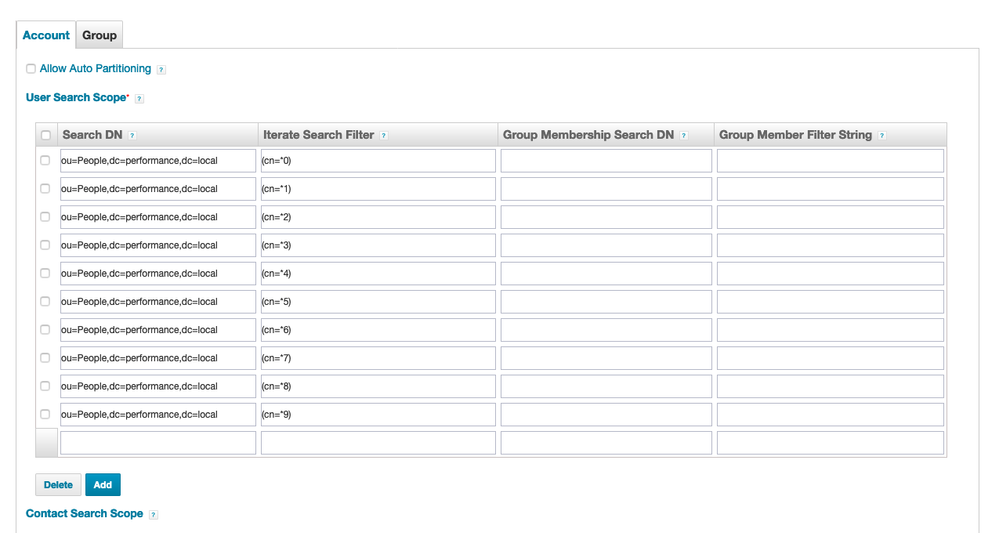
Here's another example showing the UI with 10 manual partitions, dividing the data by last digit on cn:
Azure Active Directory Partition Configuration
Examples of partitioning for the Azure Active Directory connector are provided here: Azure Connector Integration Guide for IdentityIQ 7.0+
PeopleSoft HRMS and SAP Partition Configuration
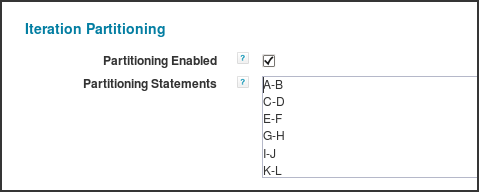
The PeopleSoft HRMS and SAP connectors use range operators to specify the search filters for accounts. For these connectors, the best practice is to split the account list into 13 partitions by two-letter alphabetic ranges.
These partitions are configured in the user interface for the PeopleSoft HRMS or SAP application, as shown below.
Here is a snippet from a PeopleSoft application XML demonstrating this in practice:
<entry key="partitionMode">
<value>
    <Boolean>true</Boolean>
</value>
</entry>
<entry key="partitionStatements">
<value>
    <List>
    <String>A-B</String>
    <String>C-D</String>
    <String>E-F</String>
    <String>G-H</String>
    <String>I-J</String>
    <String>K-L</String>
    <String>M-N</String>
    <String>O-P</String>
    <String>Q-R</String>
    <String>S-T</String>
    <String>U-V</String>
    <String>W-X</String>
    <String>Y-Z</String>
    </List>
</value>
</entry>
Delta Aggregation Partitioning
IdentityIQ 7.2 introduced support for partitioning in delta aggregations. This functionality relies on the connector to have partitioning implemented; if the connector does not include partitioning functionality, the partitioning option will be ignored and delta aggregation will work in the default, singled-threaded mode. In version 7.2, only the Active Directory connector has implemented the option for partitioning delta aggregation. IdentityIQ 7.3 adds this feature for the Azure Active Directory connector.
For Active Directory, delta aggregation partitioning is done per domain - i.e. each partition is responsible for bringing changes from a specific domain in Active Directory. No user configuration is required to drive the partitioning by domain; that is built into the connector. This feature is especially useful for deployments where large volumes of changes are collected in delta aggregation runs.
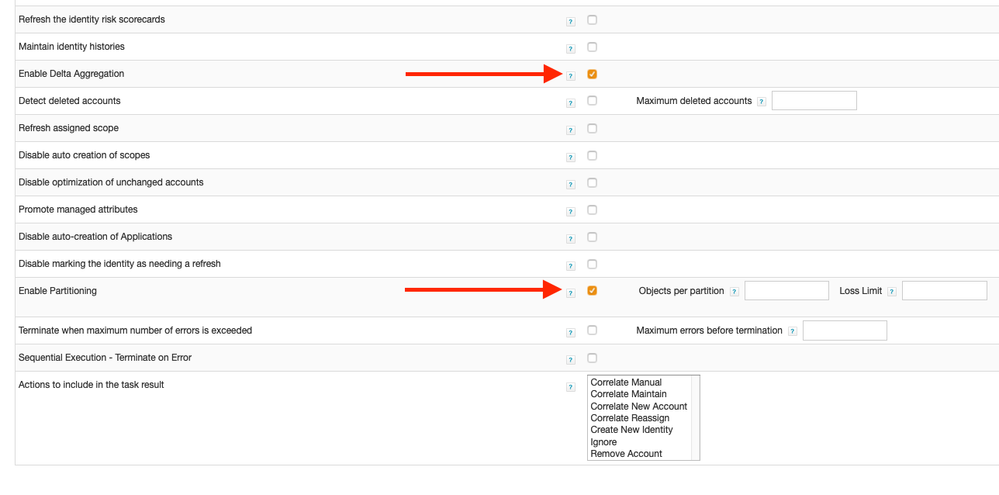
See the Direct Connector guide for your version of IdentityIQ to get the latest information on this feature.
Partitioned Identity Refresh Tasks
Identity Refresh tasks can also be configured to use partitioning. Turning on partitioning for a refresh task simply requires enabling the "enable partitioning" option in the Task Definition user interface page.
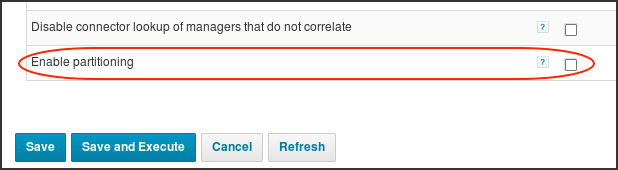
This can also be set in XML on the TaskDefinition with entry <entry key="enablePartitioning" value="true"/>.
The rest of the configuration for partitioning of identity refresh tasks is managed through the Global Settings described earlier in this document: the Server, ServiceDefinition, and Identity Refresh Partition RequestDefinition settings.
The Identity Refresh task supports a multi-threading on a single task server, enabled by specifying a "number of refresh threads" value in the task options (key refreshThreads in XML). This is only applicable when partitioning is not enabled. When the partitioning option is selected, the thread calculations done ignore the refreshThreads value on the task. In addition, multi-threaded Identity Refresh tasks run on task servers while partitioned Identity Refresh tasks run on request servers. We recommend using partitioning in lieu of the more limited refreshThreads option for Identity Refresh tasks.
Partitioned Manager Certification Generation
The generation of manager certifications can be partitioned across the request hosts on a per-certification basis. Since partitioning does not apply to all certification types, partitioning is not available as a global certification setting. Partitioning can be enabled on the "advanced" page of a manager certification specification by selecting "enable partitioning" in the "partitioning options" section.
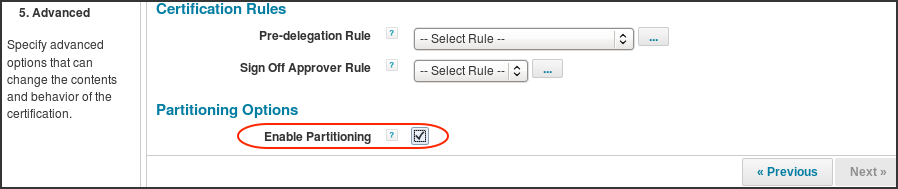
This appears on the CertificationDefinition XML as <entry key="enablePartitioning" value="true"/>
The rest of the configuration for manager certification partitioning is managed through the Global Settings described earlier in this document: the Server, ServiceDefinition, and Manager Certification Generation Partition RequestDefinition settings. More information can be found here: Managing Large Certifications in IdentityIQ Versions 7.0+
Partitioned Targeted Certification
IdentityIQ 7.3 introduced targeted certifications, and this includes a partitioning feature. Each CertificationDefinition can be set to use a certain number of partitions. The partition count is set per the Global Settings section; consider the Certification Builder RequestDefinition. The partition count can also be set directly on the CertificationDefinition object.
Here's an example of setting partitioning for this directly in the UI:
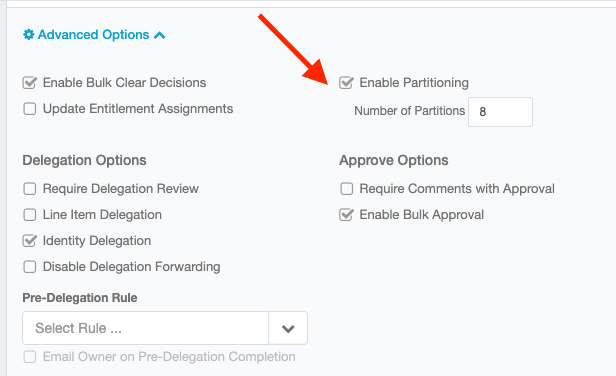
Here's a snippet of XML from a CertificationDefinition showing partitioning is enabled with 8 partitions; partitionCount overrides the maxThreads value on the Certification Builder RequestDefinition.
<entry key="enablePartitioning" value="true"/>
<entry key="partitionCount" value="8"/>
For the latest advice on this feature, see the User Guide for your version of IdentityIQ.
Partitioned Role Propagation Tasks
Beginning with IdentityIQ 7.0, Role Propagation tasks can use partitioning to multi-thread the process of pushing role changes out to the identities which hold those roles. See Role Management in IdentityIQ for more details about the role propagation task and how it works.
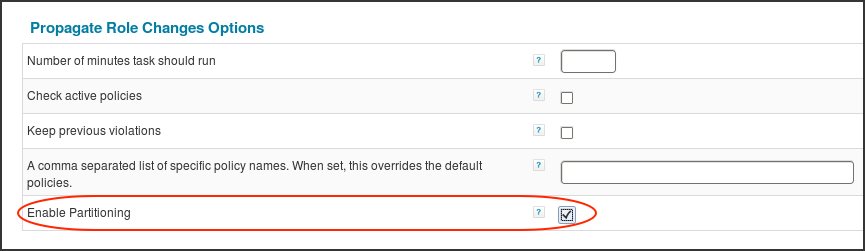
To turn on partitioning for a role propagation task (a task of type "Propagate Role Changes"), select the "enable partitioning" option in the Task Definition user interface page (or use <entry key="enablePartitioning" value="true"/> in task's XML).
The rest of the configuration for partitioning of role propagation tasks is managed through the Global Settings described earlier in this document: the Server, ServiceDefinition, and Role Propagation Partition RequestDefinition settings.