Knowledge Article
Native Change Detection
Author
menno_pieters
SailPoint
Introduction
Native change detection is a mechanism in IdentityIQ's application connectors that can detect changes made in account information outside of IdentityIQ's control. The native change detection can detect newly created accounts, deleted accounts or modified accounts. The changes are detected on aggregation by comparing stored information with newly read information. If any changes are detected, actions can be taken to respond to these changes. These actions include automatic re-certification, approval, notifications or even automatically reverting the changes.
How Does Native Change Detection Work?
Native change detection is an option of the application and needs to be enabled on each application separately. When native change detection is enabled on the application and native change events are configured, IdentityIQ will create a snapshot of the account's attributes before aggregation to be compared with the state after aggregation. This so called trigger snapshot is stored in the Identity's attributes:
<entry key="triggerSnapshots"> <value> <Map> <entry key="NativeChange"> <value> <List> <NativeChangeDetection application="RedHat" identity="tolson" operation="Modify"> <Differences> <Difference attribute="groups" multi="true" newValue="[users,wheel]" oldValue="[users,tomcat,wheel]"> <RemovedValues> <String>tomcat</String> </RemovedValues> </Difference> </Differences> </NativeChangeDetection> </List> </value> </entry> </Map> </value> </entry>
Collected native changes are processed during the identity cube refresh, if the option Process Events is enabled. The identity cube refresh task will then check for any active lifecycle event or certification event for native changes that need to be executed. A lifecycle event can trigger a business process to take action on native changes. A certification event will generate a new certification for the changed identity and allows a selected certifier to review an entire identity cube.
Enabling Native Change Detection
Native change detection can be enabled per application. It is enabled by simply ticking the option Native Change Detection, just above the tabs with application specific options.
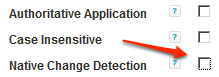
When this option is enabled, a set of configuration options for the native change detection become available.

The native change detection can be enabled on Create, Modify or Delete operations for application accounts. If none of these is selected, changes will not be detected. The options at Attributes to detect are used to select accounts for further inspection. This is not just for the Modify operation but is also relevant for Create and Delete. For the option Entitlements, the attributes listed under the Schema tab and marked as entitlement will be compared to the previous version. If User Defined is selected, a list of attributes to compare can be entered, one per line. These attributes do not need to be entitlements. Make sure to list at least one useful attribute for any changes to be detected.
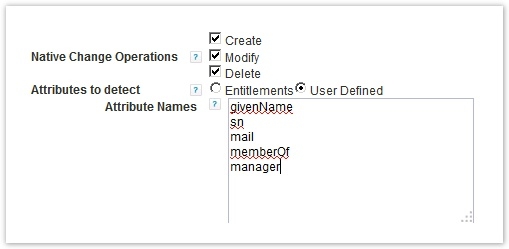
For changes to be detected the change on the monitored application must involve an entitlement or any of the listed attributes. Changes to other attributes will not be detected. So if an account is created without entitlements or any of the listed attributes, no native change event will be triggered. Similarly, if an account's first and last name are changed, but these attributes are not listed to be detected, the change will not trigger an event. It is important to carefully select the attributes that IdentityIQ should monitor. Selecting too many attributes can result in lots of unnecessary events. If not all relevant attributes are configured, important events may be missed.
Processing Changes
After enabling the change detection on the application the changes need to be processed. In order to do so, the relevant applications need to be aggregated. During aggregation the data is gathered. There are no special options on the aggregation task to be set specifically for native change detection. It is, however, recommended not to set the option Disable optimization of unchanged accounts. Setting that option may result in (a lot of) unnecessary events being generated.

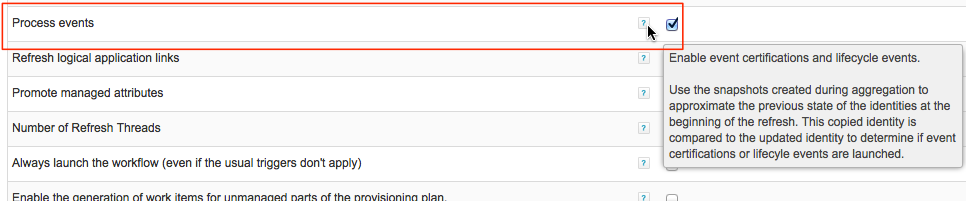
The actual processing of the events is performed during identity refresh. The standard task Refresh Identity Cube, or a dedicated task of the type Identity Refresh can be configured by setting the option Process Events.
Automatic Certification
One of the possible actions that can be taken on change detection is to automatically start a certification. This can be done by creating and configuring a certification event. This option does not need the Lifecycle Manager (LCM) to be licensed and enabled.
To configure a certification event, go to Monitor → Certifications → (tab) Certification Events. Then click Add New Certification Event.
Enter a name for the new event, optionally a description and set the event type to Native Change. Optionally set a selection of identities to include. By default all identities will be inspected and certified on change.
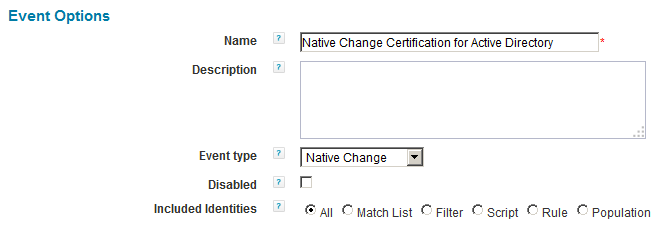
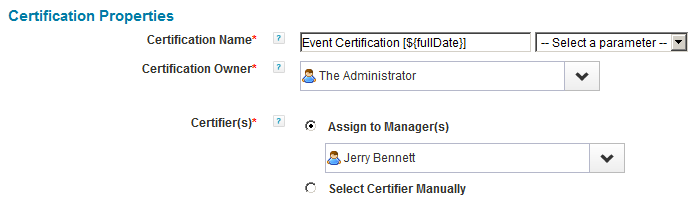
Under the Certification Properties a name template can be entered for generated certifications. Also enter an owner and configure who is to certify the identity when changes are detected. This can be the identity's manager, with a default certifier for identities that don't have a manager, or a manually selected identity or workgroup, like for example the security officer or an application owner.
Under the Certification Content, the included data can be selected, similar to any normal identity certification (manager, application owner, certification owner, etc.).
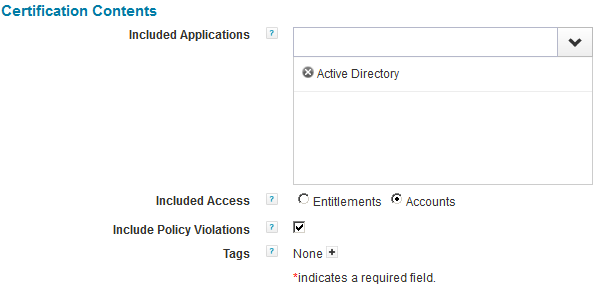
In this example a certification is triggered by changes on Active Directory. Apart from the default options, in the example above the option Included Access has also been set to Accounts. Unlike other certifications, on the second page (2. Lifecycle), the staging period cannot be enabled. This is logical, since changes need to be acted upon immediately. Other common options are available.
After reviewing all options, click the button Save Event to store the event.
For this event to be triggered, native change needs to be enabled on (in this case) Active Directory for all operations.
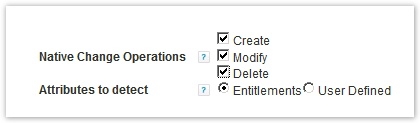
By default the attribute memberOf is marked as an entitlement. To also detect setting or changing the user's primary group, the attributes for the primary group must also be marked as an entitlement in the application schema.

User entitlement changes in the configured applications (Active Directory in this example) should now be detected and result in a certification. Let's see how this works. First, create a new account in Active Directory to see what happens.
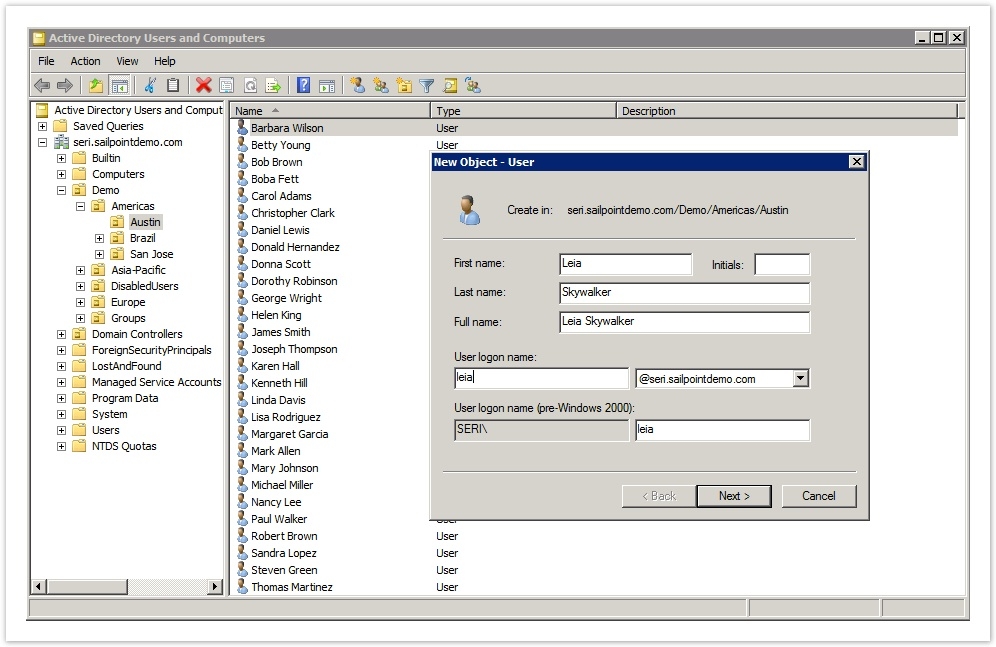
On aggregation this new account should be detected. The aggregation task result below shows that a new account is created:
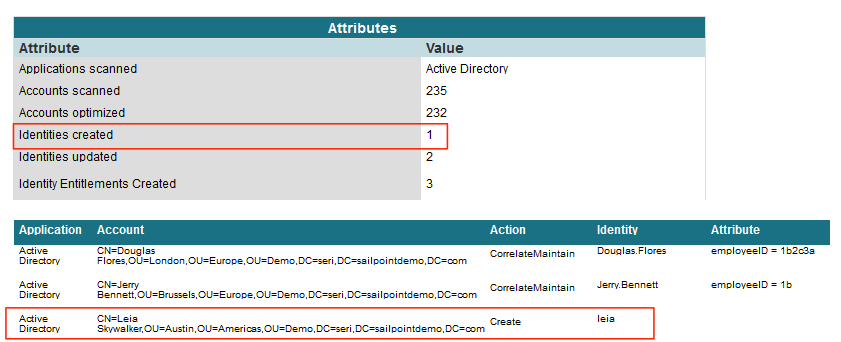
A quick look in the debug interface will show that a new identity named 'leia' is created and that this identity contains a "trigger snapshot":
<?xml version='1.0' encoding='UTF-8'?><!DOCTYPE Identity PUBLIC "sailpoint.dtd" "sailpoint.dtd"><Identity created="1418891881098" id="4028c61b4a5c5dc7014a5c8bea8a006c" lastRefresh="1418891881274" modified="1418891881275" name="leia"> <Attributes> <Map> <entry key="department"/> <entry key="displayName" value="leia"/> <entry key="employeeId"/> <entry key="employeeType"/> <entry key="jobTitle"/> <entry key="location"/> <entry key="phone"/> <entry key="region"/> <entry key="terminationDate"/> <entry key="triggerSnapshots"> <value> <Map> <entry key="NativeChange"> <value> <List> <NativeChangeDetection application="Active Directory" id="4028c61b4a5c5dc7014a5c8bea8b006d" lastRefresh="1418891881099" identity="CN=Leia Skywalker,OU=Austin,OU=Americas,OU=Demo,DC=seri,DC=sailpointdemo,DC=com" operation="Create" simpleIdentity="leia"> <Attributes> <Map> <entry key="accountFlags"> <value> <List> <String>Normal User Account</String> <String>Password Cannot Expire</String> </List> </value> </entry> <entry key="cn" value="Leia Skywalker"/> <entry key="displayName" value="Leia Skywalker"/> <entry key="distinguishedName" value="CN=Leia Skywalker,OU=Austin,OU=Americas,OU=Demo,DC=seri,DC=sailpointdemo,DC=com"/> <entry key="givenName" value="Leia"/> <entry key="inactive"> <value> <Boolean></Boolean> </value> </entry> <entry key="msNPAllowDialin" value="Not Set"/> <entry key="objectClass"> <value> <List> <String>top</String> <String>person</String> <String>organizationalPerson</String> <String>user</String> </List> </value> </entry> <entry key="objectSid" value="S-1-5-21-2954011510-4038636893-1982036514-17124"/> <entry key="primaryGroupID" value="513"/> <entry key="privileged"> <value> <Boolean></Boolean> </value> </entry> <entry key="sAMAccountName" value="leia"/> <entry key="service"> <value> <Boolean></Boolean> </value> </entry> <entry key="sn" value="Skywalker"/> <entry key="userAccountControl" value="66048"/> </Map> </Attributes> <Differences> <Difference attribute="primaryGroupID" newValue="513"/> </Differences> </NativeChangeDetection> </List> </value> </entry> </Map> </value> </entry> </Map> </Attributes> <Links> <Link created="1418891881099" displayName="leia" id="4028c61b4a5c5dc7014a5c8bea8b006d" key1="S-1-5-21-2954011510-4038636893-1982036514-17124" lastRefresh="1418891881099" modified="1418891881216" identity="CN=Leia Skywalker,OU=Austin,OU=Americas,OU=Demo,DC=seri,DC=sailpointdemo,DC=com" uuid="{66f73f89-05bf-4a86-bd15-dc806b4e823d}"> <ApplicationRef> <Reference class="sailpoint.object.Application" id="2c9182054711029601471102d614002d" name="Active Directory"/> </ApplicationRef> <Attributes> <Map> <entry key="accountFlags"> <value> <List> <String>Normal User Account</String> <String>Password Cannot Expire</String> </List> </value> </entry> <entry key="cn" value="Leia Skywalker"/> <entry key="displayName" value="Leia Skywalker"/> <entry key="distinguishedName" value="CN=Leia Skywalker,OU=Austin,OU=Americas,OU=Demo,DC=seri,DC=sailpointdemo,DC=com"/> <entry key="givenName" value="Leia"/> <entry key="inactive"> <value> <Boolean></Boolean> </value> </entry> <entry key="msNPAllowDialin" value="Not Set"/> <entry key="objectClass"> <value> <List> <String>top</String> <String>person</String> <String>organizationalPerson</String> <String>user</String> </List> </value> </entry> <entry key="objectSid" value="S-1-5-21-2954011510-4038636893-1982036514-17124"/> <entry key="primaryGroupID" value="513"/> <entry key="privileged"> <value> <Boolean></Boolean> </value> </entry> <entry key="sAMAccountName" value="leia"/> <entry key="service"> <value> <Boolean></Boolean> </value> </entry> <entry key="sn" value="Skywalker"/> <entry key="userAccountControl" value="66048"/> </Map> </Attributes> </Link> </Links></Identity>
Nothing, however, is found in the inbox or outbox on the dashboard. An identity refresh is needed to trigger the event. The refresh task needs the option Process Events enabled:

It may be useful to create a specialized refresh task to just process these event, especially on large environments.
After running the refresh task to process the events, the task result should show one or more events that have been processed.
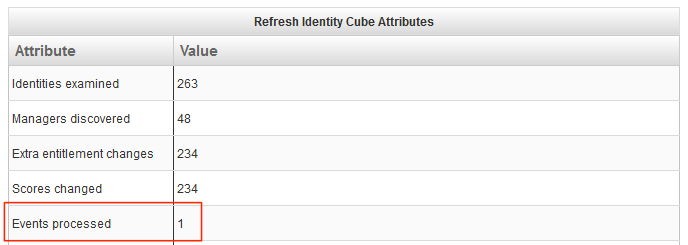
The creation of Leia's account has thus triggered a certification event. The certification is found under Monitor → Certifications. Due to the fact that "leia" does not have a manager, the certification is assigned to the security officer, Jerry Bennett.
![Event Certification [12_18_14 10_41_07 AM CET] - Mozilla Firefox.png](https://cdn.sanity.io/images/4vd6xhxw/community-prod/89e2c2d32ac2fce37477c61bd002c18ae9eb420f-1351x144.png?q=100&auto=format)
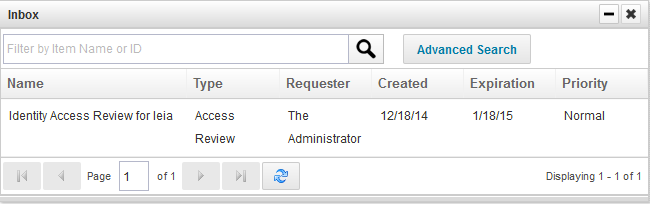
Jerry Bennett will thus receive a notification in his Inbox.
Jerry Bennett can now review and if necessary revoke the account.
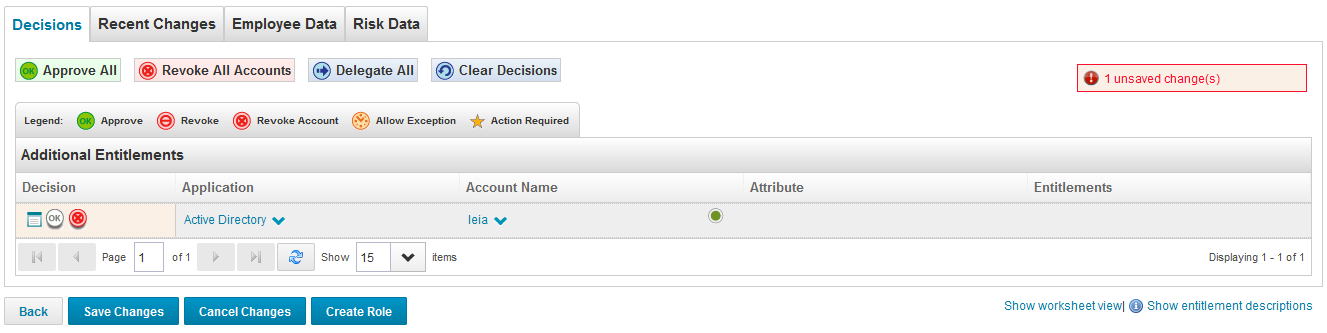
After saving and signing off the certification, the task Perform Maintenance needs to run in order for the changes to be processed. The task result of the Perform Maintenance task now shows that the actions have been performed. By default, this task runs every five minutes. If changes must be processed faster, the option "Process Revokes Immediately" must be enabled on the certification event.
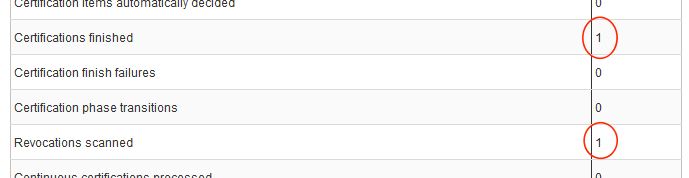
The rebel account "leia" is now removed from Active Directory.
LifeCycle Events
In order to process native changes we can set up life cycle events, instead of a certification. This requires the lifecycle manager (LCM) to be enabled and licensed.
Note that both lifecycle events and event certifications can be triggered for the same changes. This may be useful in some cases, if you like some things to be processed automatically and others to be reviewed manually. If this is not the case, the certification event configured above should be removed or disabled.
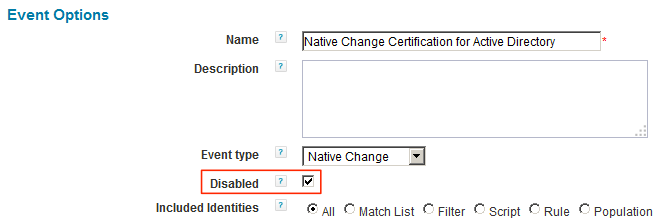
To configure lifecycle events, go to Define → Lifecycle Events. Here, a new configuration is created by clicking Add New Lifecycle Event. Apart from the name and an optional description, the Event type must be set to Native Change and a suitable business process must be selected, to be run when this event is triggered.
Out of the box, IdentityIQ comes with two business processes that can be used for native changes:
- Lifecycle Event - Email manager for all native changes
- Lifecycle Event - Manager Approval for all native changes
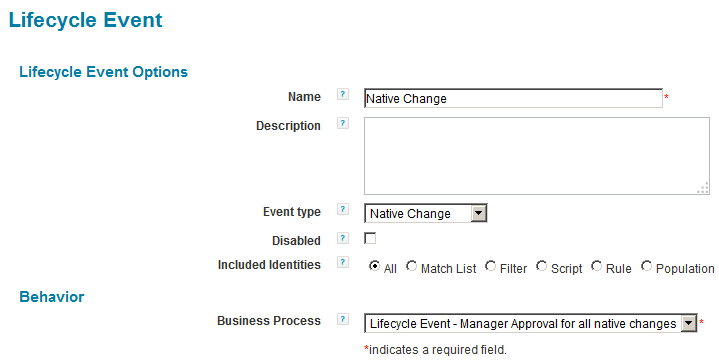
The Included Identities option is used to select the identities for which the native change detection is run. The selection is similar to the selection for policy violations in the advanced policies.
Email Manager
Continuing the example with Active Directory, let's have a look what the default business process "Lifecycle Event - Email manager for all native changes" can do on detected changes. The subject of change will now be Adam Kennedy, a Payroll Analyst, located in London. In Active Directory he is a member of the following groups:
- All_Users
- Domain Users
- InventryAnalysis
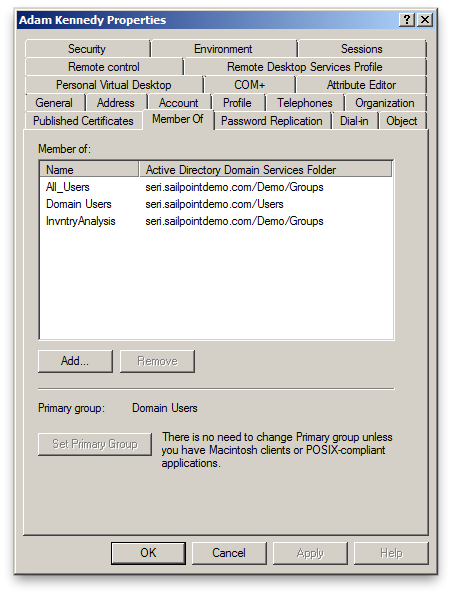
Changing Adam's group membership should be detected by native change detection. Active Directory has already been configured to detect group changes. The life cycle event is re-configured to use the out-of-the-box business process Lifecycle Event - Email manager for all native changes.
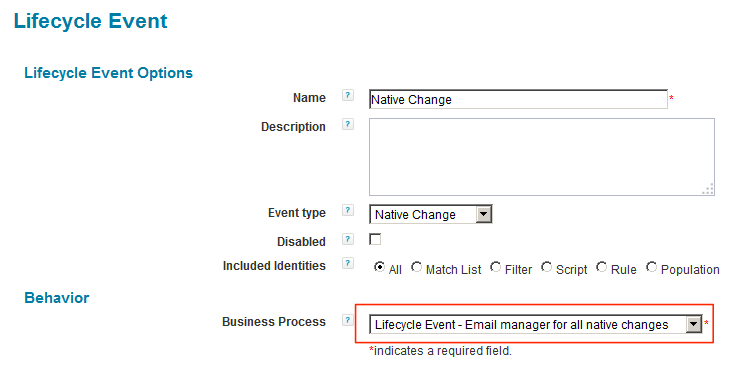
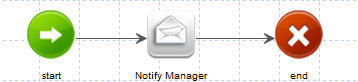
The selected business process is a relatively simple one with just three steps: Start, Notify Manager and End.
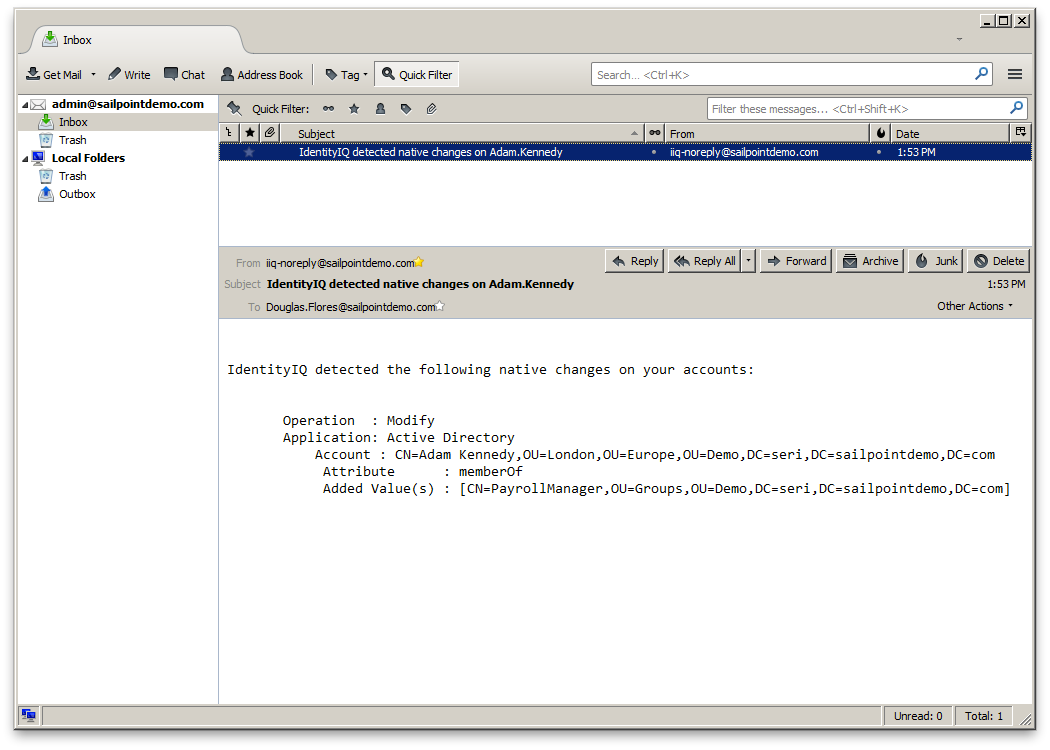
If Adam's group memberships in Active Directory change, an aggregation and refresh will trigger this business process. Adam's manager, Douglas Flores, now receives an email notification. As an example, Adam Kennedy is added to the group PayrollManager.
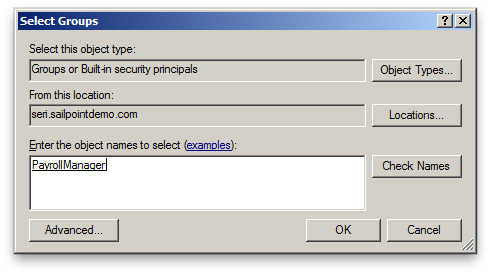
In Adam Kennedy's identity object, after aggregation, this is stored as a NativeChange within the triggerSnapshots attribute:
<entry key="NativeChange"> <value> <List> <NativeChangeDetection application="Active Directory" identity="CN=Adam Kennedy,OU=London,OU=Europe,OU=Demo,DC=seri,DC=sailpointdemo,DC=com" operation="Modify"> <Differences> <Difference attribute="memberOf" multi="true" newValue="[CN=All_Users,OU=Groups,OU=Demo,DC=seri,DC=sailpointdemo,DC=com,CN=PayrollManager,OU=Groups,OU=Demo,DC=seri,DC=sailpointdemo,DC=com,CN=InvntryAnalysis,OU=Groups,OU=Demo,DC=seri,DC=sailpointdemo,DC=com]" oldValue="[CN=All_Users,OU=Groups,OU=Demo,DC=seri,DC=sailpointdemo,DC=com,CN=InvntryAnalysis,OU=Groups,OU=Demo,DC=seri,DC=sailpointdemo,DC=com]"> <AddedValues> <String>CN=PayrollManager,OU=Groups,OU=Demo,DC=seri,DC=sailpointdemo,DC=com</String> </AddedValues> </Difference> </Differences> </NativeChangeDetection> </List> </value> </entry>
After refreshing Adam Kennedy's identity cube, Douglas Flores receives an email:
Email Accounts without a Manager
The default business process only works for accounts and identities with a manager. Sometimes an identity does not have a manager (yet). For example, the rebel account "leia" was uncorrelated and did not have a manager defined. From a security point of view, it is desirable to get a notification of illegally created accounts. This can easily be solved with a small modification of the out-of-the-box workflow. It is best to create a copy of the existing one.
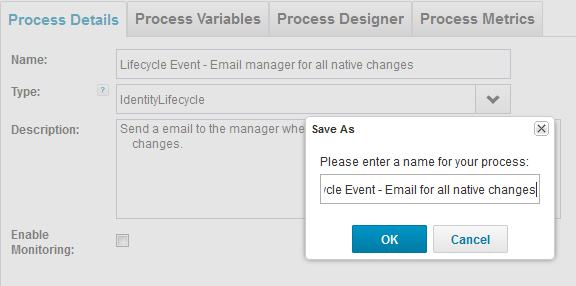
A copy of Lifecycle Event - Email manager for all native changes can be saved as Lifecycle Event - Email for all native changes. On the Process Designer tab, open the step Notify Manager and go to the Arguments tab. The argument to contains a small script to get the manager's email address. This script needs to be modified for identities that do not have a manager, or whose manager does not have an email address.
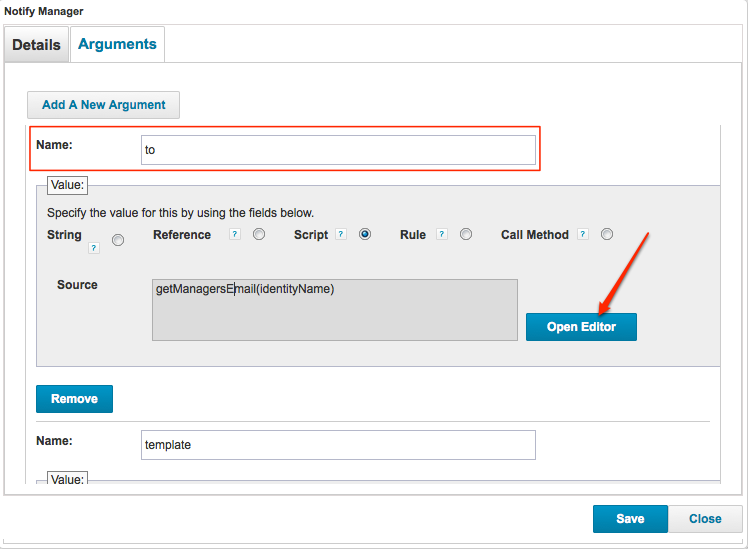
The script can be updated to use a fallback email address when no valid email address is found.
String email = getManagersEmail(identityName);if (email == void || email == null || email.length() == 0) { return "securityofficer@seri.sailpointdemo.com";}return email;
After saving the new business process, the life cycle event must be updated to use it instead of the out-of-the-box version.

Approval
The other out-of-the-box business process, Lifecycle Event - Manager Approval for all native changes, can be used to have a manager approve or reject any changes made on the native system without IdentityIQ's involvement. This business process has a fallback approver, which by default is set to spadmin. If the manager or fallback approver rejects the change, it can be reverted.
The business process builds a provisioning plan, based on the detected changes. Based on the plan, an approval set is generated and presented to the approver. If the changes in the plan are rejected, the business process will create a new provisioning plan to revert the rejected changes. The new plan is then handed over to the provisioning sub-process.
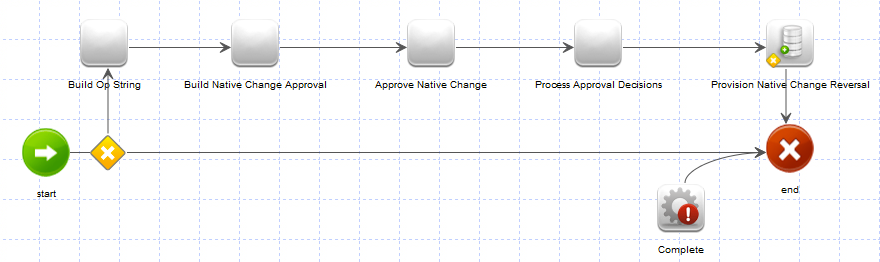
The life cycle event must be updated to use this workflow.

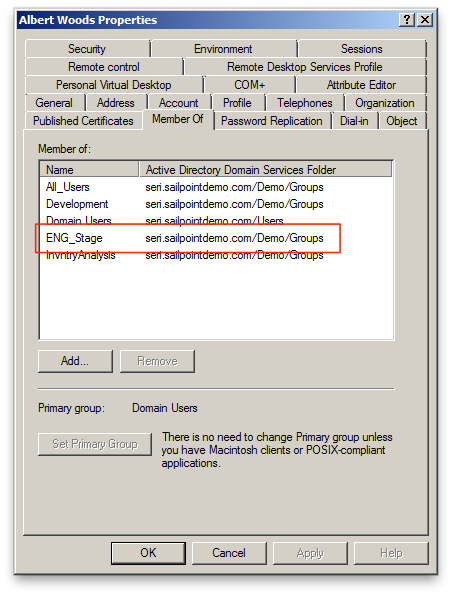
To demonstrate this feature, Albert Woods, an inventory analyst based in Brussels is used. His group membership of the Active Directory group ENG_Stage is removed.
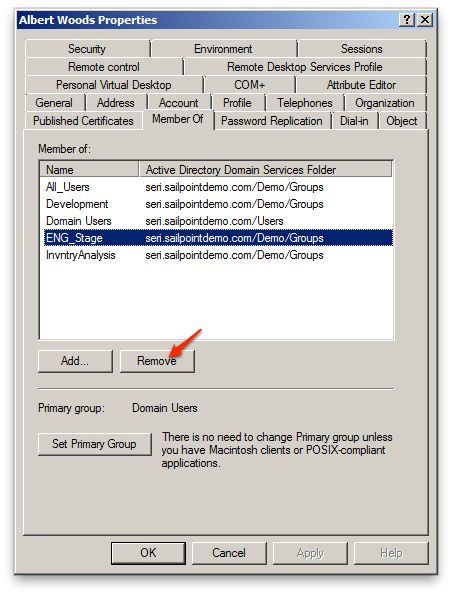
After aggregation, this removed group is found in the identity object's XML as a NativeChange, as part of the triggerSnapshots attribute.
<entry key="NativeChange"> <value> <List> <NativeChangeDetection application="Active Directory" identity="CN=Albert Woods,OU=Brussels,OU=Europe,OU=Demo,DC=seri,DC=sailpointdemo,DC=com" operation="Modify"> <Differences> <Difference attribute="memberOf" multi="true" newValue="[CN=All_Users,OU=Groups,OU=Demo,DC=seri,DC=sailpointdemo,DC=com,CN=InvntryAnalysis,OU=Groups,OU=Demo,DC=seri,DC=sailpointdemo,DC=com,CN=Development,OU=Groups,OU=Demo,DC=seri,DC=sailpointdemo,DC=com]" oldValue="[CN=All_Users,OU=Groups,OU=Demo,DC=seri,DC=sailpointdemo,DC=com,CN=InvntryAnalysis,OU=Groups,OU=Demo,DC=seri,DC=sailpointdemo,DC=com,CN=ENG_Stage,OU=Groups,OU=Demo,DC=seri,DC=sailpointdemo,DC=com,CN=Development,OU=Groups,OU=Demo,DC=seri,DC=sailpointdemo,DC=com]"> <RemovedValues> <String>CN=ENG_Stage,OU=Groups,OU=Demo,DC=seri,DC=sailpointdemo,DC=com</String> </RemovedValues> </Difference> </Differences> </NativeChangeDetection> </List> </value> </entry>
After refreshing the identity cube, Albert Woods' manager, Patrick Jenkins, receives a notification in his Inbox to review this change.
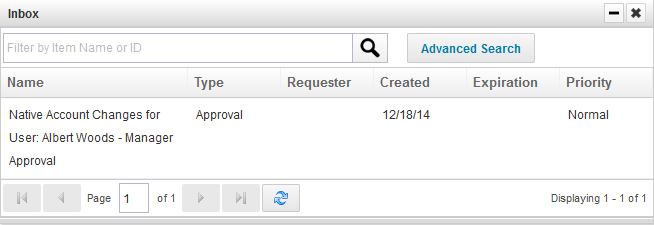
To re-instate Albert's group membership, Patrick can reject the change.

After completing the rejection (approval item), the decision is processed. And voilá, Albert's group membership is restored in Active Directory.
Account Deletion and Restoration
If an account gets deleted on the monitored system, the business process Lifecycle Event - Manager Approval for all native changes can even reinstate the entire account. The stored NativeChange in the triggerSnapshots attribute will contain a complete snapshot of the account link that is removed.
<entry key="NativeChange"> <value> <List> <NativeChangeDetection application="Active Directory" id="2c918205471109c1014711127a38050d" lastRefresh="1418889720727" identity="CN=Roger Diaz,OU=Brussels,OU=Europe,OU=Demo,DC=seri,DC=sailpointdemo,DC=com" operation="Delete" simpleIdentity="rdiaz"> <Attributes> <Map> <entry key="accountFlags"> <value> <List> <String>Normal User Account</String> </List> </value> </entry> <entry key="cn" value="Roger Diaz"/> <entry key="department" value="Information Technology"/> <entry key="displayName" value="Roger Diaz"/> <entry key="distinguishedName" value="CN=Roger Diaz,OU=Brussels,OU=Europe,OU=Demo,DC=seri,DC=sailpointdemo,DC=com"/> <entry key="employeeID" value="1b2a3b4b"/> <entry key="givenName" value="Roger"/> <entry key="inactive"> <value> <Boolean></Boolean> </value> </entry> <entry key="mail" value="Roger.Diaz@sailpointdemo.com"/> <entry key="manager" value="CN=Stephanie Coleman,OU=Brussels,OU=Europe,OU=Demo,DC=seri,DC=sailpointdemo,DC=com"/> <entry key="memberOf"> <value> <List> <String>CN=All_Users,OU=Groups,OU=Demo,DC=seri,DC=sailpointdemo,DC=com</String> <String>CN=Telecom,OU=Groups,OU=Demo,DC=seri,DC=sailpointdemo,DC=com</String> <String>CN=SysAdministration,OU=Groups,OU=Demo,DC=seri,DC=sailpointdemo,DC=com</String> <String>CN=Remote,OU=Groups,OU=Demo,DC=seri,DC=sailpointdemo,DC=com</String> </List> </value> </entry> <entry key="msNPAllowDialin" value="Not Set"/> <entry key="objectClass"> <value> <List> <String>top</String> <String>person</String> <String>organizationalPerson</String> <String>user</String> </List> </value> </entry> <entry key="objectSid" value="S-1-5-21-2954011510-4038636893-1982036514-16905"/> <entry key="primaryGroupID" value="513"/> <entry key="privileged"> <value> <Boolean>true</Boolean> </value> </entry> <entry key="sAMAccountName" value="rdiaz"/> <entry key="service"> <value> <Boolean></Boolean> </value> </entry> <entry key="sn" value="Diaz"/> <entry key="userAccountControl" value="512"/> </Map> </Attributes> <Differences> <Difference attribute="memberOf" multi="true" newValue="[CN=All_Users,OU=Groups,OU=Demo,DC=seri,DC=sailpointdemo,DC=com,CN=Telecom,OU=Groups,OU=Demo,DC=seri,DC=sailpointdemo,DC=com,CN=SysAdministration,OU=Groups,OU=Demo,DC=seri,DC=sailpointdemo,DC=com,CN=Remote,OU=Groups,OU=Demo,DC=seri,DC=sailpointdemo,DC=com]"> <AddedValues> <String>CN=All_Users,OU=Groups,OU=Demo,DC=seri,DC=sailpointdemo,DC=com</String> <String>CN=Telecom,OU=Groups,OU=Demo,DC=seri,DC=sailpointdemo,DC=com</String> <String>CN=SysAdministration,OU=Groups,OU=Demo,DC=seri,DC=sailpointdemo,DC=com</String> <String>CN=Remote,OU=Groups,OU=Demo,DC=seri,DC=sailpointdemo,DC=com</String> </AddedValues> </Difference> <Difference attribute="primaryGroupID" newValue="513"/> </Differences> </NativeChangeDetection> </List> </value> </entry>
After the identity refresh, the manager of Roger Diaz, whose account has been deleted from Active Directory, will get a notification to review the account deletion.
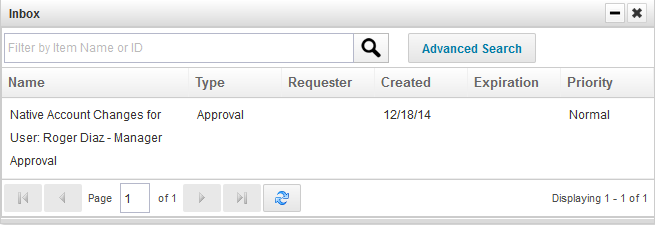
After rejection of the native account changes, Roger Diaz's account is re-created in Active Directory:

Automatic Response
(A copy of) the out-of-the-box business process Lifecycle Event - Manager Approval for all native changes can be modified to automatically respond to native changes. Instead of requiring approval, the workflow could be modified to automatically reject and revert all changes, by iterating over the approval set and rejecting every change.
Remarks
Native change detection is a powerful mechanism to respond to changes in connected applications made outside of IdentityIQ's control. It is however important to keep a few things in mind:
- Native change detection is activated after changes have been processed within IdentityIQ. Changes detected during aggregation may have already had effect on identity attributes, role membership and possibly even other applications, before the change can be responded to, properly.
- Native change detection should not be used on applications where changes, not initiated by IdentityIQ, can be expected. This is especially the case for authoritative applications. Sometimes only specific attribute changes should be monitored to prevent an overload of events.
- Detected changes should be processed as soon as possible, by running a generic or specialized refresh task. The reason is not only that the changes is responded too soon, but also to prevent that detected changes pile up. As seen above, the triggerSnapshot attribute can become rather big, even for a single change. Moreover no order is maintained, possibly resulting in overlapping changes in need of processing.
- Native change detection works best with IdentityIQ 6.3 or above. In previous versions, not all types of changes were supported completely.
Debugging and Maintenance
As with most debugging tasks within IdentityIQ, it is very useful to set up logging properly. Examples of classes to log can be found within the log4j2.properties file provided with the product. Specifically focus on the aggregation and refresh tasks while debugging. When using a customized business processes, also add logging statements to custom BeanShell code and enable logging and/or monitoring for the business processes.
Native change detection requires configuration changes to be made in several places within IdentityIQ. If changes are not detected or processed as expected, check the following:
- Are you running IdentityIQ 6.3 or above? If not, please upgrade for full support.
- Is native change detection enabled on the application?
- Have you configured the right attributes? If you have enabled detection of entitlements, are all relevant attributes marked as entitlements in the application schema? If you have selected change detection on attributes, are all relevant attributes listed (one per line, case sensitive)?
- Is the refresh task configured to process events?
- For certifications:
- Is the certification event enabled?
- Are the relevant applications listed for certification?
- Is the identity selector configured correctly to handle the identity?
- Have you configured the correct certifier(s) and fall back certifier?
- Has the identity or some of the entitlements been excluded by an exclusion rule?
- For lifecycle events:
- Is the lifecycle event enabled?
- Is the identity selector configured correctly to handle the identity?
- Has the correct workflow been selected?
If native change detection is enabled in applications, but the events have not been processed for some time, the events will pile up, resulting in very large XML objects for identities in the IdentityIQ database. These large objects will slow down processing of identities and may also have unexpected results if the events suddenly do get processed. To handle such situations, use the two rules attached to this article, which have been provided by Adam Hampton. Both rules can be run from the debug interface or the console.
- Rule-StandAlone-Cleanup-Native-Change-Apps.xml: the rule contained in this file will detect for which applications native change detection has been enabled. The script can be configured to turn off native change detection, or the feature can be turned off manually.
- Rule-StandAlone-Cleanup-Native-Change-Detections.xml: this rule will iterate over all identities and clean the triggerSnapshot attribute.
Using these rules will provide a fresh start. Make sure to enable and schedule the option to process events in the identity refresh task(s).
Downloads
- Rule-StandAlone-Cleanup-Native-Change-Detections.xml.zip
- Rule-StandAlone-Cleanup-Native-Change-Apps.xml.zip