
- Products & services Products & services
- Resources ResourcesCustomer resources
- Customer resources
- Customer support Find more information about engaging support and get help
- Services guide Find more information about working with Services teams
- Free resources Leverage our free tools and trainings
- Modernize to Identity Security Cloud Transition to the cloud for advanced capabilities and a future-ready security posture
Learning- Learning
- Identity University Get technical training to ensure a successful implementation
- SailPoint professional certifications & credentials Advance your career or validate your identity security knowledge
- SailPoint recertification program Get recertified by demonstrating ongoing learning
- Training onboarding guide Make of the most of training with our step-by-step guide
- Training FAQs Find answers to common training questions
- Community Community
- Compass
- :
- Discuss
- :
- Community Wiki
- :
- IdentityIQ Wiki
- :
- How to set accountexpires value on Active Directory
How to set accountexpires value on Active Directory
How to set accountexpires value on Active Directory
Symptoms
Many times IIQ developer facing an issue to set accountexpires active directory application attribute value via beanshell code.
Please find below solution for setting accountexpires, pwdLastSet,accountExpires, LastLogon, LastLogonTimestamp, and LastPwdSet value using beanshell code.
Diagnosis
The expected timestamp required for the accountexpires AD attribute is the 18-digit Active Directory timestamps, also named 'Windows NT time format', 'Win32 FILETIME or SYSTEMTIME' or NTFS file time. These are used in Microsoft Active Directory for pwdLastSet, accountExpires, LastLogon, LastLogonTimestamp, and LastPwdSet. The timestamp is the number of 100-nanosecond intervals (1 nanosecond = one billionth of a second) since Jan 1, 1601 UTC.
Solution
Please find below solution to calculate pwdLastSet, accountExpires, LastLogon, LastLogonTimestamp, and LastPwdSet from String value.
import java.time.LocalDate;
import java.time.Month;
import java.util.Calendar;
import java.util.TimeZone;

/**
	 * This method will convert date into the 18-digit Active Directory timestamps,
	 *  also named 'Windows NT time format', 'Win32 FILETIME or SYSTEMTIME' or NTFS file time
	 * @param terminationDate
	 * @return ldapTimeStamp
	 */
	public String getAcccountExpiresValue(String terminationDate) {
		// "2020-07-18" - example date
		String ldapTimeStamp = "never";

		if (null != terminationDate && !"never".equalsIgnoreCase(terminationDate)) {

			LocalDate currentDate = LocalDate.parse(terminationDate);
			// Get day from date
			int day = currentDate.getDayOfMonth();
			// Get month from date
			Month month = currentDate.getMonth();
			// Get year from date
			int year = currentDate.getYear();
			// Print the day, month, and year
			System.out.println("Day: " + day);
			System.out.println("Month: " + month.getValue());
			System.out.println("Year: " + year);
			Calendar c = Calendar.getInstance(TimeZone.getTimeZone("UTC"));
			c.clear();
			c.set(year, month.getValue(), day); // your date
			long time1 = c.getTimeInMillis();
			c.set(1601, 1, 1);
			long time2 = c.getTimeInMillis();
			long ldap = (time1 - time2) * 10000;
			System.out.println(ldap);
			ldapTimeStamp = Long.toString(ldap);

		}
		return ldapTimeStamp;
	}
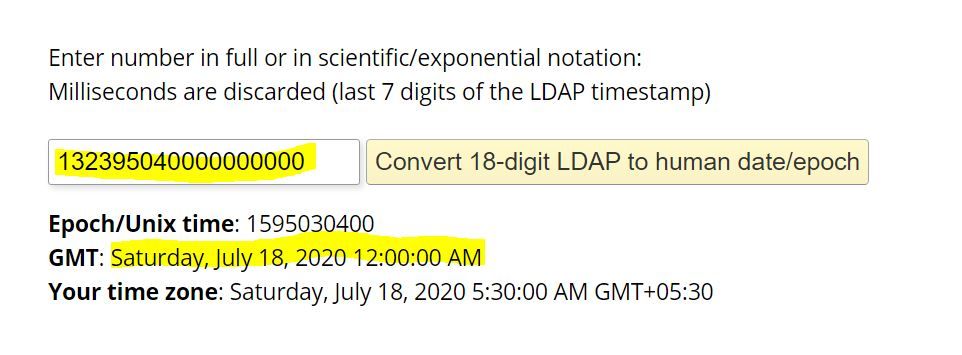
You can validate the ldaptimestamp or the return String is correct or not follow below steps -
- Run the code.
- Get the string value.
- Open the link in browser - https://www.epochconverter.com/ldap
- Copy the output of string & paste it on converter.
- And press the button to convert.
- You will see the output as Date format on webpage.
- Please check the below image.
Please let me know if any one have any questions!!
Thanks,
IAM PDU
