Knowledge Article
How to Customize Identity Details for Certifications via REST API
Author
christina_gagnon
SailPoint
In order for reviewers to make the best informed decisions in certification reviews, it is helpful for the reviewers to be able to see specific information about the identities they are reviewing. Email, lifecycle state, and manager are shown by default, but it is often helpful to show other attributes such as department, title, region, etc. In this article, we will show how to configure up to five custom identity attributes on the identity details panel in certification reviews to assist the reviewer in the decision making process.
This configuration cannot be made in the Identity Security Cloud user interface but can be done via REST API. You can use an API client like Postman or cURL for all API calls utilized in this process. Review this guide for information on OAuth 2.0 authentication for Identity Security Cloud REST API calls.
Before we can make a configuration change to the public identity config, we need to get the current configuration. This is achieved by using the Get Public Identity Config API endpoint.
Run the following API call where {tenant} is your tenant name:
GET https://{tenant}.api.identitynow.com/v2026/public-identities-config
If this has never been configured before, you should get a response like this:
{
    "attributes": [],
    "modified": null,
    "modifiedBy": null
}
If it has already been configured, your response will look like this:
{
    "attributes": [
        {
            "key": "department",
            "name": "Department"
        },
        {
            "key": "title",
            "name": "title"
        }
    ],
    "modified": "2024-09-02T23:22:07.400Z",
    "modifiedBy": {
        "type": "IDENTITY",
        "id": "2c9180867624ce5b01762f370ea63c3d",
        "name": "SailPoint Trainee"
    }
}
You can add up to five custom attributes. If you already have fewer than five configured, you can add more. If you already have five configured but you want to add a new one, you have to decide which one to replace.
To update the configuration, you will use the Update Public Identity Config API endpoint with a JSON response body containing the custom attributes. You must use the exact technical attribute name of the identity attributes, but you can configure a different display name.
Run the following API call where {tenant} is your tenant name:
PUT https://{tenant}.api.identitynow.com/v2026/public-identities-config
with a JSON request body as shown below including an array of the attributes you want to add. "key" is the technical identity attribute name, and "name" is the display name you want to appear in the certification review:
{
    "attributes": [
        {
            "key": "department",
            "name": "Department"
        },
        {
            "key": "title",
            "name": "Job Title"
        },
        {
            "key": "country",
            "name": "Country Code"
        },
        {
            "key": "region",
            "name": "Region"
        }
    ]
}
If your call and request body were correctly constructed, you should expect a successful response of 200 and a response body that looks like this:
{
    "attributes": [
        {
            "key": "department",
            "name": "Department"
        },
        {
            "key": "title",
            "name": "Job Title"
        },
        {
            "key": "country",
            "name": "Country Code"
        },
        {
            "key": "region",
            "name": "Region"
        }
    ],
    "modified": "2026-04-23T23:44:37.414Z",
    "modifiedBy": {
        "type": "IDENTITY",
        "id": "2c9180867624ce5b01762f370ea63c3d",
        "name": "SailPoint Trainee"
    }
}
After configuring the public identity config as above, hovering over the name of an identity in a certification review shows the custom attributes:
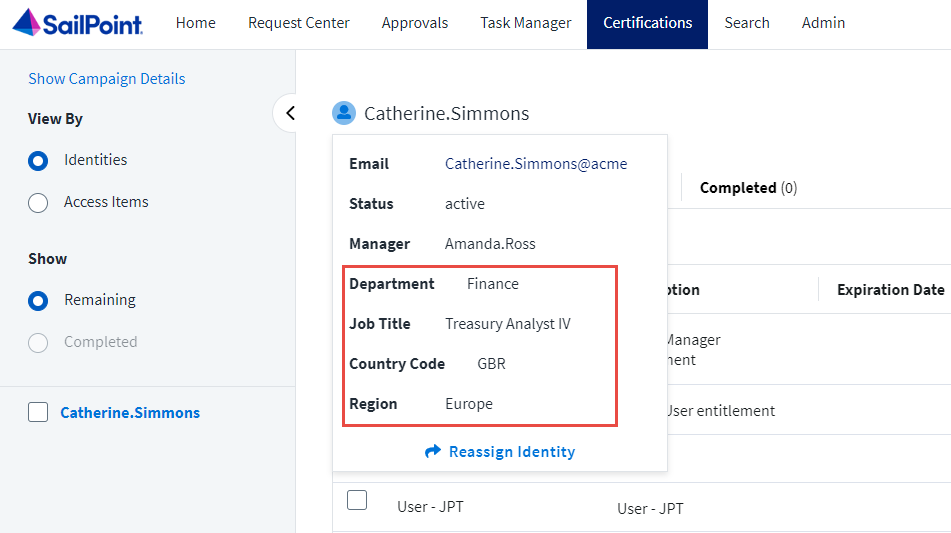
public-identity-config-details.png