
- Products & services Products & services
- Resources ResourcesCustomer resources
- Customer resources
- Customer support Find more information about engaging support and get help
- Services guide Find more information about working with Services teams
- Free resources Leverage our free tools and trainings
- Modernize to Identity Security Cloud Transition to the cloud for advanced capabilities and a future-ready security posture
Learning- Learning
- Identity University Get technical training to ensure a successful implementation
- SailPoint professional certifications & credentials Advance your career or validate your identity security knowledge
- SailPoint recertification program Get recertified by demonstrating ongoing learning
- Training onboarding guide Make of the most of training with our step-by-step guide
- Training FAQs Find answers to common training questions
- Community Community
Turn on suggestions
Auto-suggest helps you quickly narrow down your search results by suggesting possible matches as you type.
- Compass
- :
- Discuss
- :
- Community Wiki
- :
- Identity Security Cloud Wiki
- :
- IdentityNow Rule Guide - After Modify Rule
IdentityNow Rule Guide - After Modify Rule
IdentityNow Rule Guide - After Modify Rule
Purpose
This rule is used to execute PowerShell commands on the IQService component after a source account is modified, enabled, disabled, or unlocked.
Execution
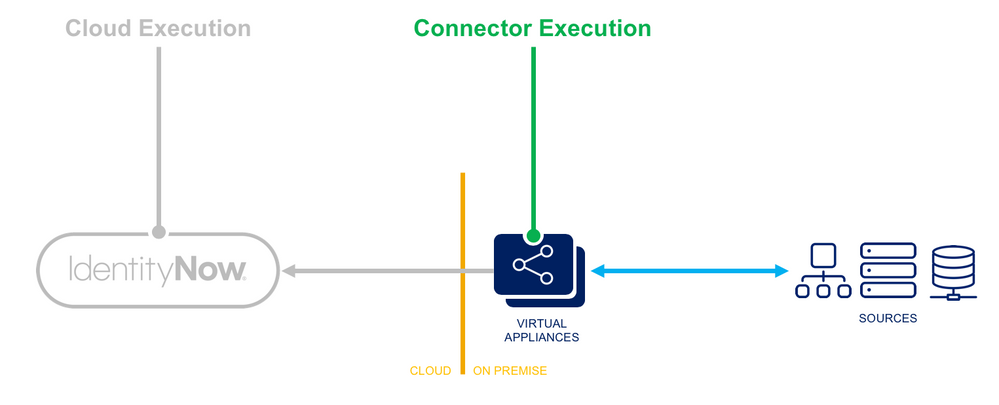
- Connector Execution - This rule executes within the Virtual Appliance and may offer special abilities to perform connector-related functions, and may offer managed connections to sources.
- Logging - Logging statements are viewable within the ccg.log on the Virtual Appliance and by SailPoint personnel.
Input
| Argument | Type | Purpose |
|---|---|---|
|
Application
|
System.Collections.Hashtable
|
Map of the application configuration.
|
|
Request
|
SailPoint.Utils.objects.AccountRequest
|
A reference to the account request provisioning instructions.
|
|
Result
|
SailPoint.Utils.objects.ServiceResult
|
A reference to the provisioning result that can be manipulated if needed.
|
Architecture Best Practices
For supportability, it is recommended that the After Creation rule be written with only the most basic logic necessary to trigger a PowerShell script, and shift the bulk of the downstream events and/or modifications to the PowerShell script itself. This script would reside on the client's servers and could therefore be easily maintained or modified by the client as needed. It also allows the client to implement changes to the PowerShell scripted functionality without requiring code review by SailPoint, as the code runs outside of the IdentityNow platform.
Rule Template
<?xml version='1.0' encoding='UTF-8'?>
<!DOCTYPE Rule PUBLIC "sailpoint.dtd" "sailpoint.dtd">
	<Rule language="beanshell" name="SampleSource AfterModify" type="ConnectorAfterModify">
		<Attributes>
			<Map>
				<entry key="ObjectOrientedScript" value="true" />
				<entry key="disabled" value="false" />
				<entry key="extension" value=".ps1" />
				<entry key="program" value="powershell.exe" />
				<entry key="timeout" value="300" />
			</Map>
		</Attributes>
		<Description>
			This is an IQService afterScript - On a successful provisioning event, this after script should be used as the starting point for
            initiating a separate PowerShell script residing on the client's IQService server.

            Configuration tasks include:
             - Set a proper location for the $logFile variable
             - Set the proper script location and name for the $command variable
             - Set the $enableDebug flag to $true or $false to toggle debug mode
		</Description>
		<Source>
<![CDATA[

$logDate = Get-Date -UFormat "%Y%m%d"
$logFile = "c:\SailPoint\Scripts\Logs\ConnectorAfterModify_$logDate.log"
$command = "c:\SailPoint\Scripts\SampleSource-AfterModify.ps1"
$enableDebug = $false

#====================-------Helper functions-------====================
function LogToFile([String] $info) {
    $info | Out-File $logFile -Append
}

#====================-------Get the request object-------====================
Try{
    if($enableDebug) {
        LogToFile("Entering SailPoint rule")
    }

    Add-type -path utils.dll;
	$sReader = New-Object System.IO.StringReader([System.String]$env:Request);
	$xmlReader = [System.xml.XmlTextReader]([sailpoint.utils.xml.XmlUtil]::getReader($sReader));
	$requestObject = New-Object Sailpoint.Utils.objects.AccountRequest($xmlReader);
    $requestAsString = $env:Request

    if($enableDebug) {
        LogToFile("Request as XML object is: $requestAsString")
    }

    #Call the client script
    $command = -join ($command, " -requestString '$requestAsString'")
    Invoke-Expression $command

}Catch{
	$ErrorMessage = $_.Exception.Message
  	$ErrorItem = $_.Exception.ItemName
  	LogToFile("Error: Item = $ErrorItem -> Message = $ErrorMessage")
}

if($enableDebug) {
    LogToFile("Exiting SailPoint rule")
}

]]>
		</Source>
	</Rule>
PowerShell Script Template
###############################################################################################################################
# SETUP
# Instructions (for each IQService host that could run the script):
#   - Update the path to Utils.dll (can be an unqualified path like "Utils.dll" since script is copied to IQService folder for execution)
#   - Make sure Utils.dll is in the specified folder on each IQService host
#   - Be sure the account that runs IQService has appropriate permissions to create directories and set permissions on them
#   - Be sure to set the "run as" account for the IQService in Windows Service to the above-specified account instead of just the "logged on" user
#   - Set a proper location for the $logFile variable
#   - Set the $enableDebug flag to $true or $false to toggle debug mode
###############################################################################################################################

param (
	[Parameter(Mandatory=$true)][System.String]$requestString
)

#include SailPoint library
Add-Type -Path "c:\SailPoint\IQService\Utils.dll";

#import AD cmdlets
Import-Module activeDirectory

#log file info
$logDate = Get-Date -UFormat "%Y%m%d"
$logFile = "c:\SailPoint\Scripts\Logs\SampleSourceAfterModifyScript_$logDate.log"
$enableDebug = $false

###############################################################################################################################
# HELPER FUNCTIONS
###############################################################################################################################

#save logging files to a separate txt file
function LogToFile([String] $info) {
    $info | Out-File $logFile -Append
}

#if we have a non-null account request, get our value; otherwise return nothing
function Get-AttributeValueFromAccountRequest([sailpoint.Utils.objects.AccountRequest] $request, [String] $targetAttribute) {
    $value = $null;

    if ($request) {
        foreach ($attrib in $request.AttributeRequests) {
            if ($attrib.Name -eq $targetAttribute) {
                $value = $attrib.Value;
                break;
            }
        }
    } else {
        LogToFile("Account request object was null");
    }
    return $value;
}


###############################################################################################################################
# BODY
###############################################################################################################################
if($enableDebug) {
    LogToFile("Entering afterScript")
}

try {

    ##########################
    # Begin SailPoint protected code -- do not modify this code block
    #
        $sReader = New-Object System.IO.StringReader([System.String]$requestString);
        $xmlReader = [System.xml.XmlTextReader]([sailpoint.utils.xml.XmlUtil]::getReader($sReader));
        $requestObject = New-Object Sailpoint.Utils.objects.AccountRequest($xmlReader);

        #debug line for testing
        if($enableDebug) {
            LogToFile("Request object contents:")
            LogToFile($requestObject | Out-String)
        }
    #
    # End SailPoint protected code
    ##########################


    ##########################
    # Begin Client-provided code

    #get the necessary info we need from the accountRequest object
    #as an example: $nativeIdentity = $requestObject.nativeIdentity

    #do whatever work needs to be done here

    #
    # End Client-provided code
}
catch {
    $ErrorMessage = $_.Exception.Message
  	$ErrorItem = $_.Exception.ItemName
  	LogToFile("Error: Item = $ErrorItem -> Message = $ErrorMessage")
}

if($enableDebug) {
    LogToFile("Exiting afterScript")
}
Version history




© 2026 SailPoint Technologies, Inc. All Rights Reserved.