Knowledge Article
Migrating Between Authoritative Sources
Author
hari_patel
SailPoint
Overview
For a variety reasons, customers sometimes need to switch the authoritative (HR) source that underpins the identity profiles within their tenant. During implementation, this can be due to the true HR source not being available on the same project timeline as the customer’s Identity Security Cloud project, and they want to get started with a “dummy” representation of the data. Or, after going live with an HR system, a customer's HR team may choose to replace their previous system with another one.
Whatever the reason, switching authoritative sources can have a significant impact on the customer’s Identity Security Cloud tenant and data. This guide highlights some things to consider when planning a migration of authoritative sources and provides some best practices for how to accomplish it successfully.
Planning
The most critical aspect of planning a migration is establishing correlative data between the existing HR system and the new one. Simply put, there must be a unique identifying attribute on users' account records which can indicate that Worker A in the existing or old HR system is the same person in the new HR system.
Most often, organizations correlate with data like an employee number or company ID that can be replicated across both HR systems. As long as it is a unique value that only one person in the organization can hold at any given time and it is consistently captured in both sources, it can be used. Note that we do not recommend using personally identifiable information such as Social Security numbers or other forms of government ID. The chosen data will be read into Identity Security Cloud, so customers should be aware of which data elements can be shared with SailPoint per their organization’s data security policies.
If customers have criteria-based roles in place that automatically assign or revoke access based on job information, we strongly encourage that Identity Security Cloud admins undertake a data comparison exercise to ensure that the information referenced in the role membership criteria remains consistent between both HR sources. If there are variations in the data, they should be captured ahead of time and the impacted roles adjusted to address those differences. This data comparison and impact analysis should also be conducted for attribute sync attributes, if applicable.
It is also a best practice to schedule the migration for a day and time that impacts the least number of users within your organization. If all goes according to plan, the migration is seamless to end users. However, in case of any issues, Identity Security Cloud Admins should ensure that proper rollback plans are in place and sufficient time is available to execute those rollbacks if needed.
A successful migration also includes data validation, both in the new HR system and in Identity Security Cloud. Consider adding process steps to verify that users' attribute data in the old and new HR systems match. After the new HR authoritative source is onboarded to Identity Security Cloud, verify that users' identity data mapped and correlated properly and that the attribute data is correct.
Lastly, it is always a good idea to engage with SailPoint’s Expert Services organization for migration planning and/or support if there is any part of the process which is unclear.
Migration Steps
- Go-live with the new HR system.
- As a best practice, it is NOT recommended to go-live with the new HR system and the new authoritative source in Identity Security Cloud on the same day. If you can, monitor account data in the new HR system at least for a few days or a week to ensure accuracy.
- While you are verifying data accuracy in the new HR system, it is also recommended to pause orchestrations. This prevents unnecessary automations against inaccurate or incorrect data.
- Onboard the new HR source to Identity Security Cloud according to these steps.
- As with any new source, ensure that you have proper connectivity to the new HR system. It is a good idea to review any out-of-the-box schemas on the new connector to make sure all required attributes are present and/or mapped.
- Whether using a direct connection or a delimited file source, allowing several days' worth of regular aggregations to run lets you confirm that connectivity and orchestration operations are reliable.
- Be sure to configure the proper manager correlation(s) for the new HR source.
- Correlate accounts in the new HR source to existing identities.
- For both the existing HR source and the new one, set up correlation to the identity attribute that your planning phase identified as correlative data. For example, if employee number is going to be the same in both sources and it is currently mapped to the Employee Number identity attribute in the existing identity profile, then the configuration below accomplishes the proper correlation:
- For both the existing HR source and the new one, set up correlation to the identity attribute that your planning phase identified as correlative data. For example, if employee number is going to be the same in both sources and it is currently mapped to the Employee Number identity attribute in the existing identity profile, then the configuration below accomplishes the proper correlation:
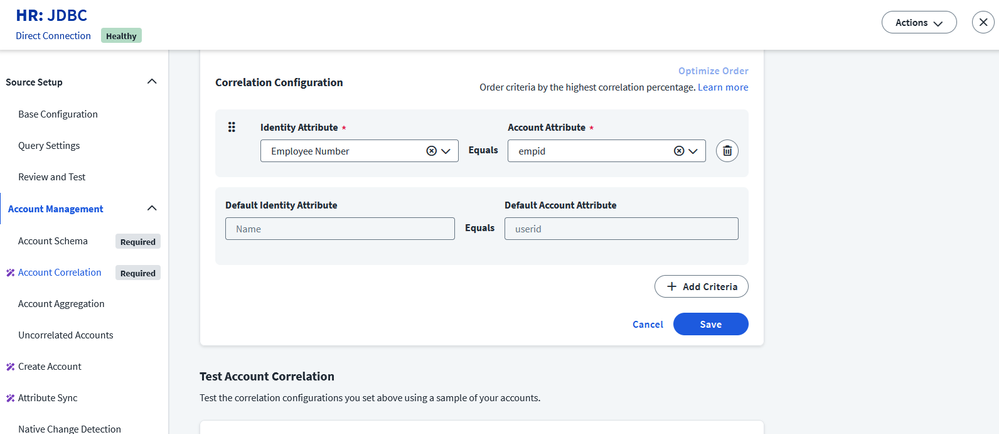
- MigratingAuthSources-NewCorrelationImage.png
- Because the new HR source is not authoritative yet, looking at the uncorrelated accounts report in the new source can help identify any problem accounts.
- Create a new identity profile based on the new HR source. At first, the new identity is automatically created with a lower identity profile priority. Before switching priorities, make sure that the appropriate identity profile values are mapped.
- Navigate to the profile’s Mappings tab and mimic the same mappings from the old HR source's identity profile. In the Source dropdown on each attribute, select the existing HR source then select the existing HR source attribute and any transforms which are configured for it.
- Apply changes and ensure that the identity count for the old and new identity profiles is the same.
- Verify that users' identity attributes still reflect the old / existing HR source.
- Change the priority of the new identity profile to take precedence over the old identity profile by following the steps documented here.
- At this point, the identities' attributes still reflect the existing HR data, so changes to identities are not perceived yet.
- Verify that identities have migrated from the old to the new identity profiles.
- Easily check by looking at the identity counts for each profile from the Identity Profiles page. You can also leverage Search, as well as spot-checking individual identities.
- If role change needs were identified during the planning stage, now is a good time to make those changes.
- Add an “OR” clause to each updated role so that an identity with either the job data associated with the previous HR system or with the new HR system will qualify for role membership. This is critical for the next step, as it ensures that any data mismatches between systems do not remove users from roles that they should still have.
- Start introducing updated attribute changes on the new identity profile. For a subset of attributes, update the new identity profile's Mappings > Source dropdown to the new HR source and its related attribute.
- Best practice is using firstValid transforms on these attributes. They first look for data within the new HR system, but will return data from the old HR system if it is not found. Roll these out in a slow, controlled manner.
- Update the more innocuous attributes first before attempting to update those which drive access. Attributes such as Lifecycle State, Job Title, Department, etc., are often inputs into role membership criteria, so those should be updated after the migration of less critical attributes are confirmed to be working properly.
- If the new identities are not matched to the old identities, they might still be referenced in several areas such as Governance Groups, Source Owner, App Owner, and Access Profile Owner. These references will point to the old identities and will need to be reconfigured to the new identities.
- As a final cleanup item after all identities have been successfully migrated to the new HR source’s identity profile, delete the previous profile from the system. At your organization's discretion, the previous HR source may also be deleted from the tenant.