
- Products & services Products & services
- Resources ResourcesCustomer resources
- Customer resources
- Customer support Find more information about engaging support and get help
- Services guide Find more information about working with Services teams
- Free resources Leverage our free tools and trainings
- Modernize to Identity Security Cloud Transition to the cloud for advanced capabilities and a future-ready security posture
Learning- Learning
- Identity University Get technical training to ensure a successful implementation
- SailPoint professional certifications & credentials Advance your career or validate your identity security knowledge
- SailPoint recertification program Get recertified by demonstrating ongoing learning
- Training onboarding guide Make of the most of training with our step-by-step guide
- Training FAQs Find answers to common training questions
- Community Community
- Compass
- :
- Discuss
- :
- Community Wiki
- :
- IdentityIQ Wiki
- :
- Extend SSB (Standard Service Build) to Containerize IdentityIQ
Extend SSB (Standard Service Build) to Containerize IdentityIQ
Extend SSB (Standard Service Build) to Containerize IdentityIQ
- Background
- Summary
- Build IdentityIQ docker Image
- Deploy IdentityIQ to Docker Container Instance
- Deploy IdentityIQ to Kubernetes
- References
Background
Containerization is becoming extremely popular now days due to high adoption of cloud technologies across all industries. Many customers even have such IT strategic policy which dictates that all new applications must be running in a containerized cloud environment. IdentityIQ doesn't natively support container but it can be running in a container with some extra configuration. This document describe the solution which allows you to containerize the IdentityIQ application without losing the best practices (such as SSB a.k.a Standard Service Build) that have been widely used in many projects.
Summary
The solution is built on top of SSB (Standard Service Build) v7.0.1. It relies on SSB to perform the build the IdentityIQ war file. The war file is then used to build a Docker container image. The generated Docker image can then be deployed to a Kubernetes cluster or Docker container instance.. The containerized IdentityIQ runs in Tomcat 9.0.72 and JDK 11.
The solution includes 2 parts:
- Build IdentityIQ docker image
- Deploy IdentityIQ docker image to Kubernetes cluster
Build IdentityIQ docker Image
Refer to the following github repository for more details about how to build a docker image for IdentityIQ
https://github.com/renliangfeng/iiq-container
Deploy IdentityIQ to Docker Container Instance
To run IdentityIQ in a Docker Container instance is simply to execute the following command after the docker image is built. Before that, you need to prepare the iiq.properties file and save it in your preferred location, then update the command with the right path. Most likely, you may want to override log4j2.properties with your ownn version. You can just simply add an additional parameter. Lastly, change "iiq-image" to name of docker image you've built.
docker run -it -v /Users/bruce.ren/Desktop/log/sp-log/:/usr/local/tomcat/logs -v /Users/bruce.ren/Desktop/iiq-properties/sandbox/iiq.properties/:/usr/local/tomcat/webapps/identityiq/WEB-INF/classes/iiq.properties --name my-iiq-container -d -p 8080:8080 iiq-imageDeploy IdentityIQ to Kubernetes
Docker Desktop includes a standalone Kubernetes server and client, as well as Docker CLI integration that runs on your machine. The Kubernetes server runs locally within your Docker instance, is not configurable, and is a single-node cluster. This is a perfect way to develop and unit test a Kubernetes/Docker solution. This document focus on steps to deploy IdentityIQ (containerized docker image) to the single-node cluster in local Docker instance. However, with some modification, the Helm Chart can be enhanced to support the production-grade Kubernetes cloud service (e.g. AWS EKS or Azure AKS).
Below diagram shows the high level deployment process in a AWS EKS environment.
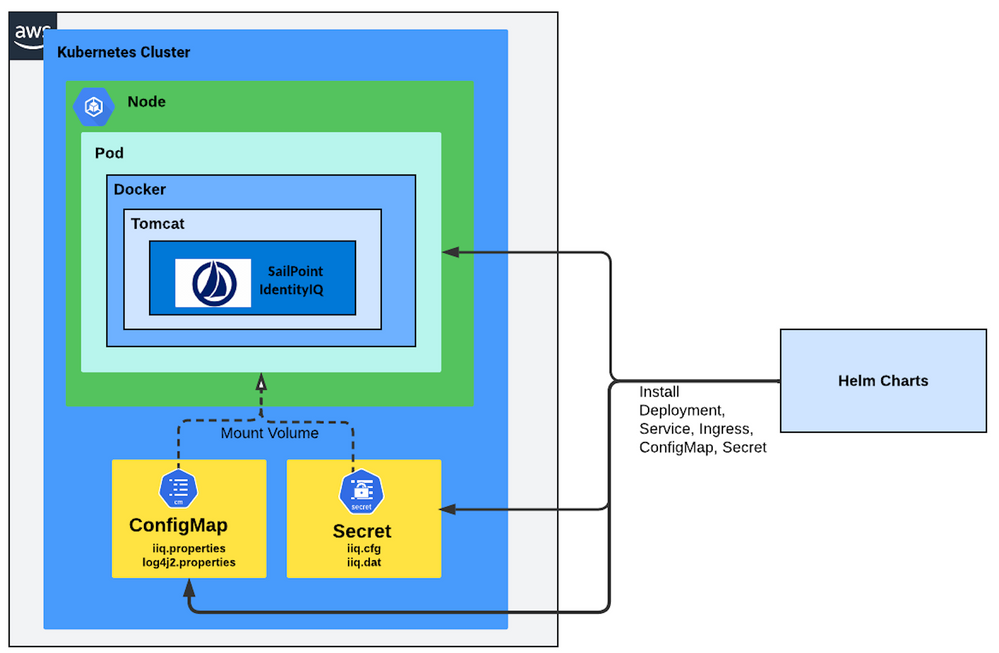
Refer to the following github repository for more details about the process:
https://github.com/renliangfeng/iiq-chart
References

