
- Products & services Products & services
- Resources ResourcesCustomer resources
- Customer resources
- Customer support Find more information about engaging support and get help
- Services guide Find more information about working with Services teams
- Free resources Leverage our free tools and trainings
- Modernize to Identity Security Cloud Transition to the cloud for advanced capabilities and a future-ready security posture
Learning- Learning
- Identity University Get technical training to ensure a successful implementation
- SailPoint professional certifications & credentials Advance your career or validate your identity security knowledge
- SailPoint recertification program Get recertified by demonstrating ongoing learning
- Training onboarding guide Make of the most of training with our step-by-step guide
- Training FAQs Find answers to common training questions
- Community Community
Turn on suggestions
Auto-suggest helps you quickly narrow down your search results by suggesting possible matches as you type.
- Compass
- :
- Discuss
- :
- Community Wiki
- :
- IdentityIQ Wiki
- :
- Hiding access filter attributes from request access, manage access page in IdentityIQ
Hiding access filter attributes from request access, manage access page in IdentityIQ
Hiding access filter attributes from request access, manage access page in IdentityIQ
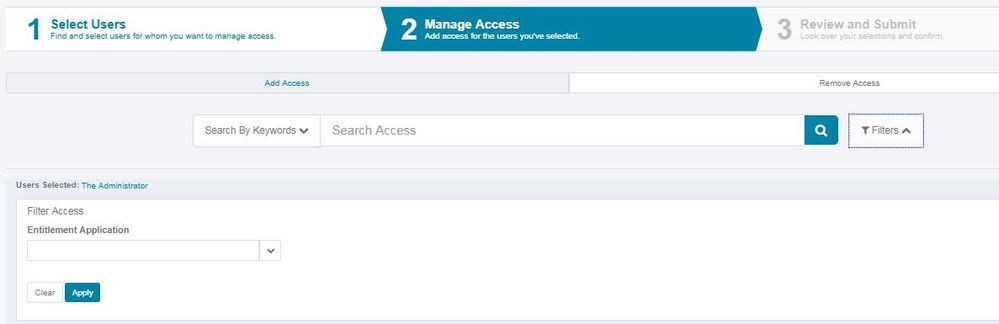
Hiding the Filter Attributes from the Request Access --> Manage Access Page using the Plugin. We need to create the below folder structure and copy the required codes in each of the files as given below, here in expAccessSerachFilter.js we have written the JS to hide few OOTB Attributes such as the Role Type, Entitlement Attribute and Entitlement Owner. This can be even used to hide any of the
Extended Attribute from the Managed Attribute.
│
├───AccessRequestAccessFilter
│ │ manifest.xml
│ │
│ ├───jars
│ └───ui
│ ├───images
│ └───js
│ expAccessSerachFilter.js
manifest.xml
<?xml version='1.0' encoding='UTF-8'?>
<!DOCTYPE Plugin PUBLIC "sailpoint.dtd" "sailpoint.dtd">
<Plugin name="AccessRequestAccessFilter" displayName="AccessRequestAccessFilter" disabled="false" version="0.0.1.0" minSystemVersion="7.1" maxSystemVersion="7.4"
  certificationLevel="None">
  <Attributes>
    <Map>
      <entry key="snippets">
        <value>
          <List>
            <Snippet regexPattern=".*" rightRequired="">
              <Scripts>
                <String>ui/js/expAccessSerachFilter.js</String>
              </Scripts>
            </Snippet>
          </List>
        </value>
      </entry>
    </Map>
  </Attributes>
</Plugin>
expAccessSerachFilter.js
jQuery(document).ready(function(){
var MutationObserver = window.MutationObserver || window.WebKitMutationObserver || window.MozMutationObserver;
var observer = new MutationObserver(function(mutations) {
 mutations.forEach(function(mutation){
   for(var i =0;i < mutation.addedNodes.length;i++){
   if($("[id*='itemsFilterPanel']").length) {
    if(jQuery(mutation.addedNodes[i]).find("sp-object-suggest[sp-button-aria-label='Role Type']").length)
     {
      $("sp-object-suggest[sp-button-aria-label='Role Type']").parent().parent().parent().hide();
     }
    if(jQuery(mutation.addedNodes[i]).find("sp-object-multi-suggest[sp-button-aria-label='Entitlement Attribute']").length)
     {
      $("sp-object-multi-suggest[sp-button-aria-label='Entitlement Attribute']").parent().parent().parent().hide();
     }
    if(jQuery(mutation.addedNodes[i]).find("sp-object-suggest[sp-button-aria-label='Entitlement Owner']").length)
     {
      $("sp-object-suggest[sp-button-aria-label='Entitlement Owner']").parent().parent().parent().hide();
     }
   }
   }
    });
 });
observer.observe(document,{childList:true,subtree:true,attributes:false});
});
]create the zip folder with the above structure and install the same as the plugin in UI. Login into Identity IQ --> Gear --> Plugins -->New -->Drag and drop a file or click in this box to install a plugin Once we have installed logout and login and see the changes. Below UI shows and has hidden the required attributes.
Version history
Revision #:
5 of 5
Last update:
May 16, 2026
12:00 PM
Updated by:

© 2026 SailPoint Technologies, Inc. All Rights Reserved.