
- Products & services Products & services
- Resources ResourcesCustomer resources
- Customer resources
- Customer support Find more information about engaging support and get help
- Services guide Find more information about working with Services teams
- Free resources Leverage our free tools and trainings
- Modernize to Identity Security Cloud Transition to the cloud for advanced capabilities and a future-ready security posture
Learning- Learning
- Identity University Get technical training to ensure a successful implementation
- SailPoint professional certifications & credentials Advance your career or validate your identity security knowledge
- SailPoint recertification program Get recertified by demonstrating ongoing learning
- Training onboarding guide Make of the most of training with our step-by-step guide
- Training FAQs Find answers to common training questions
- Community Community
- Compass
- :
- Discuss
- :
- Community Wiki
- :
- IdentityIQ Wiki
- :
- Identity processing threshold in IdentityIQ 8.2
Identity processing threshold in IdentityIQ 8.2
Identity processing threshold in IdentityIQ 8.2
- Setting an identity processing threshold in Rapid Setup
- Setting an identity processing threshold in Lifecycle Events
- Enabling identity processing threshold in the identity refresh task
The Identity Processing Threshold feature gives you the ability to stop lifecycle events before they are fully processed, to protect against dangerous or accidentally-triggered workflows from completing. For example, if someone makes a change in the Human Resources database that accidentally changes the status of an entire department's employees to "terminated", the identity processing threshold can stop IdentityIQ from running a Leaver workflow for hundreds of employees.
Thresholds can be set either as a fixed number, or as a percentage of identities. When a threshold is set, the Identity Refresh task will terminate when the threshold is met, without updating any identities.
Identity Processing Threshold can be configured both in Rapid Setup (as global setting) and in Lifecycle Events, for specific workflows. In addition, there are some settings in the Identity Refresh task that must be set to fully enable this feature.
Setting an identity processing threshold in Rapid Setup
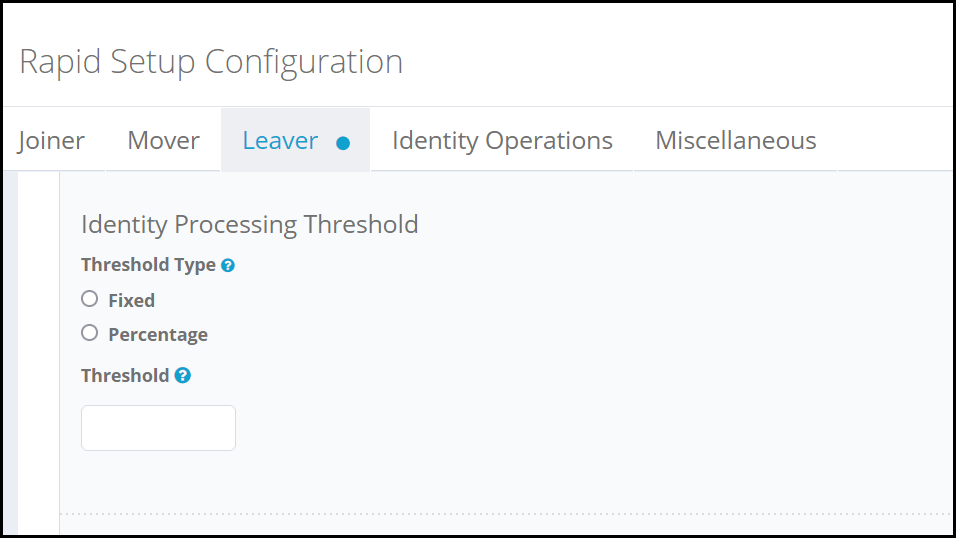
The Identity Processing Threshold in Rapid Setup is configured as a global setting, for each type of processing event.
- Click gear > Global Settings > Rapid Setup Configuration.
- Choose the type of process (for example, Joiner, Mover, or Leaver) that you want to set a threshold for. Note that the process must be enabled before you can set an identity processing threshold.
- In the Identity Processing Threshold area, set your threshold preferences
- Choose whether to use a Fixed number or a Percentage of identities as the threshold.
- Enter the threshold value. Fixed numbers must be whole; decimal values are not supported. Percentages must be between 1 and 100.
- Save your changes.
- Ensure that the Process events setting is selected in the Identity Refresh task; the identity processing threshold will not take effect if this option is not selected. See the section below for more information.
Setting an identity processing threshold in Lifecycle Events
Identity Processing Thresholds are set individually for different types of Lifecycle Events.
- Click Setup > Lifecycle Events.
- Choose the type of process (for example, Joiner, Mover, or Leaver) that you want to set a threshold for.
- Choose a Threshold Type: a Fixed number or a Percentage of identities as the threshold.
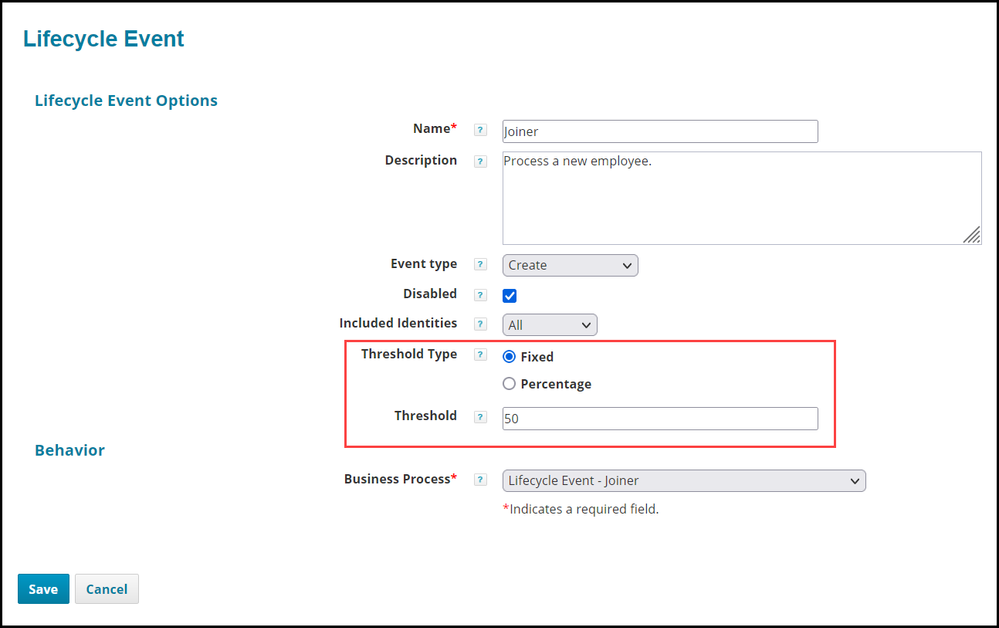
- Enter the Threshold value. Fixed numbers must be whole; decimal values are not supported. Percentages must be between 1 and 100.
- Save your changes.
- Ensure that the Process events setting is selected in the Identity Refresh task; the identity processing threshold will not take effect if this option is not selected. See the section below for more information.
Enabling identity processing threshold in the identity refresh task
The Identity Refresh task must be set to process events in order for the Identity Processing Threshold to work as intended.
- Click Setup > Tasks
- Select the task you use for refreshing identities to edit it. This is a task of type Refresh Identities.
- Ensure that the Process events option is enabled. If you want to process events for other purposes but disable the Identity Processing Threshold feature, you can check the Disable identity processing threshold option.
- Save your changes.

