
- Products & services Products & services
- Resources ResourcesCustomer resources
- Customer resources
- Customer support Find more information about engaging support and get help
- Services guide Find more information about working with Services teams
- Free resources Leverage our free tools and trainings
- Modernize to Identity Security Cloud Transition to the cloud for advanced capabilities and a future-ready security posture
Learning- Learning
- Identity University Get technical training to ensure a successful implementation
- SailPoint professional certifications & credentials Advance your career or validate your identity security knowledge
- SailPoint recertification program Get recertified by demonstrating ongoing learning
- Training onboarding guide Make of the most of training with our step-by-step guide
- Training FAQs Find answers to common training questions
- Community Community
- Compass
- :
- Discuss
- :
- Community Wiki
- :
- IdentityIQ Wiki
- :
- IdentityIQ 7.3: Process Resiliency
IdentityIQ 7.3: Process Resiliency
IdentityIQ 7.3: Process Resiliency
Back to the IdentityIQ 7.3 overview: What's New in IdentityIQ 7.3
- Overview of Process Resiliency
- Video
- Process Resiliency in Tasks
- Setting a Loss Limit
- The RequestState Object
- Database Resiliency: The Reanimator Service
Overview of Process Resiliency
IdentityIQ 7.3 adds resiliency features to task processing for the Identity Refresh task, and Account Aggregation task. It also adds a new service that provide resiliency in the case of database failure. These improvements provide several benefits:
- For cloud implementations, these changes ensure that processes in IdentityIQ are resilient to the dynamic nature of cloud-hosted environments. For example, when cloud-hosted task servers become unavailable, or return to availability after an outage, IdentityIQ can react appropriately with no loss in productivity.
- For on-premise implementations, the changes improve efficiency by minimizing the rework that must be done in processing tasks or accounts, when there is an outage or interruption that impacts identity refresh or identity aggregation tasks.
- In cases of database failure, requests can be “reanimated”, that is, restarted. The new functionality also makes it easier for “hung” tasks to be identified and gracefully terminated.
The Identity University eLearning course on IdentityIQ 7.3 New Features includes a lesson on process resiliency. The course is available in early September 2018.
Video
Process Resiliency in Tasks
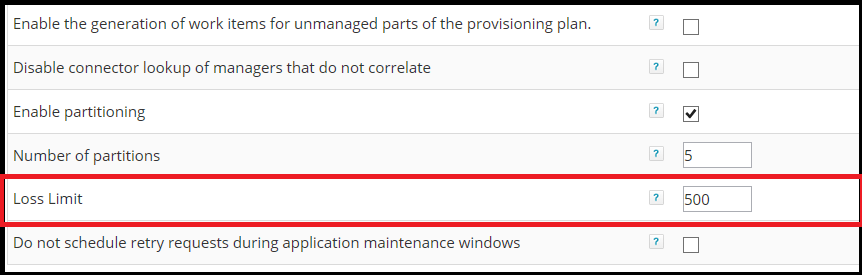
For identity refresh tasks and account aggregation tasks, you can set a “loss limit.” This setting determines specific checkpoints that, in case of failure, give the task the ability to pick up where it left off. This helps minimize the amount of rework the task will have to do when it restarted. This feature is only supported for partitioned tasks that act on identities.
Setting a Loss Limit
The UI for the tasks that support this feature have a new field for setting a Loss Limit, which is a number of accounts or identities. In a partitioned task, each time the task reaches the loss limit – that is, it has processed a number of accounts or identities that match the value of the loss limit – it commits a list of the accounts to a requestState object. This is a new object type for IdentityIQ 7.3. If the task should happen to fail, due perhaps to a server or database going down – the task will check the requestState object when it resumes, so that it knows which accounts have already been processed. This means the task doesn’t have to re-process the entire partition.
The RequestState Object
The requestState object is a new object in IdentityIQ that holds loss-limit data. The name of the requestState object indicates the range of records, and it contains a list of identities or accounts that have been processed. The list data is base-64 encoded and so is not human-readable.
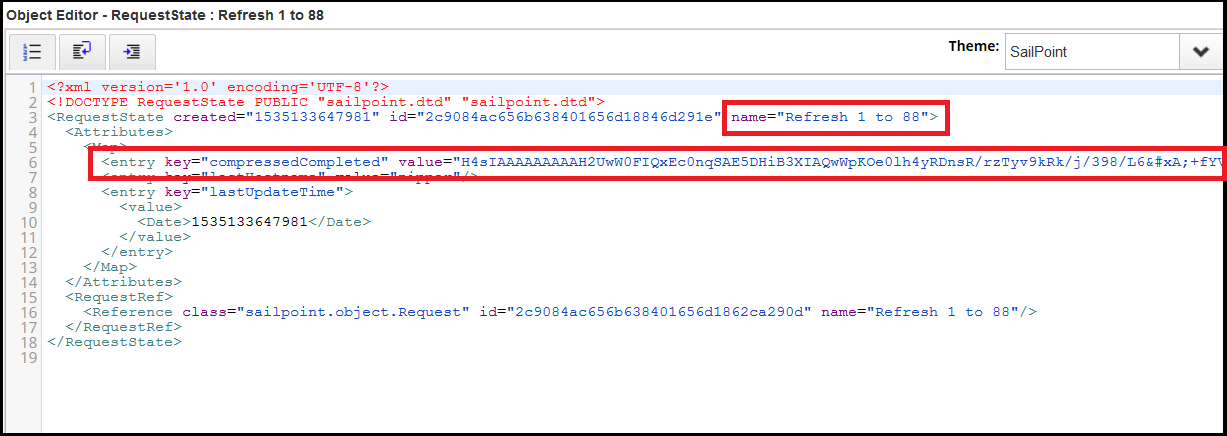
These objects are not retained in the IdentityIQ database past their usefulness. Once a loss limit has been reached, the object for that particular segment is automatically deleted.
Database Resiliency: The Reanimator Service
A new Reanimator service in IdentityIQ 7.3 helps manage “hung” tasks. An un-partitioned task can sometimes fail without properly updating the state of the TaskResult. This can leave the task in a “hung” state, appearing to still be running even though it isn’t. The most common cause for this kind of issue is a temporary loss of connection to the database, or a brief database server failure. However, the Reanimator service performs the task of resetting requests or tasks regardless of the underlying reason.
When a task has hung, the Reanimator service resets the task or request so that it can resume. The service can also help with the termination of a task or request that’s not configured to resume upon being orphaned or failing. If the task or request is not configured to resume, then when the service detects a task in a hung state, it automatically marks it as terminated.
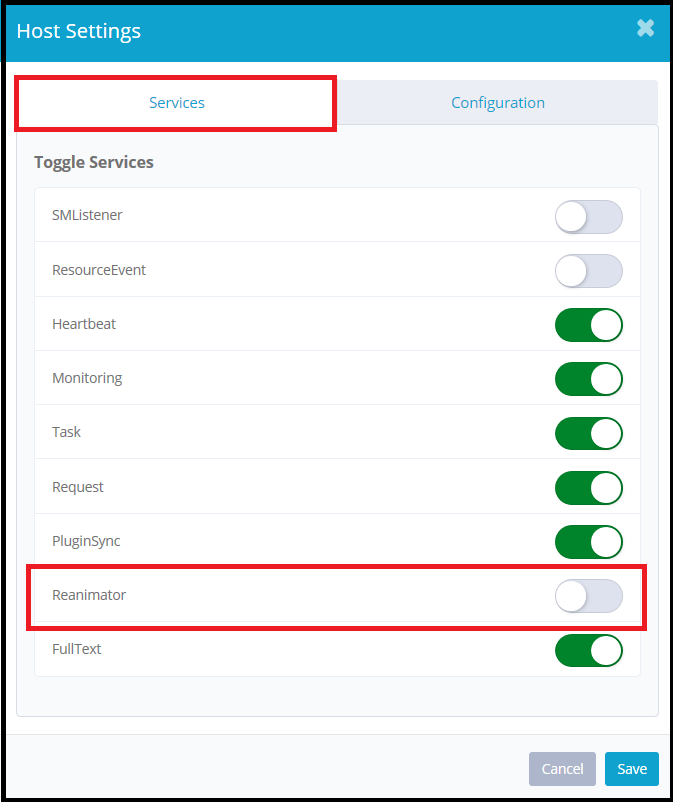
The Reanimator service runs by default on all hosts. Although it’s unlikely that you would need to switch it off, it’s possible to do so – for example, if you have a dedicated UI host, you might not need this service running there. To disable the Reanimator service on a specific host:
- Click gear > Administrator Console
- Click Environment in the left navigation
- On the Hosts tab, click the gear icon beside the specific host on which you want to disable the service
- On the Services tab of the Host Configuration dialog, use the slider to switch off the Reanimator service
The Reanimator service can also be run via an IdentityIQ console service command:
sendCommand <task_name_or_id> reanimate

