
- Products & services Products & services
- Resources ResourcesLearning
- Learning
- Identity University Get technical training to ensure a successful implementation
- SailPoint professional certifications & credentials Advance your career or validate your identity security knowledge
- SailPoint recertification program Get recertified by demonstrating ongoing learning
- Training onboarding guide Make of the most of training with our step-by-step guide
- Training FAQs Find answers to common training questions
- Community Community
- Compass
- :
- Discuss
- :
- Community Wiki
- :
- IdentityIQ Wiki
- :
- IdentityIQ 8.0: Plugin enhancements
- Article History
- Subscribe to RSS Feed
- Mark as New
- Mark as Read
- Bookmark
- Subscribe
- Printer Friendly Page
- Report Content to Moderator
IdentityIQ 8.0: Plugin enhancements
IdentityIQ 8.0: Plugin enhancements
Back to the IdentityIQ 8.0 overview: What's new in IdentityIQ 8.0
- Overview
- Forms in plugin configuration
- Defining a plugin form in manifest.xml
- Referencing custom javaScript forms in plugins
- Leveraging plugin classes
- Packaging plugin classes
- Referencing plugin classes in BeanShell
- New IIQ console commands for plugin class support
- Plugin class script blocking
- Declaring executors in plugins
- Plugin version number requirements
- For more information
Overview
Version 8.0 of IdentityIQ offers a number of enhancements to plugins:
- Classes contained in a plugin can be leveraged from any area or feature of IdentityIQ where BeanShell can be used, such as rules, workflow steps, and scriptlets. Version 8.0 also provides mechanisms for limiting or blocking scripting access to plugin classes as needed, and some new iiq console commands to support troubleshooting of plugin classes.
- Support for forms in the plugin configuration UI, giving you new ways to present complex or dynamic options in the plugin's configuration page
- Stricter handling of executors for Tasks, Services, and Policies, with a global configuration option allowing you to "relax" the stricter declarations for legacy plugins, to help with forward compatibility.
Forms in plugin configuration
IdentityIQ 8.0 adds support for dynamic, form-based options in a plugin's configuration UI. For example, you could include a drop-down list of options for a plugin configuration setting, then show specific additional configuration settings based on the option the user chose from the drop-down. There are two ways to implement forms for your plugin's configuration: by defining the form directly in the plugin's manifest file, or by referencing a custom JavaScript form.
Defining a plugin form in manifest.xml
If you want to define a form directly in the plugin's manifest.xml file, use the settingsForm entry key. This example shows a simple form that includes help text for fields, and a default value for one field:
<entry key="settingsForm">
        <value>
          <Form name="ToDo Plugin Settings">
            <Attributes>
              <Map>
                <entry key="pageTitle" value="ToDo Plugin Configuration"/>
                <entry key="title" value="ToDo Plugin Configuration"/>
              </Map>
            </Attributes>
            <Description>Example form to display plugin settings</Description>
            <Section name="Configuration">
              <Field displayName="Delete Allowed" helpKey="Indicates whether or not todos can be deleted" name="canDelete" type="boolean"/>
              <Field displayName="Default Name" helpKey="The default name for a todo" name="defaultName" type="string" value="My Todo"/>
              <Field displayName="Default Time" helpKey="The default time in minutes for a todo" name="defaultTime" type="int">
                <DefaultValue>
                  <Integer>30</Integer>
                </DefaultValue>
              </Field>
              <Field displayName="Max Active Todos" helpKey="The maximum number of active todos a user is allowed to have before being flagged" name="maxUntilFlagged" required="true" type="int">
                <DefaultValue>
                  <Integer>10</Integer>
                </DefaultValue>
              </Field>
            </Section>
          </Form>
        </value>
      </entry>
For more information about using forms in IdentityIQ generally, see Forms 7.0+.
Referencing custom javaScript forms in plugins
To reference a custom JavaScript form in your plugin:
- In the plugin's manifest.xml file, use the settingsPage entry key to reference the name of the XHTML file that contains the HTML and any JavaScript for your plugin settings page - for example:
<entry key="settingsPage" value="myPluginConfigForm.xhtml"/> - When packaging your plugin, place the settings XHTML page (that is, the page you reference in the settingsPage entry key) in the plugin's /ui folder.
Leveraging plugin classes
Enhancement to plugin functionality in IdentityIQ version 8.0 allow IdentityIQ scripts to access the classes defined in an installed IdentityIQ plugin. Classes contained in a plugin can be leveraged from any area or feature of IdentityIQ where BeanShell can be used, such as rules, workflow steps, and scriptlets.
Packaging plugin classes
BeanShell scripting invocations can use all Java classes (from all plugins) that are declared as exported for "scripting". These are declared in the plugin's manifest.xml file. The Java package name is specified under <String> in the <scriptPackages> element; for example:
<entry key="scriptPackages">
        <value>
          <List>
            <String>com.acme.todo.util</String>
          </List>
        </value>
      </entry>
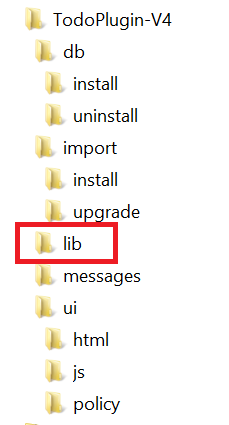
The placement of classes in the plugin zip file is important. Classes are packaged in a jar that must be placed in the plugin's /lib directory. You can also put 3rd party jars in the /lib directory if you are using them.
Referencing plugin classes in BeanShell
Here is a simple example of BeanShell code that references a plugin class. The <Source> tag in this example is the element for the script embedded within the Rule XML object. If you use IdentityIQ's rule editor to create or edit your rule, you would omit the <Source> tag.
<Source>
     import com.acme.todo.util.TodoUtil;
     long now = TodoUtil.now();
     return "Hello World at " + now;
</Source>
New IIQ console commands for plugin class support
There are additions to the plugin command that is invoked from the iiq console. These new command help troubleshoot problems when accessing plugin classes from scripts.
- The command plugin classes will show you the list of all the classes from all plugins which are available currently for scripting and executors.
> plugin classes
Class                                                Usage          Plugin
==================================================   =============  ===========================
com.acme.todo.util.TodoQuery                         Scripting      TodoPlugin
com.acme.todo.util.TodoUtil                          Scripting      TodoPlugin
com.acme.class.util.ClassUtil                        Scripting      ClassPlugin
com.acme.todo.server.TodoFlaggingService             Service        TodoPlugin
com.acme.todo.policy.TodoPolicyExecutor              Policy         TodoPlugin
- The command plugin classes <plugin_name> will show you the list of all the classes from the specified plugin which are available currently for scripting and executors
> plugin classes ClassPlugin
Class                                                Usage          Plugin
==================================================   =============  ===========================
com.acme.class.util.ClassUtil                        Scripting      ClassPlugin
- The command plugin list will list all of the installed plugins, including the plugin name, version, and if enabled/disabled.
> plugin list
Name                                       Version   Status
========================================   ========  ========
TodoPlugin                                      4.0  Enabled
ClassPlugin                                     1.0  Enabled
Plugin class script blocking
A new plugin mechanism can block IdentityIQ scripts from accessing classes from plugins. This "Prohibit Scripting" mechanism dynamically enables/disables the ability for scripts to load classes from plugins.
This mechanism can be set either via a configuration key, or via the UI.
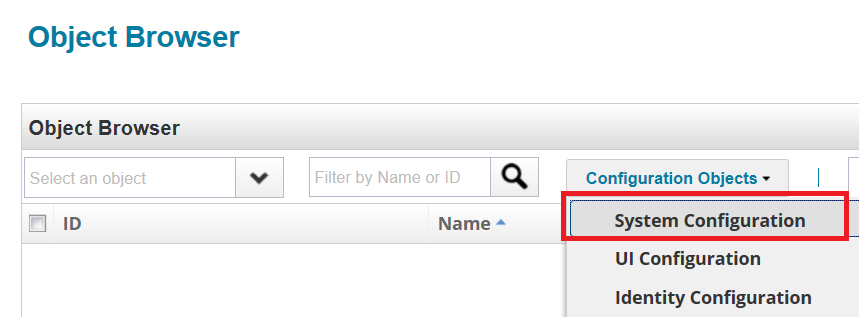
To enable or prohibit scripting access via a configuration key, use the new SystemConfiguration key called pluginProhibitScripting. This is set in the Debug page:
- In the Debug Page, choose SystemConfiguration from the Configuration Objects drop-down.
- Find the pluginProhibitScripting key and set it to true to prohibit scripts from accessing plugin classes, or to false to allow scripts to access plugin scripts.
<entry key="pluginProhibitScripting" value="false"/>
To enable or prohibit scripting access to plugin classes via the UI:
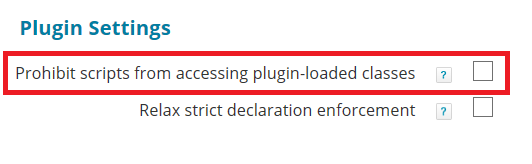
- Navigate to the gear menu > Global Settings > IdentityIQ Configuration > Miscellaneous tab
- In the Plugin Settings area of the Miscellaneous tab, use the checkbox to enable or disable script access to plugin classes.
Declaring executors in plugins
IdentityIQ plugins support executors, which let you extend or add new policies, tasks, or services to IdentityIQ via a plugin. In earlier versions of IdentityIQ, plugins could optionally declare Service executors. In IdentityIQ version 8.0, there are some changes:
- Two new declaration types, Task and Policy, have been added.
- Declaring executors is now required for plugins developed against IdentityIQ 8.0
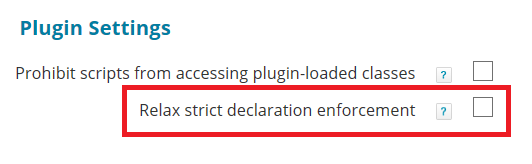
- To ensure compatibility with older plugins, IdentityIQ 8.0 offers a configuration setting that lets you "relax" the declaration requirement, so that the declaration requirement won't cause your legacy plugins to fail. This is done in IdentityIQ's global settings, under the gear menu > Global Settings > IdentityIQ Configuration > Miscellaneous tab, in the Plugin Settings area:
Declarations are specified in the plugin's manifest.xml file - for example:
      <entry key="serviceExecutors">
        <value>
          <List>
            <String>com.acme.todo.server.TodoFlaggingService</String>
          </List>
        </value>
      </entry>
      <entry key="policyExecutors">
        <value>
          <List>
            <String>com.acme.todo.policy.TodoPolicyExecutor</String>
          </List>
        </value>
      </entry>
      <entry key="taskExecutors">
        <value>
          <List>
            <String>com.acme.todo.task.TodoTaskExecutor</String>
          </List>
        </value>
      </entry>
Plugin version number requirements
Refer to the IdentityIQ 8.0 Release Notes section on Upgrade Considerations for important information on new requirements for the plugin version number format.
For more information

- Mark as Read
- Mark as New
- Bookmark
- Permalink
- Report Content to Moderator
Found the issue, need to declare only the package and not the package / full class. When compiling the class fix all the warnings otherwise it will not show up.

- Mark as Read
- Mark as New
- Bookmark
- Permalink
- Report Content to Moderator
@dragolo4 - I would recommend creating a new discussion thread.
And also attach your manifest.xml file, and then I may be able to help you.
We are using scriptPackages in 8.4p1 successfully, and nothing has changed since 8.0
- Mark as Read
- Mark as New
- Bookmark
- Permalink
- Report Content to Moderator
If your task executor is in the plugin, don't forget to add the "pluginName" to the attributes map of your TaskDefinition object, otherwise it will not load the executor"
- « Previous
-
- 1
- 2
- Next »

