
- Products & services Products & services
- Resources ResourcesCustomer resources
- Customer resources
- Customer support Find more information about engaging support and get help
- Services guide Find more information about working with Services teams
- Free resources Leverage our free tools and trainings
- Modernize to Identity Security Cloud Transition to the cloud for advanced capabilities and a future-ready security posture
Learning- Learning
- Identity University Get technical training to ensure a successful implementation
- SailPoint professional certifications & credentials Advance your career or validate your identity security knowledge
- SailPoint recertification program Get recertified by demonstrating ongoing learning
- Training onboarding guide Make of the most of training with our step-by-step guide
- Training FAQs Find answers to common training questions
- Community Community
- Compass
- :
- Discuss
- :
- Community Wiki
- :
- IdentityIQ Wiki
- :
- Implementing advanced policy using filters and rules
Implementing advanced policy using filters and rules
Implementing advanced policy using filters and rules
This article explains how to implement a detective type of Advanced Policy in SailPoint IIQ using Filters and Rules with a sample business scenario.
IdentityIQ Versions: 7.0, 7.1 and above
- Overview
- Sample Business Scenario
- Implementation
- Filter – Selection method
- Rule – Selection method
- Testing
- Policy scan task for testing
- Resolve policy violation
- Suggested readings
Overview
SailPoint IIQ provides several features for addressing the compliance requirements of organizations. SoD (Segregation of Duty) Policy and Certification are some of the options. SoD policy basically consists of verifying an Identity against a set of Policy rules and creating a policy violation if any conflicts are found in access permissions, roles or entitlements etc.., based on the compliance regulations set by the organizations. Policy violation can be acted upon by a designated owner who can take a corrective action by removing the access through certification or taking an exception to violation with a proper explanation.
NOTE: Scope of this article is limited to develop a detective type of Advanced SoD Policy consisting of rules with options like Filters and custom Rules. SoD Policies is a bigger topic in itself and comes up with various types of policies like Entitlement Policy, Role Policy, Activity Policy and its related configurations. Reference is provided in suggested readings section with several links for articles and product documentation to explore more on this topic.
Sample Business Scenario
In today’s world, organizations are required to meet the challenge of compliance at every level. In the Identity and Access Management domain there will be restrictions on access level, roles and permissions identities need to have based on the organization’s compliance needs. Below table lists two compliance requirement scenarios which are most likely to occur in any organization, these two requirements can be formulated as Policy Rules inside an advanced policy and violations can be raised to handle the compliance regulations.
|
Sl. No. |
Application |
Entitlement/Role |
Business Rule |
|
1. |
Test App |
TEST_ENT_1 |
Access only to Identities with: Business Unit - Finance Department – “Payroll” OR “Invoice Processing” Job Title – Accountant |
| 2. |
Test App |
TEST_ENT_2 |
Access only to Identities with: Role – Security Officer |
- First requirement is, for any identity which has an application account “Test App” with entitlement “TEST_ENT_1” should belong to Business Unit “Finance”, Department “Payroll” or “Invoice Processing” and Job Title “Accountant”. If there is any change in any of the above three attributes then there should be a Policy Violation which needs to be addressed.
- Second requirement is, for any identity which has an application account “Test App” with entitlement “TEST_ENT_2” should have an assigned Role of “Security Officer”. If there is any change in the Role then there should be a Policy Violation which needs to be addressed.
NOTE: Sample XML files provided in this article can be used as a reference and modified as the per environment needs.
Implementation
This sections explains the implementation details in IIQ, below Figure 1, shows the Advanced Policy creation page with controls to create policy rules. Figure 2, shows the Policy Rules creation page with Selection Method options, “Match List”, “Filter”, “Script”, “Rule” and “Population” are the available choices. These are basically Identity Selector configurations, this article focuses on “Filter” and “Rule” options for implementing the above two business requirements respectively.
NOTE: Decision to implement the business requirements using Advanced SoD Policy is mainly due to the complexity level and the conditions/comparisons which needs to be evaluated for an identity. Other types of policies doesn’t provide much flexibility for customization. For more information on this, refer to suggested readings section.

Figure 1: Advanced Policy Creation page with UI controls to create Policy Rules
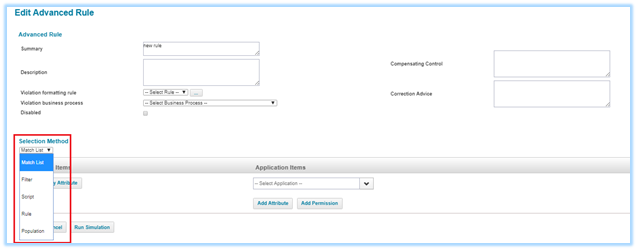
Figure 2: Policy Rules creation page with Selection Method’s for Advanced Policy
Filter – Selection method
IIQ provides Filter selection method for querying the identities in an XML format. For the first sample requirement mentioned above, xml filter query can be written as shown below. This will use a combination of “Composite Filters” with AND, OR and NOT operators, “Filters” with EQ & NE operators for selecting the identities and raising policy violations.
Figure 3: Shows an Identity Selector configuration using filters, this will detect for identities with entitlement “TEST_ENT_1” in “Test App” application. If the identity doesn’t belong to particular Business Unit or Department or Job Title apart from the preferred ones then a Policy Violation will be raised to correct the access issue (Using AND, OR, EQ, NE and NOT operators is for evaluating these conditions should be noted carefully, indexing for attributes Business Unit, Department and Job Title are not used for search as they are identity attributes)
<CompoundFilter>
  <Applications>
    <Reference class="sailpoint.object.Application" name="Test App"/>
  </Applications>
  <CompositeFilter operation="AND">
    <CompositeFilter operation="AND">
      <Filter operation="EQ" property="0:Entitlements" value="TEST_ENT_1"/>
    </CompositeFilter>
    <CompositeFilter operation="OR">
      <Filter operation="NE" property="businessUnit" value="Finance"/>
      <CompositeFilter operation="NOT">
        <Filter operation="IN" property="departmentName">
          <Value>
            <List>
              <String>Payroll</String>
              <String>Invoice Processing</String>
            </List>
          </Value>
        </Filter>
      </CompositeFilter>
      <Filter operation="NE" property="jobTitle" value="Accountant"/>
    </CompositeFilter>
  </CompositeFilter>
</CompoundFilter>
Figure 3: Sample xml filter which detects an identity based on the filter conditions
Rule – Selection method
IIQ provides Rule based selection method for querying the identities written using Java Beanshell code. For the second requirement mentioned above, custom rule can be written as shown below.
Figure 4: Shows an Identity Selector using a custom rule which uses API provided by the SailPoint framework to query the identities, this code will check for identities with an entitlement “TEST_ENT_2” in “Test App” application. Also, it will check for the assigned role “Security Officer” on an identity and raises Policy Violation if it is not assigned (Usage of Java Beanshell API for evaluating the identities should be noted carefully)
<?xml version='1.0' encoding='UTF-8'?>
<!DOCTYPE Rule PUBLIC "sailpoint.dtd" "sailpoint.dtd">
<Rule language="beanshell" name="Test SOD Policy Rule" type="Policy">
<Description>This rule is  to determine if a Policy has been violated.</Description>
<Signature returnType="PolicyViolation">
  <Inputs>
    <Argument name="log"/>
    <Argument name="context"/>
    <Argument name="identity"/>
    <Argument name="policy"/>
    <Argument name="constraint"/>
  </Inputs>
  <Returns>
    <Argument name="violation">
      <Description>The PolicyViolation object.</Description>
    </Argument>
  </Returns>
</Signature>
<Source>
  <![CDATA[
import sailpoint.object.*;
import java.util.*;
import java.text.*;
import org.apache.log4j.Logger;
import org.apache.log4j.Level;

Logger log = Logger.getLogger("identity.test.sodPolicy");
log.debug("=== ENTER: Test SOD Policy ===");

PolicyViolation polVil = null;
boolean isViolation = false;

if (identity != null) {
  String identityidentityName = identity.getName();
  log.debug(" Test SOD : identityName ---"+identityName);

  List roleAssigns = identity.getAssignedRoles();
  log.debug("Have roleAssigns: " + roleAssigns);

  boolean roleViolation = true;

  if (roleAssigns != null){
    log.debug("# currently assigned = " + roleAssigns.size());

    for (Bundle roleAssign : roleAssigns){
      String rName = roleAssign.getName();
      log.debug("Have role assign: " + rName);

      if(rName.equalsIgnoreCase("Security Officer")){
        roleViolation = false;
      }
    }
  }

  List links = identity.getLinks();

  if(links != null && links.size() > 0){
    log.debug(" Test SOD : Inside links ---");

    //==Declare variables
    String appName;
    List entitlements;
    String entVal;

    //==Iterate thru the links
    for (Link link : links) {
      if (link != null && !link.isDisabled()) {
        appName = link.getApplicationName();
        log.debug(" Test SOD : appName ---"+appName);

        if (appName != null && appName.equalsIgnoreCase("Test App")) {
          log.debug(" Test SOD : Inside Test App ---");

          //==Retrieve the entitlements for the Application
          entitlements = link.getEntitlements(Locale.getDefault(),"");

          if(entitlements != null && entitlements.size() > 0){
            log.debug(" Test SOD : Inside Entitlements ---");

            //==Iterate thru the entitlements
            for(Entitlement entitlement : entitlements){
              entVal = entitlement.getAttributeValue();
              log.debug(" Test SOD : entVal ---"+entVal);

              if(entVal.equalsIgnoreCase("TEST_ENT_2")){
                log.debug(" Test SOD : entVal : TEST_ENT_2---");
                if(roleViolation){
                  //==Set the Policy Violation flag if Role Violation is Present
                  isViolation = true;
                }
              }
            }
          }
        }
      }
    }
  }
}

//==Check for Violation
if (isViolation) {
  log.debug(" Test SOD : Inside Violation ---");
  polVil = new PolicyViolation();
  polVil.setActive(true);
  polVil.setIdentity(identity);
  polVil.setPolicy(policy);
  polVil.setDescription("This combination of Role is not allowed for the Identity");
}

log.debug("=== EXIT: Test SOD Policy ===");
return polVil;
    ]]>
  </Source>
</Rule>
Figure 4: Sample IIQ Rule file to detect Identities and raise policy violation for conflicting roles
After adding Rules to Advanced Policy
After adding the above policy rules to an advanced policy, Figures 5 and 6 below will show the details of how the policy looks in IIQ UI and xml file representation of the advanced policy for the sample business scenario.
Figure 5: shows advanced policy with “Test Rule 1” and “Test Rule 2” which are Filter and Rule features.
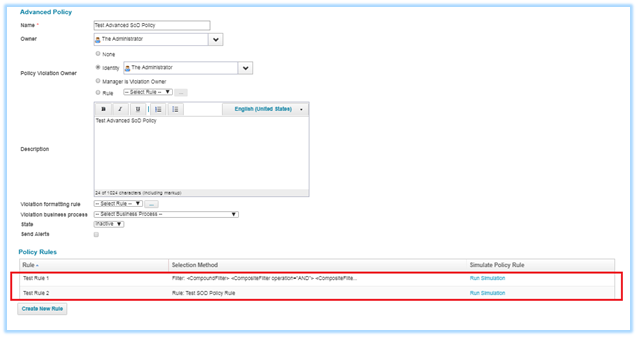
Figure 5: Advanced policy with policy rules created as Filter and Custom Rule
Figure 6: shows the xml representation of the Test Advanced policy configuration for business scenario.
<?xml version='1.0' encoding='UTF-8'?>
<!DOCTYPE Policy PUBLIC "sailpoint.dtd" "sailpoint.dtd">
<Policy certificationActions="Mitigated,Delegated" configPage="advancedPolicy.xhtml" executor="sailpoint.policy.GenericPolicyExecutor"
name="Test Advanced SoD Policy" state="Inactive" type="Advanced" typeKey="policy_type_advanced" violationOwnerType="Identity">
  <PolicyAlert disabled="true" escalationStyle="none"/>
  <Attributes>
    <Map>
      <entry key="sysDescriptions">
        <value>
          <Map>
            <entry key="en_US" value="Test Advanced SoD Policy"/>
          </Map>
        </value>
      </entry>
    </Map>
  </Attributes>
  <Owner>
    <Reference class="sailpoint.object.Identity" name="spadmin"/>
  </Owner>
  <ViolationOwner>
    <Reference class="sailpoint.object.Identity" name="spadmin"/>
  </ViolationOwner>
  <GenericConstraints>
    <GenericConstraint name="Test Rule 1" violationOwnerType="None">
      <CompensatingControl>Test Rule 1</CompensatingControl>
      <Description>Test Rule 1</Description>
      <RemediationAdvice>Test Rule 1</RemediationAdvice>
      <IdentitySelector>
        <CompoundFilter>
          <CompositeFilter operation="AND">
            <CompositeFilter operation="AND">
              <Filter operation="EQ" property="0:Entitlements" value="TEST_ENT_1"/>
            </CompositeFilter>
            <CompositeFilter operation="OR">
              <Filter operation="NE" property="businessUnit" value="Finance"/>
              <CompositeFilter operation="NOT">
                <Filter operation="IN" property="departmentName">
                  <Value>
                    <List>
                      <String>Payroll</String>
                      <String>Invoice Processing</String>
                    </List>
                  </Value>
                </Filter>
              </CompositeFilter>
              <Filter operation="NE" property="jobTitle" value="Accountant"/>
            </CompositeFilter>
          </CompositeFilter>
        </CompoundFilter>
      </IdentitySelector>
    </GenericConstraint>
    <GenericConstraint name="Test Rule 2" violationOwnerType="None">
      <CompensatingControl>Test Rule 2</CompensatingControl>
      <Description>Test Rule 2</Description>
      <RemediationAdvice>Test Rule 2</RemediationAdvice>
      <IdentitySelector>
        <RuleRef>
          <Reference class="sailpoint.object.Rule" name="Test SOD Policy Rule"/>
        </RuleRef>
      </IdentitySelector>
    </GenericConstraint>
  </GenericConstraints>
</Policy>
Figure 6: Sample advanced policy xml file with Filter and Rule configurations
Testing
Testing can be executed for SoD Policies in several ways, through "Aggregation", "Identity Refresh" and "Policy Scan" types of tasks are very common. “Simulation” feature available for policy rule and in the SoD Policy is another option for unit testing. Verifying the identity against policy using “Policy Scan” task is explained below.
NOTE: For more information on Testing refer to links provided in suggested readings section.
Policy scan task for testing
Figure 7: shows the snapshot of a “Policy Scan” type of Task, which can verify the identity against the policy. As shown in the figure, task contains the details of the identity which needs to be verified and the name of the policy which needs to be evaluated, when executed task will evaluate all the policy rules and raises the policy violation. Policy owner can take appropriate action on the violation.

Figure 7: Policy scan task to test the identity against the advanced policy
Resolve policy violation
Figure 8: shows the snapshot of a “Policy Violations” raised after the task has run. Policy owner can take several actions like allowing the violation as an exception till the desired date so that there will not be any violation raised till the expiry date. Also, other option is to do a certification and re-mediate the conflicting access.

Figure 8: Sample xml filter which detects an identity based on the filter conditions
NOTE: During testing, for better tracking of the flow, log statements can be enabled with proper permission and trace levels. Some log statements are provided inside the sample files can be utilized for tracing or debugging purposes.
Suggested readings
- Policies: Understanding, usage & testing of SoD policies
- Rules in IdentityIQ: Policy violation rules and formatting
- Identity selector configurations
Document Revision History
|
Revision Date |
Written/Edited By |
Comments |
|
Jun 2018 |
Jayaram K H |
Initial Creation For IIQ versions: 7.0, 7.1 and above |
