
- Products & services Products & services
- Resources ResourcesCustomer resources
- Customer resources
- Customer support Find more information about engaging support and get help
- Services guide Find more information about working with Services teams
- Free resources Leverage our free tools and trainings
- Modernize to Identity Security Cloud Transition to the cloud for advanced capabilities and a future-ready security posture
Learning- Learning
- Identity University Get technical training to ensure a successful implementation
- SailPoint professional certifications & credentials Advance your career or validate your identity security knowledge
- SailPoint recertification program Get recertified by demonstrating ongoing learning
- Training onboarding guide Make of the most of training with our step-by-step guide
- Training FAQs Find answers to common training questions
- Community Community
- Compass
- :
- Discuss
- :
- Community Wiki
- :
- IdentityIQ Wiki
- :
- Provisioning to a JDBC Source via an external jar
Provisioning to a JDBC Source via an external jar
Provisioning to a JDBC Source via an external jar
Disclaimer: Some information in this article may be outdated, please verify details by referring to latest resources or reach out to our technical teams.
Introduction
In an effort to better enable both partners and customers, we have outlined a process that allows technically savvy customers the ability to make modifications to their JDBC provisioning rule without directly engaging IdentityNow's Expert Services team. We do not recommend this approach if you do not have the correct technical resources on hand with at least an intermediate level knowledge of Java.
Prerequisites
- A functional JDBC source that is aggregating accounts into IdentityNow successfully.
- A JDBC Driver jar attached to the Source Config. (see Required JDBC Driver JAR Files)
- Eclipse or another IDE able to import Maven projects.
- The 'identityiq.jar' to import into your IDE. (Attached at the bottom).
- Intermediate knowledge of Java.
- Understanding of Account and Attribute requests within an IdentityNow provisioning plan.
Elements of the project
- JDBC Rule Adapter- This is the rule that will still be needed to be uploaded to your org by Expert Services or Professional Services. Essentially, this rule calls a 'provision' method in an attached jar and all the logic is built there. Getting passed into the method is the application, the connection to the database, the plan, and an *optional* log file. An example is attached below.
- Primary Java class- This is the main class that we will be using in our example. This is essentially the tunneling and logic portion of the code. It is the home of the 'provision' method, receives the account and attribute requests and directs the request to the appropriate calls in the auxiliary class in the project. (In the attached project, this is TestDemo.java)
- Auxiliary Java class- This is the class that executes stored procedures or (in this projects case) prepared statements to the target source and contains the methods that are called from the Primary Java class. In this project, it is called database.java
Building a project structure
Within Eclipse, or any other IDE, your file structure should be as follows:
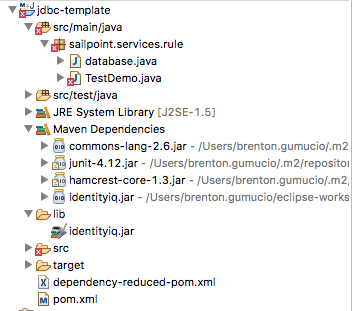
Make sure that you have imported the 'identityiq.jar' and you can see it in your Maven dependencies.
Elements of the Primary Java class
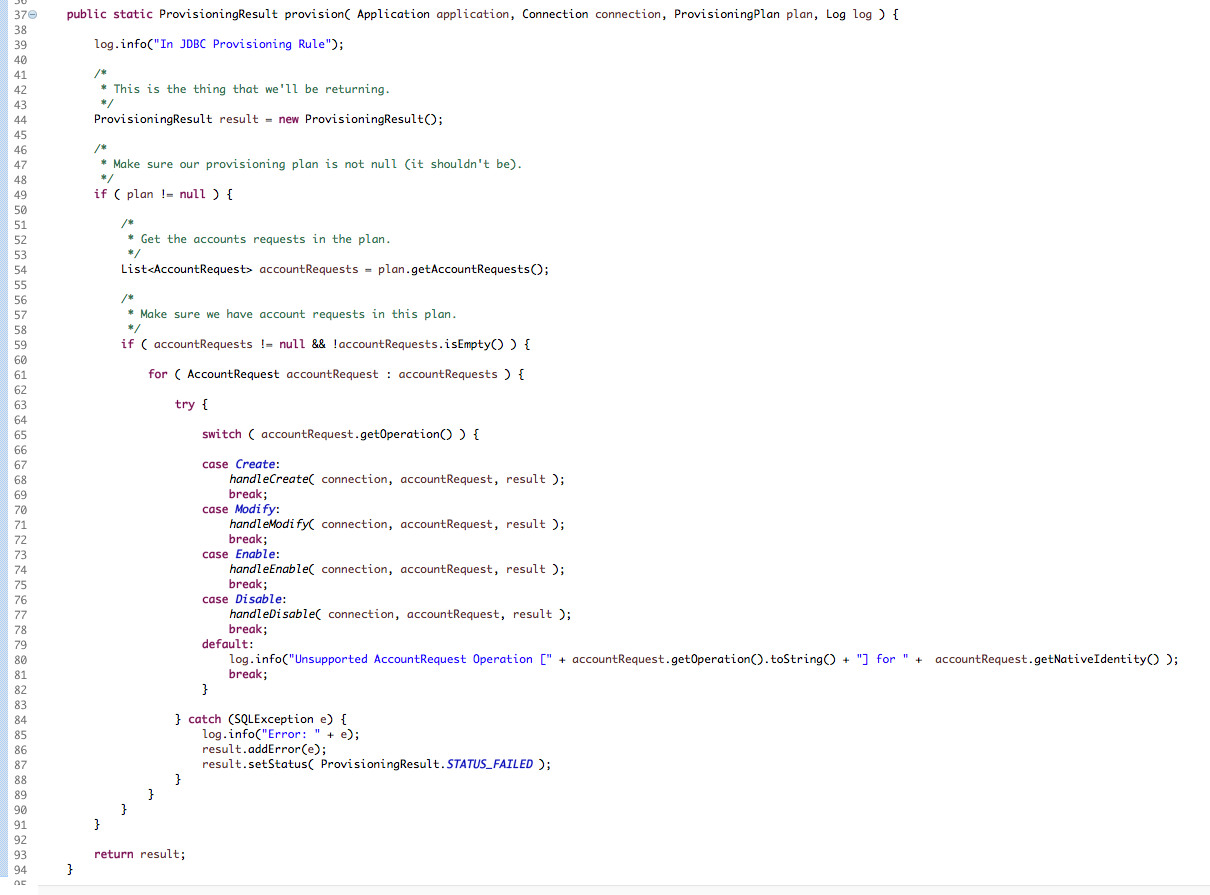
This is the foundation that handles our project. Every request initially comes here and then calls other methods.
- Provision Method- This breaks down the request and calls the appropriate method for the operation:
- Operation methods- These exist for every operation (Create, Modify, Enable, Disable).
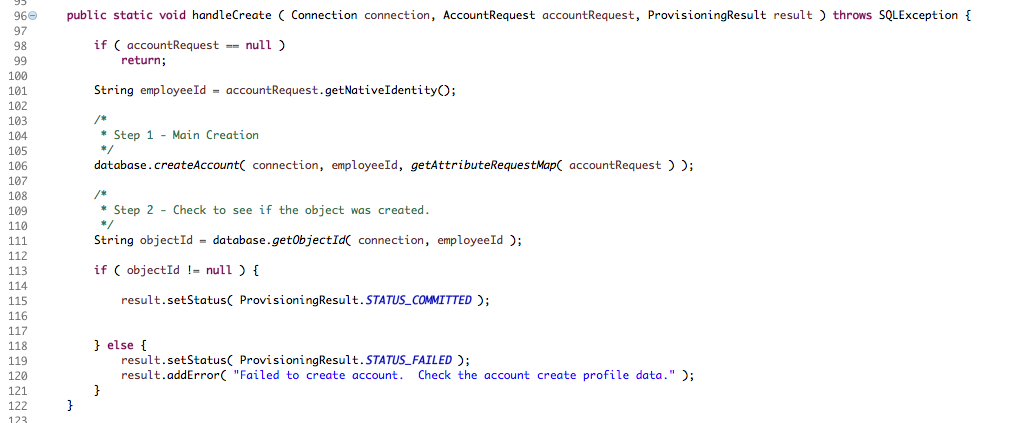
- Now that a request has come in and we have defined it's type, we need to call the Auxiliary Java class in our project.
Elements of the Auxiliary Java class
- Static Final strings- We create both public and private final strings in order to streamline interacting with the database. This may include the query string and/or constants in the project.
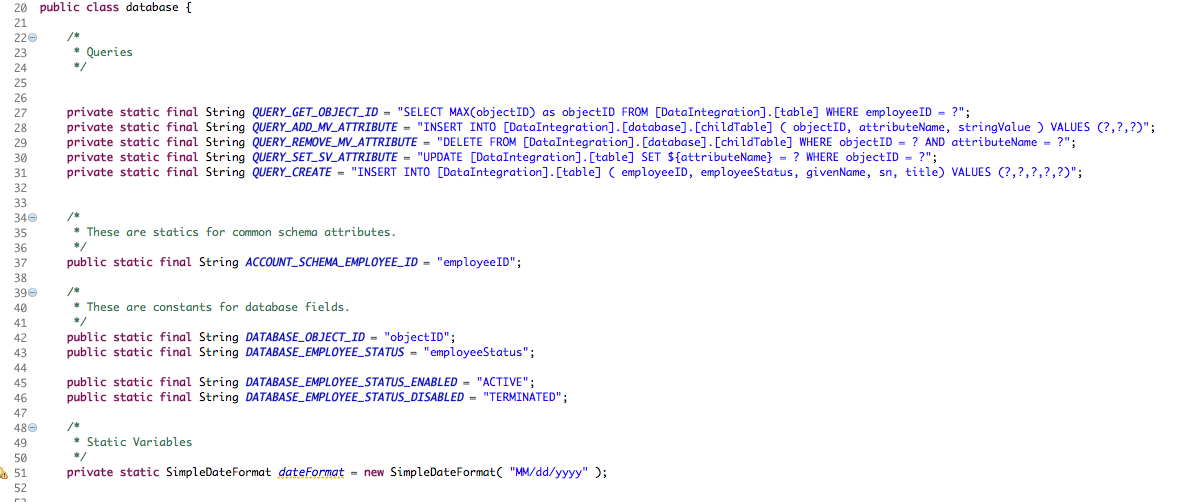
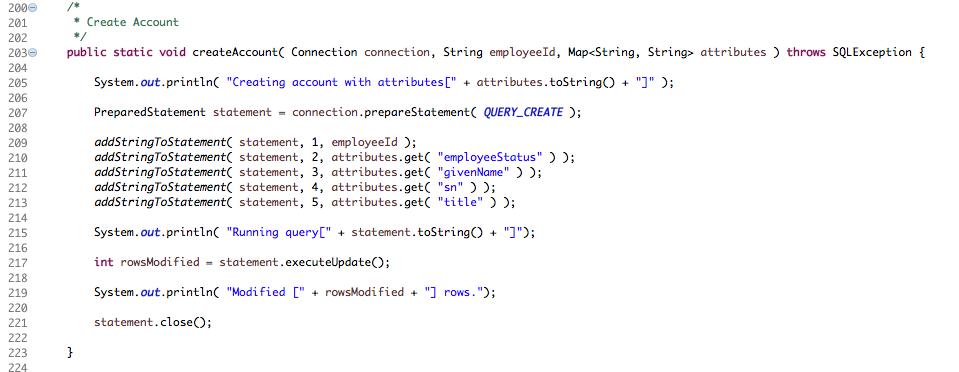
- Working methods- These are the working methods in the class. We have received the request, determined where it should go, and now need to execute it. Notice that it's simply a prepared statement that calls a final string
Clean Compile Package
The next step is to compile your Maven package. Upload the jar that is created to the source config.

Final Notes:
JDBC Rules can be very complicated depending on the source you are trying to connect to. We STRONGLY recommend that if you have any questions, bring them up to the Expert Services team for assistance.
