
- Products & services Products & services
- Resources ResourcesLearning
- Learning
- Identity University Get technical training to ensure a successful implementation
- SailPoint professional certifications & credentials Advance your career or validate your identity security knowledge
- SailPoint recertification program Get recertified by demonstrating ongoing learning
- Training onboarding guide Make of the most of training with our step-by-step guide
- Training FAQs Find answers to common training questions
- Community Community
- Compass
- :
- Discuss
- :
- Community Wiki
- :
- IdentityIQ Wiki
- :
- Steps to create custom task with custom attribute
- Article History
- Subscribe to RSS Feed
- Mark as New
- Mark as Read
- Bookmark
- Subscribe
- Printer Friendly Page
- Report Content to Moderator
Steps to create custom task with custom attribute
Steps to create custom task with custom attribute
If you have any requirement for which you have to create a custom task with custom attribute then you can follow the below steps
This can be achieved by Creating a TaskDefinition and Custom Java class that extends AbstractTaskExecutor. Java class override the methods to implement your business logic in java code.
The class name should be mentioned in as executor value in TaskDefinition like below.
Note: Below is an example for a custom task that pulls search identity and display message on result screen.
1) Create TaskDefinition
|
Task Definition |
|---|
|
<?xml version='1.0' encoding='UTF-8'?> <!DOCTYPE sailpoint PUBLIC "sailpoint.dtd" "sailpoint.dtd"> <sailpoint> <TaskDefinition executor="sailpoint.custom.task.SearchIdentityTask” name="Search Identity Custom Task" progressInterval="5000" progressMode="String" resultAction="Rename" template="true" type="Generic"> <Description> Runs a search for an identity against a specific First Name. </Description> <Signature> <Inputs> <Argument name="search_name" type="string"> <Prompt>Search Identity Name:</Prompt> </Argument> </Inputs> <Returns> <Argument name="success" type="boolean"> <Prompt>Success: </Prompt> </Argument> <Argument name="messages" type="string"> <Prompt>Messages: </Prompt> </Argument> </Returns> </Signature> </TaskDefinition> </sailpoint> |
- executor="sailpoint.custom.task.SearchIdentityTask” is the Custom JAVA Class that will be used to execute the task.
- template="true" is set to get the TaskDefinition listed in “New Task” List
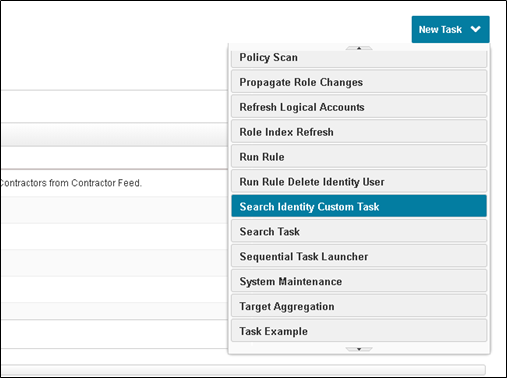
- Here Argument inside Input Tag is the custom attribute that needs input when the task is executed
2) Now create a class file
Note: Business Logic will be written in the execute method and it will change based on your requirement.
|
SearchIdentityTask.java |
|---|
|
package sailpoint.custom.task;
import sailpoint.api.SailPointContext; import sailpoint.object.Attributes; import sailpoint.object.Identity; import sailpoint.object.TaskResult; import sailpoint.object.TaskSchedule; import sailpoint.task.AbstractTaskExecutor; import sailpoint.task.TaskMonitor; import sailpoint.tools.GeneralException;
public class SearchIdentityTask extends AbstractTaskExecutor { private String strSearchname = null; private boolean isSuccess = false; private String messages = null;
public boolean isSuccess() { return isSuccess; }
public void setSuccess(boolean isSuccess) { this.isSuccess = isSuccess; }
public String getMessages() { return messages; }
public void setMessages(String messages) { this.messages = messages; }
public String getStrSearchname() { return strSearchname; }
public void setStrSearchname(String strSearchname) { this.strSearchname = strSearchname; }
//method that will be executed when the task executes @Override public void execute(SailPointContext paramSailPointContext, TaskSchedule paramTaskSchedule, TaskResult paramTaskResult, Attributes<String, Object> paramAttributes) throws Exception { // TODO Auto-generated method stub
TaskMonitor localTaskMonitor = new TaskMonitor(paramSailPointContext, paramTaskResult); setMonitor(localTaskMonitor);
localTaskMonitor.updateProgress("Parsing Arguments"); parseArgs(paramAttributes); //Get Custom attribute value System.out.println("First Name to be searched : " + this.getStrSearchname()); localTaskMonitor.updateProgress("Validating Arguments"); if (!validateArgs()) { localTaskMonitor.updateProgress("Arguments failed validation"); setSuccess(false); } else { localTaskMonitor.updateProgress("Searching for term..."); Identity user = paramSailPointContext.getObjectByName(Identity.class, this.getStrSearchname()); System.out.println("First Name to be searched user.getEmail() : " + user.getEmail()); if (user != null) setMessages("User Found with Name : " + this.getStrSearchname()); else setMessages("No user Found with Name : " + this.getStrSearchname());
setSuccess(true); localTaskMonitor.updateProgress("Finished."); } populateTaskResult(paramTaskResult);
} // Prepare Result Screen private void populateTaskResult(TaskResult paramTaskResult) { paramTaskResult.setAttribute("success", Boolean.valueOf(isSuccess())); paramTaskResult.setAttribute("messages", getMessages()); }
@Override public boolean terminate() { // TODO Auto-generated method stub return false; }
public void parseArgs(Attributes<String, Object> paramAttributes) { this.strSearchname = paramAttributes.getString("search_name"); }
public boolean validateArgs() throws GeneralException { if ((this.strSearchname == null) || (this.strSearchname.trim().equals(""))) { setMessages("Must specify a first name to be searched!"); return false; } else { return true; } }
} |
3) Compile the class file and copy it inside “\webapps\identityiq\WEB-INF\classes\sailpoint\custom\task”
4) Restart tomcat
5) Go to Setup -> Tasks to configure your task and schedule if required

- Mark as Read
- Mark as New
- Bookmark
- Permalink
- Report Content to Moderator
@Ujjwal3012 @KUjjwal you can compile it to get class file. Thanks
- « Previous
-
- 1
- 2
- Next »
