
- Products & services Products & services
- Resources ResourcesLearning
- Learning
- Identity University Get technical training to ensure a successful implementation
- SailPoint professional certifications & credentials Advance your career or validate your identity security knowledge
- SailPoint recertification program Get recertified by demonstrating ongoing learning
- Training onboarding guide Make of the most of training with our step-by-step guide
- Training FAQs Find answers to common training questions
- Community Community
- Compass
- :
- Discuss
- :
- Community Wiki
- :
- IdentityIQ Wiki
- :
- What does Identity Request Execution Status "Verifying" mean?
- Article History
- Subscribe to RSS Feed
- Bookmark
- Subscribe
- Printer Friendly Page
- Report Content to Moderator
What does Identity Request Execution Status "Verifying" mean?
What does Identity Request Execution Status "Verifying" mean?
IdentityIQ utilizes Identity Requests (also known as Access Requests) to encapsulate attribute requests and report provisioning results. The Identity Request status is updated at various times and to various values depending on the request type. This article is meant to help illuminate how the Identity Request provisioning verification works, and what the various statuses mean.
Let’s assume that we have a provisioning plan that sets a specific attribute value in Active Directory. At the end of the LCM workflow, the attribute request is left in a “Committed” state. Despite the fact that the account has been updated in AD, we notice that the Identity Request status is still “Verifying.”
This is the typical result we would expect to see at the conclusion of a successful provisioning workflow.
So what does it mean that the Identity Request is still “Verifying” and that my attribute request is “Committed”?
Let’s first approach this problem using a human analogy. You can kick / throw a ball, and your nerves can sense when the muscles are no longer interacting with the ball. But your brain might not actually believe it unless you see the ball being thrown or kicked.
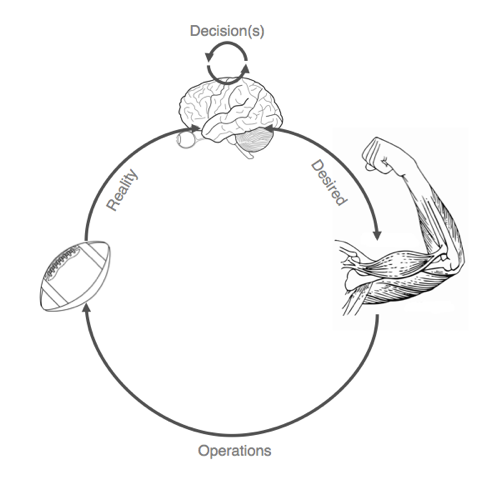
Now let's look at this from an IdentityIQ perspective:
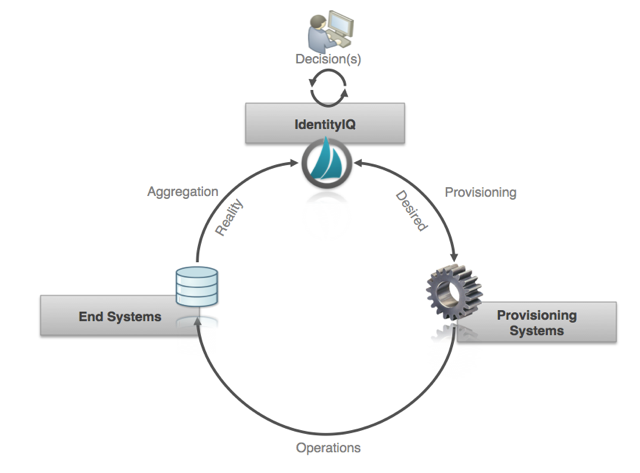
We see that the same process seen in the real world holds true for provisioning in IdentityIQ. In this case, however, governance is the brain, aggregations are the senses, and provisioning connectors are the muscles. The provisioning connectors can tell that something has been completed or not. But this could mean that a ticket has been closed, or a transaction has been completed. Aggregations can verify that the state is where we want it.
In IdentityIQ, “Committed” can mean different things depending on the implementation, but in general “Committed” means the changes have been written to the external system. Because some systems use ticketing systems to request changes and others can not immediately read back the changes, IdentityIQ shows “Committed” for provisioning operations that for all intents and purposes should be complete. This just means that the product has told the external system to make a change. That change may be instantaneous, as in the case of the direct connector, or the change may take a long time to be executed, as in the case of a message external ticketing system. Really the product has to facilitate the lowest common denominator of functionality across all connectors at this point because the LCM code is generic and connector agnostic.
Changes have been written or committed, but… they haven’t been verified. “Verifying” is what we call "closing the loop" and independently verifying the changes have been carried out through what we see during aggregation processes. And then a task runs that compares what the Identity Request expected to see in the provisioning versus what comes in the aggregation.
Two things need to happen for verification to take place and for a request to move to status of an Identity Request to “Completed”:
- The account aggregation needs to read in the new link record for the account that was provisioned to. This happens through the regular account aggregation mechanisms. Delimited files are reread, direct connectors are re-aggregated -- whatever the connector does for aggregation. This updates the link record in IdentityIQ with the latest State of entitlements on the account.
- The task called the “Perform Identity Request Maintenance” runs. This is an out-of-the-box task that ships with IdentityIQ. By default this task is scheduled to run once a day at approximately 1 AM. This task looks at open identity requests that are in state “Committed" or in a state attempting to retry a provisioning operation. For the ones in a committed state the task compares the requests for entitlements to be added or removed the current state of the link. If the desired state matches the state read in by the most recent aggregation then the request is moved to state “Finished”.
You can turn on tracing for the identity request maintenance task and see what is happening under the hood.
After the task has completed, the Identity Request in the above example has the following changes: the Verification Date is now set along with the Active Directory Attribute Request being set to “Finished” and the request’s Execution Status now set to “Completed”.
You may notice that certain Identity Requests never get set to "Completed." This can happen for multiple reasons, but one of the main reasons would be if you added and then removed role (or likewise set and then reset an attribute value). In cases where you have toggled an account setting, you will have two access requests - one to update the account, and other to undo the update. In this case, the first access request cannot be verified since the account is no longer in the expected state needed for verification.
