
- Products & services Products & services
- Resources ResourcesCustomer resources
- Customer resources
- Customer support Find more information about engaging support and get help
- Services guide Find more information about working with Services teams
- Free resources Leverage our free tools and trainings
- Modernize to Identity Security Cloud Transition to the cloud for advanced capabilities and a future-ready security posture
Learning- Learning
- Identity University Get technical training to ensure a successful implementation
- SailPoint professional certifications & credentials Advance your career or validate your identity security knowledge
- SailPoint recertification program Get recertified by demonstrating ongoing learning
- Training onboarding guide Make of the most of training with our step-by-step guide
- Training FAQs Find answers to common training questions
- Community Community
- Compass
- :
- Discuss
- :
- User Groups
- :
- UK User Group
- :
- Forum
- :
- Re: Is it possible to add a custom field in Request Access summary page
- Subscribe to RSS Feed
- Mark Topic as New
- Mark Topic as Read
- Float this Topic for Current User
- Printer Friendly Page

Is it possible to add a custom field in Request Access summary page
Similar to comments in the summary section of the request access, is it possible to add another custom field.
Tried editing the summary xhtml file to remove comments but it doesn't seem have any effect on the final page.



Hi jeyapriya.j,
Please have a look at UI Customization through UIConfig.pdf and look for the entry "sailpoint.web.lcm.AccessRequestBean_summary".
- Menno
HI All.
Similar to this i have one requirement is to add termination date column to access review page for managers and while doing access review manager should be able to edit or set the termination date (identity attribute) column value for some cases. How I can achieve this.?
Regards
Vijay
Hi Menno,
Can we make that custom field as "Mandatory"
Thanks,
Prudhvi
If you mean "always visible, cannot be hidden", then yes. Looking at the DTD-docs (DTD Information), you'll notice that there is an attribute on the column definition that controles whether or not it can be (un)hidden:
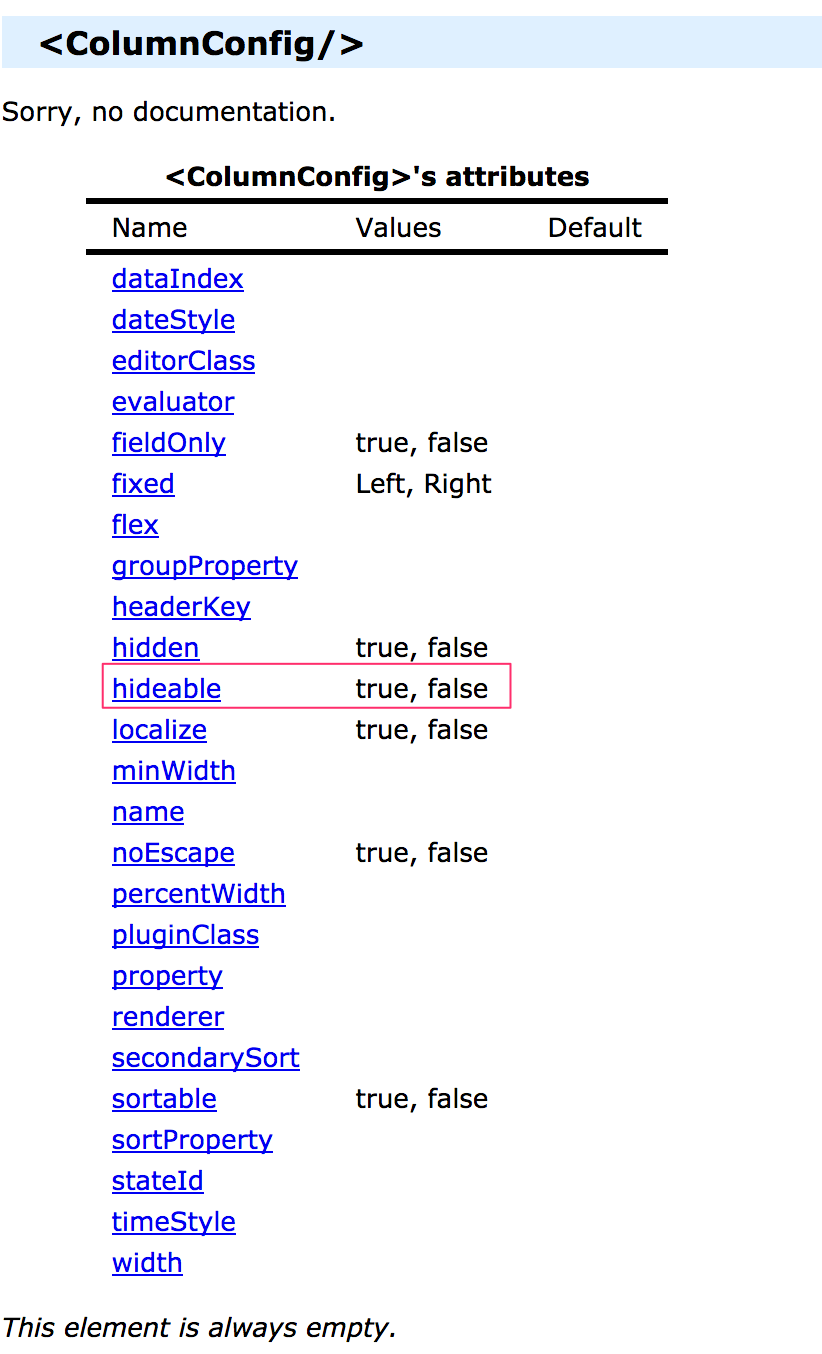
So, by marking the column with that attribute, it cannot be hidden from the UI:
<ColumnConfig name="myColumn" ... hideable="false" hidden="false"/>
- Menno
Hi Menno,
Thanks for the response,
I mean to say, can we make that custom field as "Required"
As an example I have added a custom field "Business Justification"
while requesting access - user needs to address that column, prior to that, it shouldn't allow the user to click on the submit button
I have renamed that comment field to Business Justification.
user can submit the access request without addressing comment field?
You might find some inspiration (multiple ideas) in this discussion: How to make a comment mandatory on Access Requests

How to make comment field mandatory in 7.1 access request, below link is not working 7.1
Thanks in Advance
The interface has changed quite a bit. One approach that you might try is a plugin:
- The plugin should provide a piece of JavaScript that is injected into the request pages.
- It should intercept the clicking of the Submit button and at that point verify whether of not a comment has been added.
- Note that in this interface the comment is added for each item!
- If no comment is added, show a warning, otherwise continue and submit.
- Menno
Hi,
I have almost similar requirement.
In my case, New attribute(Mandatory Justification) has been added for Role through Role configuration.
Now when this attribute is ticked while setting up role i.e set to true then while raising request for this role it must make comments mandatory and should not allow to submit the request unless comments has been added.
Please suggest me if there is anyway I can achieve this.
Thank you in Adavnce
Ankita
My suggestion is to create a new thread, instead of replying to an old discussion.
Hi jeyapriya.j,
Please have a look at UI Customization through UIConfig.pdf and look for the entry "sailpoint.web.lcm.AccessRequestBean_summary".
- Menno
Thank you, Menno, I was able to bring a new custom field in the page.
Currently trying to bring the field data inside the workflow for another customization.
Thank you once again.

