
- Products & services Products & services
- Resources ResourcesLearning
- Learning
- Identity University Get technical training to ensure a successful implementation
- SailPoint professional certifications & credentials Advance your career or validate your identity security knowledge
- SailPoint recertification program Get recertified by demonstrating ongoing learning
- Training onboarding guide Make of the most of training with our step-by-step guide
- Training FAQs Find answers to common training questions
- Community Community
- Compass
- :
- Discuss
- :
- Community Wiki
- :
- Identity Security Cloud Wiki
- :
- How to delete a Lifecycle state from IdentityNow
- Article History
- Subscribe to RSS Feed
- Bookmark
- Subscribe
- Printer Friendly Page
- Report Content to Moderator
How to delete a Lifecycle state from IdentityNow
How to delete a Lifecycle state from IdentityNow
IdentityNow Admins can create, enable, and disable Lifecycle States (LCS) from the IdN UI.
To delete an LCS, use the following API calls:
/api/profile/get/<profileID>
/api/profile/update/<profileID>
In this example, we will delete the misspelled 'Sabotical' LCS from the Identity Profile 'SM Test'.
1. After logging in as an Admin, go to Identities > Identity Profiles > and select the profile.
2. Select the Provisioning tab
NOTE: The profile ID that appears in the url:

The Lifecycle states appear on the left hand side of the UI:

3. Via Postman, run a GET operation: https://<identitynow_org>/api/profile/get/<profileID>
Where
<identitynow_org> is the url of your identitynow instance (e.g. https://acmecorp.identitynow.com)
<profileID> is the numerical ID of the identity profile you want to edit
Ex. https://acmecorp.identitynow.com/api/profile/get/1865

The output appears below. It is condensed but shows the section you will edit--the configuredStates section:
{
"id": 1865,
"name": "SM Test",
"description": "",
"dirtyFlag": false,
...
},
"configuredStates": [
{
"accessProfiles": null,
"cloudStateCleanupOption": null,
"description": null,
"displayName": "Active",
"emailNotificationOption": null,
"enabled": false,
"externalId": "2c91808455129bd1015536e7821d05a4",
"externalName": "SM Test [cloudIdentityProfile-1465504989584]-active",
"identityCount": 0,
"name": "active",
"type": null
},
{
"accessProfiles": null,
"cloudStateCleanupOption": null,
"description": null,
"displayName": "Inactive",
"emailNotificationOption": null,
"enabled": false,
"externalId": "2c91808455129bd1015536e781f405a3",
"externalName": "SM Test [cloudIdentityProfile-1465504989584]-inactive",
"identityCount": 0,
"name": "inactive",
"type": null
},
{
"accessProfiles": null,
"cloudStateCleanupOption": null,
"description": null,
"displayName": "test1",
"emailNotificationOption": null,
"enabled": false,
"externalId": "2c91808459ffd159015a153e053610f0",
"externalName": "SM Test [cloudIdentityProfile-1465504989584]-test1",
"identityCount": 0,
"name": "test1",
"type": null
},
{
"accessProfiles": null,
"cloudStateCleanupOption": null,
"description": null,
"displayName": "Sabotical",
"emailNotificationOption": null,
"enabled": false,
"externalId": "2c91808359ffcfca015a159897d91235",
"externalName": "SM Test - sabotical [cloudLifecycle-1486421006297]",
"identityCount": 0,
"name": "sabotical",
"type": null
}
],
"status": "ACTIVE",
"credentialService": {},
"externalId": "2c91808455129bd1015536e7819c05a2"
}
The configuredStates section contains the Lifecycle States. In this case, we only want to delete the section specific to "Sabotical". The area highlighted in yellow will be removed.
4. Copy the output of the /api/profile/get command to an editor and save a copy in case you decide to revert your changes.
5. In the configuredStates section, remove any Lifecycle states you do not want in IdentityNow.
6. Back in Postman, setup and run the /api/profile/update/<profileID> command:
1) In the Headers section, add the X-CSRF-TOKEN entry and the token value
2) In the Body section, select raw then paste the entire contents from step 5 into the window:
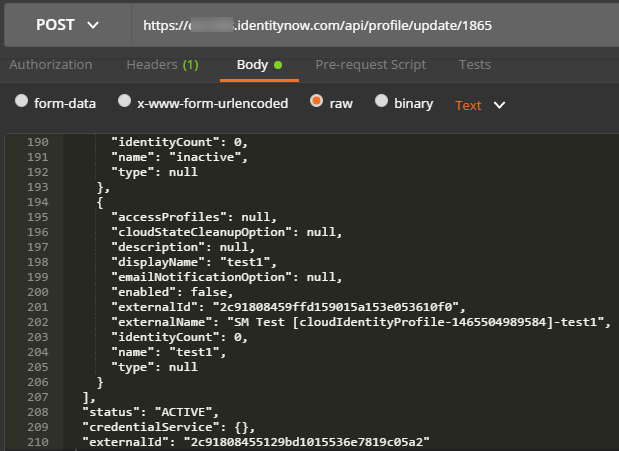
3) Press Send. A status 200 OK displays when complete
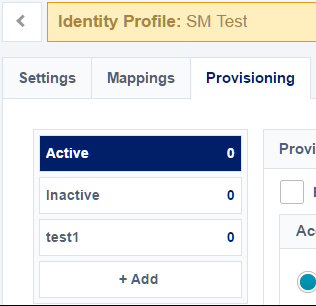
7. In the IdN UI, refresh the Provisioning tab. The LCS you deleted is removed from the view:
8. From the IdN UI, click Update to push the update through the system.
NOTE: To remove other Lifecycle states, repeat steps 5-8.

